Inspiring
May 26, 2017
Answered

Best way to organize wardrobe collection in Bridge?

  • May 26, 2017
  • 1 reply
  • 861 views

I have individual pictures of everything, marked by nested tags.  For example shirts, pants, jackets, shoes, with each item tagged for color and features and occasion such as business and casual.

Although I don't have that many clothes, there are a lot of possible combinations that add up quickly.   There might be thirty different variations on each pair of pants, for instance.   This adds up to a large number of collections.

If I could put them in folders  or nest collections that would help but I don't see that option.

If I could divide the panel into three with the pants in the middle and a slider for shoes on the bottom and shirts on the top that would help.

I'd also like to be able to keep them in order when looking at them in the window - for instance shirts on top and pants on bottom, not the other way around.

What is the best way to organize these into outfits that I can easily search and see, for instance, every individual outfit that goes with a pair of black pants?

I do not have Lightroom at this time and am looking for a solution to this that will not incur additional cost.  I'm just getting used to Bridge, so please forgive if this is a very basic question.

Suggestions welcome.

Thank you.
    This topic has been closed for replies.
    Correct answer KS555

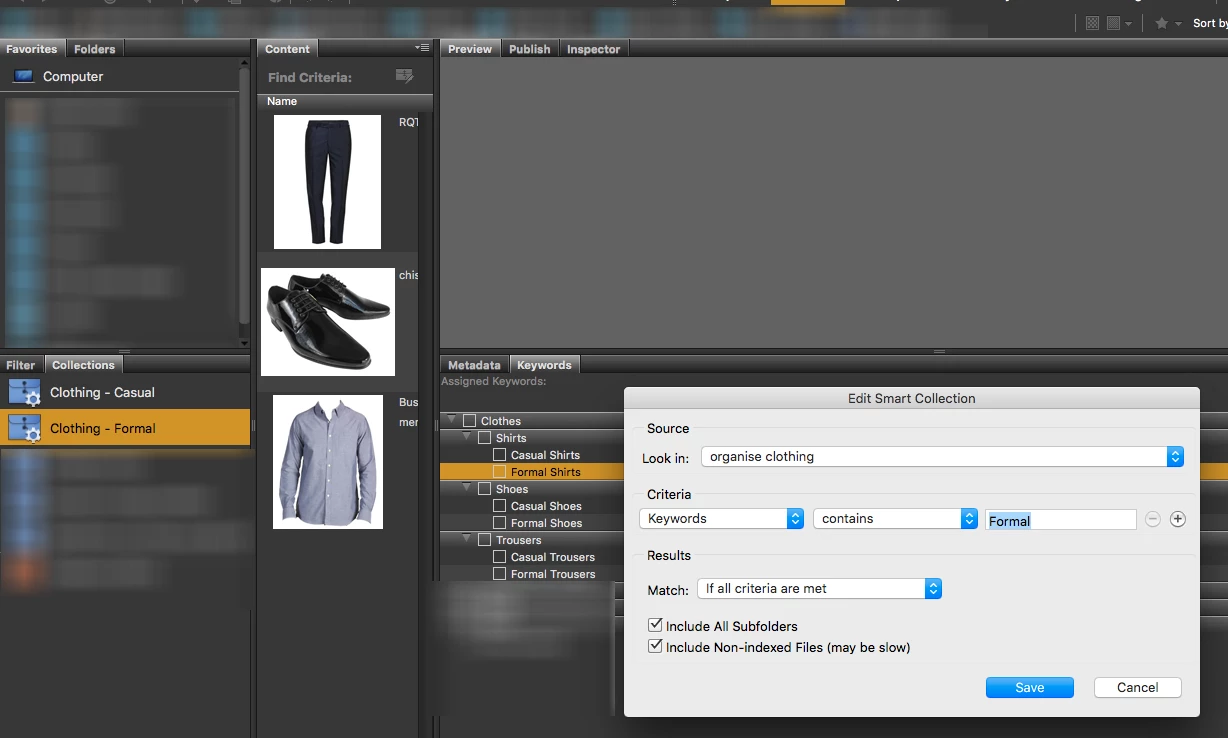
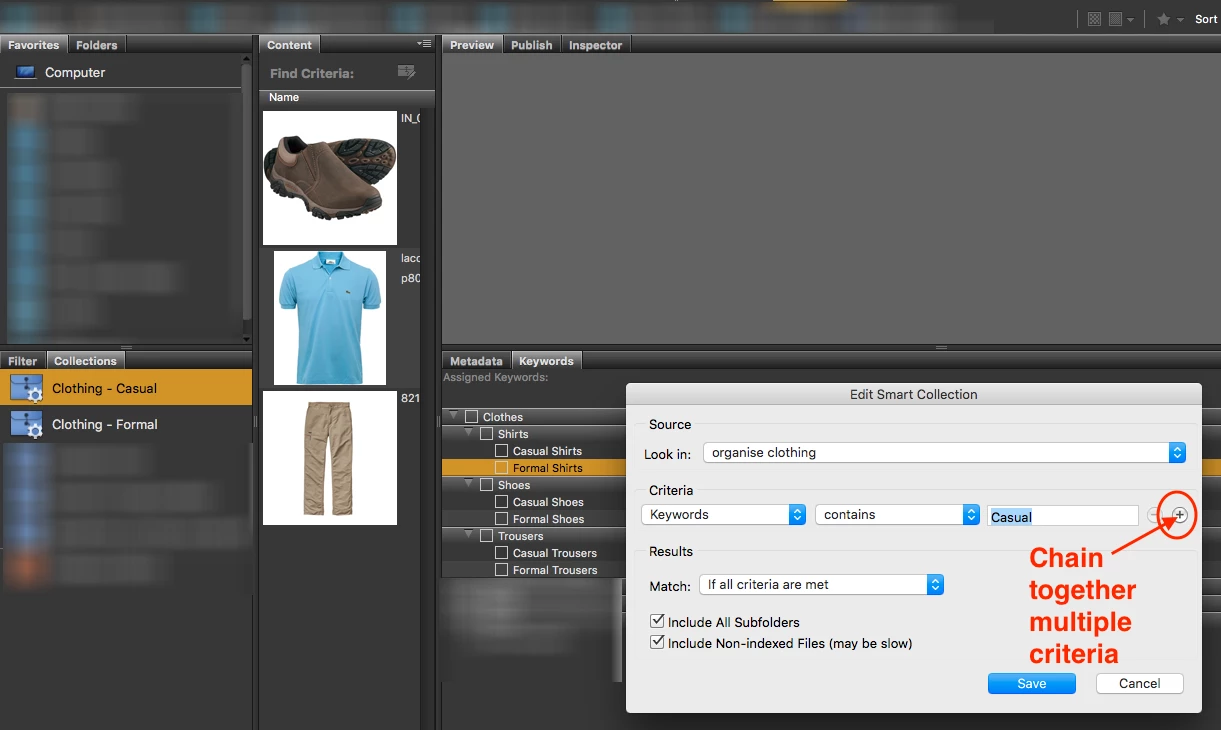
    I don’t have time to build a full model of what is possible, here is one possibility using two Smart Collections. Keep in mind that there is also the “Filter” panel where you can include/exclude Keywords, depending on how you have setup the Keywords and Collections/Smart Collections.

    You will need to work out how to “link” related items together for use with Smart Collections and or Filter panel use. No matter how you look at it, you are going to need a good set of Keywords and or multiple Filters or Collections/Smart Collections.

    All the best with your wardrobe!


    Thanks Stephen, I appreciate your time helping me to find a solution.

    However I'm not sure there is one.   Bridge may just not offer the ability to organize collections.

    I did find the window you snapshotted, only mine didn't have the word "edit."  Either way, it seems like the ability is there to chain individual images by keyword, but not entire collections that you can thumb through one after another.

    It's inconceivable that Adobe would skip basic functionality to organize collections in folders or some other way.  Did they not realize that a photographer with 30,000 images might need a way to keyword collections or put them in folders?  Or simply filter collections by name?

    This makes the program unusable for what I'm trying to do. It's a nice tool for browsing, but there's a huge hole there in terms of usability.  Just that one added feature - even only one level down- would make it perfect.

    I'm in 5.1, but I'm assuming you're on CC and if it's not there for you, then perhaps they never addressed it.

    Thanks for your suggestions, I really do appreciate it.

    As an alternative, is there a way to bulk-output your individual collections to PDF?  I see the ability to do individual ones but not bulk.

    thx

    1 reply

    melissapiccone
    Community Expert
    Community Expert
    May 26, 2017

    You could keyword with numbers - your black pants are 1 and all things that match are 1. Blue pants are 2 - all matches are 2 and some of the 1's overlap, so 1 and 2... etc.

    Your post hurts my head - I think you have way too much time on your hands .

    Melissa Piccone | Adobe Trainer | Online Courses Author | Fine Artist
    KS555Author
    Inspiring
    May 27, 2017

    LOL sorry didn't mean to give you a headache.  Actually I have too little time on my hands.  That's why I want to get organized now - to save time later. I'm always standing in the closet, indecisive, with five minutes to get dressed.  This should help with that as well as being able to just see how things look together and put new combinations together.

    The numbers might be one solution. I'll take a look at that.  =)


    If I could just put the stupid collections in folders, the problem would be solved, but it won't let me do that.  Maybe I can just export out screenshots of outfits but then you lose the search capabilities.

    I'm in Bridge 5.1 .  Can the later versions do this?  Or nest collections?

    KS555AuthorCorrect answer
    Inspiring
    May 29, 2017

    I don’t have time to build a full model of what is possible, here is one possibility using two Smart Collections. Keep in mind that there is also the “Filter” panel where you can include/exclude Keywords, depending on how you have setup the Keywords and Collections/Smart Collections.

    You will need to work out how to “link” related items together for use with Smart Collections and or Filter panel use. No matter how you look at it, you are going to need a good set of Keywords and or multiple Filters or Collections/Smart Collections.

    All the best with your wardrobe!


    Thanks Stephen, I appreciate your time helping me to find a solution.

    However I'm not sure there is one.   Bridge may just not offer the ability to organize collections.

    I did find the window you snapshotted, only mine didn't have the word "edit."  Either way, it seems like the ability is there to chain individual images by keyword, but not entire collections that you can thumb through one after another.

    It's inconceivable that Adobe would skip basic functionality to organize collections in folders or some other way.  Did they not realize that a photographer with 30,000 images might need a way to keyword collections or put them in folders?  Or simply filter collections by name?

    This makes the program unusable for what I'm trying to do. It's a nice tool for browsing, but there's a huge hole there in terms of usability.  Just that one added feature - even only one level down- would make it perfect.

    I'm in 5.1, but I'm assuming you're on CC and if it's not there for you, then perhaps they never addressed it.

    Thanks for your suggestions, I really do appreciate it.

    As an alternative, is there a way to bulk-output your individual collections to PDF?  I see the ability to do individual ones but not bulk.

    thx