


Copy link to clipboard
Copied
As suggested here
http://helpx.adobe.com/bridge/kb/install-output-module-bridge-cc.html
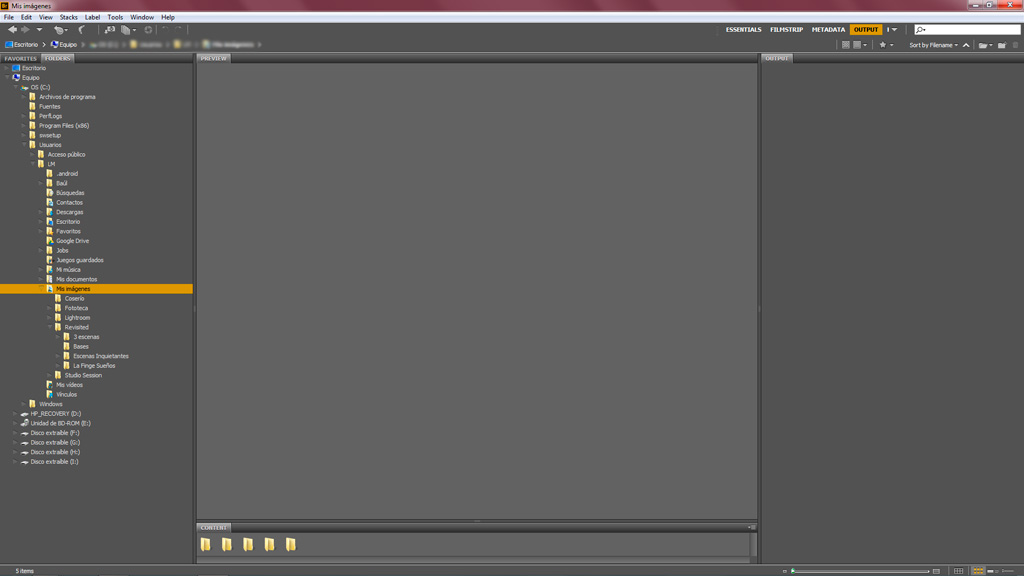
I downloaded and installed Bridge CC Output Module. The module looks blank when I launch Bridge. I already tried the two workarounds for "Possible Issues", covered at the bottom of the download page, but none of them worked for me.
Anybody else with this problem?
I'm using Windows 7, 64 bit. Here's a screenshot:


 1 Correct answer


We've had the script modification tested and now implemented. The files to download from the document have been updated with the new code and will no longer require any changes.

 117
Replies
117
117
Replies
117

Copy link to clipboard
Copied
If this is the folder you are installing to, this is the wrong location. You should be installing to the System Library folder, not the User Library folder. I can tell you are in the User Library because that folder is hidden by the system and Hidden folders have that faded look.

Copy link to clipboard
Copied
DUH! That did the trick. Thanks, Brett!
Copy link to clipboard
Copied
Brett N, I have found the System Library folder however there is not an application support folder in there. Where would I put the file if I was in this folder? See image below.

I also have located the Library folder in my User Folder and I can not get the module to work. See image below.
I am working on Mac OSX 10.10 with Bridge CC.

Thanks for your help!
Copy link to clipboard
Copied
OK, technically, there is ANOTHER Library folder, this one in the System folder. However, you should never mess around with anything in this folder, so I never talk about it. The folder I talk about as the "system" Library folder, is at the root level of the hard drive. That is to say, it should be right next to, not inside of, the System folder you are looking at here.
For the second screen shot, we can clearly see that you have not yet installed the Output Module yet. Copy the downloaded Adobe Output Module folder to the location you are showing in this screenshot and then copy the Output workspace file to the Workspace folder seen in this location.

Copy link to clipboard
Copied
Hello, I have tried installing to the "root" library, but all I can seem to find is my user library. I tried looking it up, has "El Capitan" done away with access to the root library? option+Go gets me to my user library. ~/Library brings up nothing. I have a new iMac, OSX 10.11.1. I have no CS6 to fall back on, can find no Bridge Extensions folder, and am very frustrated after 2 hours of trying to figure this out just so I can regain my ability to create a pdf!
Copy link to clipboard
Copied
The "root" Library folder exists at the "root" of the hard drive (hence the name). The root of the hard drive is the highest level of the folder hierarchy. At this level you should folders like "Applications", "Library", "System", and "Users". This is a required folder for the OS to operate properly and is still part of standard installations, even in the current version of Mac OS. If you have opened a Finder window, your Favorites should probably have "Macintosh HD" listed, if you select this, this will show you the root of the hard drive. Also, if you use Go > Go to Folder, just type in "Library" (without quotes). When you put in "~/Library", you are trying to go to the user Library (the "~" is a shortcut for Users/[Your user name]). Once you get to the correct location, and if you still don't see the Extensions folder, create it and add the contents. It could be a case that the OS prevented this folder from being created for "security" reasons.
Copy link to clipboard
Copied
Thank you Brett, your info did allow me to navigate properly to my root folders, and then I did indeed discover the Bridge CC Extensions folder. So I put the Output Module Folder in there, and the output module workspace into the workspace folder.. and then got the same blank output panel as before.  There are a couple of other issues in addition:
1> a pop up window when I load Bridge that alerts me about scripts. This started at some point yesterday when I was trying to sort this and probably messed something up. The end result is no different from before I was getting this, but it should probably be fixed: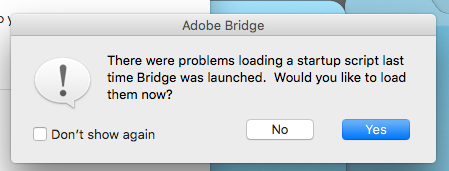
2> Output shows up twice in my Window dropdown, that seems off, too: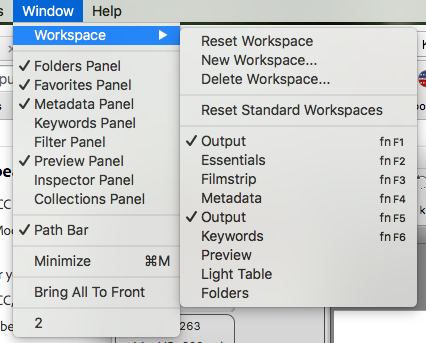
any ideas???
Copy link to clipboard
Copied
Yep, definitely not good that you now have two Outputs listed. Might need to clear things up. First just reset the Bridge preferences. Then try clearing out any duplications you might have in adding the Output module (downloaded files and folder copied to multiple locations). There is likely a conflict between multiple copies which is causing the behavior you now see.

Copy link to clipboard
Copied
Check in the workspace folder to see if you have two Adobeoutput modules. if so delete the one that you do not need.
Copy link to clipboard
Copied
For those that are seeing this issue on Mac after verifying that you have the correct files in the correct location, make sure that you have the actual files in the location and not an alias. And alias file will not work for this setup (although aliases work in some other situations). I've updated the document with information on how to check whether or not you are working with an alias.

Copy link to clipboard
Copied
Sorry for a late reply on this issue. I recently went through and installed the output module on 3 macs in our office. Mine (being one of the 3) works fine, and outputs well. Computer number 2 has the issue of when attempting to save, it seems like the files do not process, and she is given an error i/o error. These are fresh installs of bridge cc, with freshly downloaded output modules. Any idea why this is still a problem? (I have checked, double, and triple checked, all modules are installed in the correct folders.)
Copy link to clipboard
Copied
An I/O (input/output) error is a different beast altogether. These types of error occur when working with corrupted files, folders, and or disks. The first thing to do is test your source files. Try an output with fewer and different files. For example, download a couple jpegs from the internet to your desktop folder and work with those. If that works, you may need to find new copies of your source files. If this doesn't work, output to a different location, such as your desktop folder. If you are outputting to an external drive, try internal. Et cetera...
Copy link to clipboard
Copied
The issue is that I know that the files are ok. I used my personal bridge cc to output a contact sheet with those images, in that folder location. Everything came out like it was supposed to. It seems like every time an i/o error shows up in these forums that people seem to blame location of the files, so thats why I started with that. Sadly I know the images are fine that I'm using.
Copy link to clipboard
Copied
Have you tested with different files?

Copy link to clipboard
Copied
I have the same problem as everyone else I have 3 users on the one computer in Admin Output works in CC but in the other two users Output is blank. I have tried all the fixes I have CS6 on the computer and the output files work fine on that. I have deleted the output files restarted my computer re installed them re started again. I have deleted Bridge cc and reinstalled it. I have looked for a corrupt file in CS6 there is not one I am running the correct Mac Operating system the correct Bridge CC. The folders are in the correct files in the library not in the user. I just do not know what to do. Any ideas?
Copy link to clipboard
Copied
Hi LuisMarin
Go to Bridge preferences/startup scripts and enable the Adobe Output Module.
Copy link to clipboard
Copied
I have. Desktop, network files, flash drives. I eventually found that the problem was that I was using the output module for 6.3, and my co-worker's bridge was using 6.0.2.etc . Once updated now the module works perfectly. Sorry for all of the trouble.
Copy link to clipboard
Copied
Thanks for the update


Get ready! An upgraded Adobe Community experience is coming in January.
Learn more
 AdChoices