Exit
  • Global community
    • Language:
      • Deutsch
      • English
      • Español
      • Français
      • Português
  • 日本語コミュニティ
  • 한국 커뮤니티
0

Bridge 12.0.2 memory leak?

Participant ,
May 13, 2022 May 13, 2022

Since I updated to 12.0.2 this morning Bridge will keep on growing it's memory usage non-stop until all my free memory is gone after a couple hours, and also eventually start consuming all available CPU and become unresponsive. I've reinstalled 12.0.1 to see if goes back to normal.


macOS 12.3.1

Bridge 12.0.2

TOPICS
Crash or freeze , Problem or error
502
Translate
Report
Community guidelines
Be kind and respectful, give credit to the original source of content, and search for duplicates before posting. Learn more
community guidelines
Participant ,
May 13, 2022 May 13, 2022

Well downgrading to 12.0.1 didn't change the behavior. The memory maybe isn't growing as fast, but Bridge is using anywhere from 50-400% CPU non-stop, just sitting there without any interaction on a folder with no images. The only other thing I have going on is Microsoft Outlook is re-synchronizing a very large email account in the background, which I did on a different computer (identical specs) last week without issue.

Translate
Report
Community guidelines
Be kind and respectful, give credit to the original source of content, and search for duplicates before posting. Learn more
community guidelines
Engaged ,
May 13, 2022 May 13, 2022

It has been a problem for a very long time.  Several updates since it first appeared and no solutions.  The latest update to Ver 12.0.2.252 does nothing to fix it either.  Welcome to Adobe-World.

Translate
Report
Community guidelines
Be kind and respectful, give credit to the original source of content, and search for duplicates before posting. Learn more
community guidelines
Explorer ,
May 13, 2022 May 13, 2022

LarryK_95
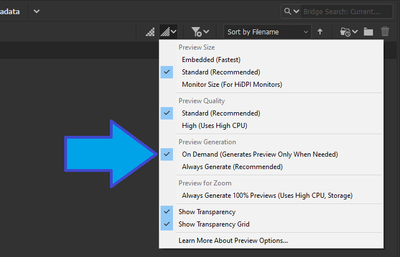
Try using OnDemand Preview setting - or - Use 'Embedded Preview Size' from this setting

Yuvan5ED0_0-1652505274221.png

Translate
Report
Community guidelines
Be kind and respectful, give credit to the original source of content, and search for duplicates before posting. Learn more
community guidelines
Participant ,
May 23, 2022 May 23, 2022
LATEST

Well I think this is now fixed, what I had to do is purge all the cache. Changing any other settings had no effect.

Translate
Report
Community guidelines
Be kind and respectful, give credit to the original source of content, and search for duplicates before posting. Learn more
community guidelines