
Participating Frequently
December 14, 2022
Answered

Bridge 13.01.583

  • December 14, 2022
  • 1 reply
  • 453 views

The Search window has been replaced with a "Criteria Box" or something. I rely on the Search Window to Search for files by Filename. I can find any file from the previous Search Window faster and with fewer clicks than this ackward Critera Box. The only workaround I've found is to sift through hundreds of files alphbetically. Yuck!
This topic has been closed for replies.
Correct answer gary_sc

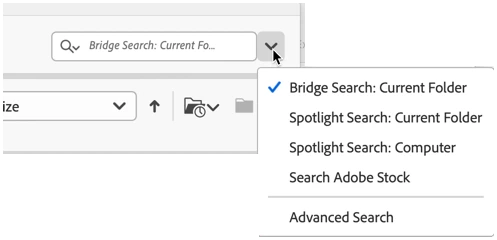
If you look just to the right of that field is a dropdown button. When you click on that, you can select where the search is going to, well, search.

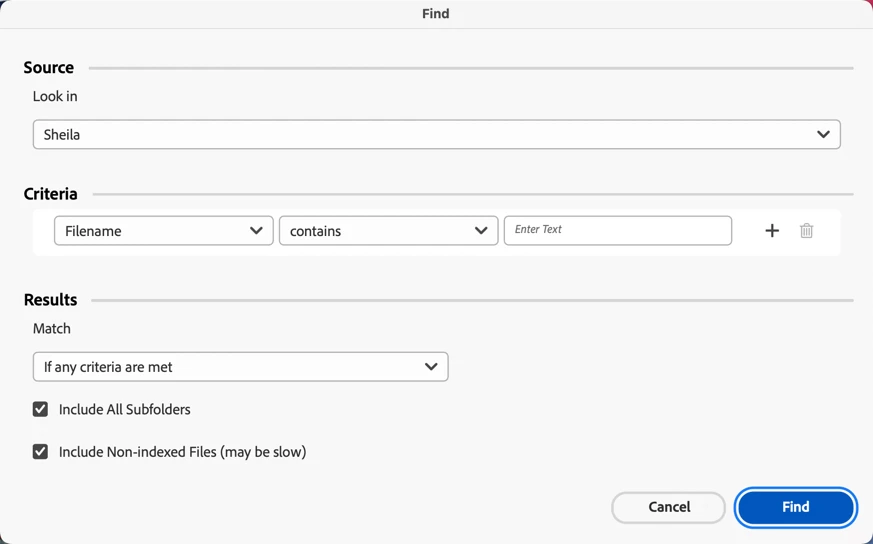
In addition to that, if you select the Advanced Search option, you'll get the same thing if you press Command/Control-f, which is pretty powerful.

Does this/these give you what you need?

1 reply

gary_sc
Community Expert
Community Expert
December 14, 2022

Hi @Sudsbucket 


Just to make sure we're talking about the same thing, can you provide a screenshot of what you're talking about?


Thanks.

Participating Frequently
December 14, 2022

Took a minute, It appears to be a new forn of Sort window. However, there's nowhere to enter a Filename.

Participating Frequently
December 14, 2022

If you look just to the right of that field is a dropdown button. When you click on that, you can select where the search is going to, well, search.

In addition to that, if you select the Advanced Search option, you'll get the same thing if you press Command/Control-f, which is pretty powerful.

Does this/these give you what you need?


Thank you, somehow it was hiden, with your help I found it and the standard Search Window I'm used to using. This is all I need. I rarily use Bridge to sort images, I use it to Find images by Filename. Thanks for your help.