

MisterGrey
Participant
March 14, 2020
Question

Bridge 2020 - No more thumbnail for mp4 & mov files

  • March 14, 2020
  • 7 replies
  • 2852 views

Hi dudes,


A common problem without a solution at this time for me.

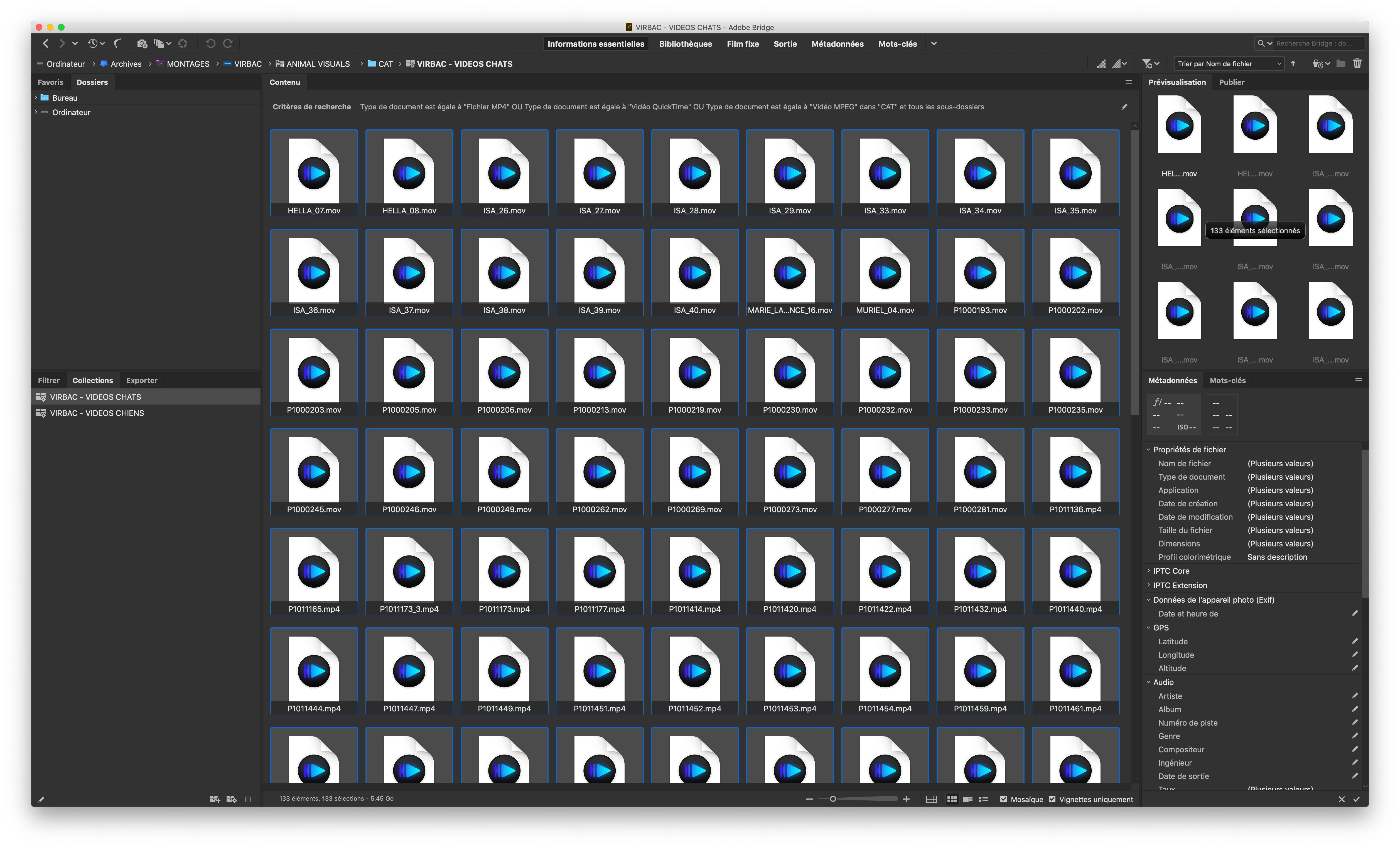
With Bridge 2020 (10.0.3.138) on MacOs Catalina, i have a serious trouble with thumbnails generation and fileformats recognition. In my case, the mp4 and the mov files are not recognized as video files. I can't preview them and Bridge do not generate their preview vignettes. Instead, it display the default attached system application icon.


I have tried several operations as uninstalling Bridge then re-install it, resetting the configuration files, modifying the associated filetypes application inside Bridge, turn on "Use Software Rendering", purging cache, but none of these worked for me.


Could anybody help me to find a solution ? thx.


    7 replies

    DigitalDesignDude
    Inspiring
    September 11, 2023

    Initially, I was unable to see thumbnails and playback .mov files from Adobe Bridge 2023.

    However, this was only the case for .mov files that were transferred from my iPhone 11 to my Windows 10 computer when using the "Keep Originals" transfer setting in the Photos app settings.

    All other .mov files from my Canon DSLR camera and stock footage sites like Freepik have thumbnails and are playable within Adobe Bridge 2023 from what I tested.

    So if anyone is using an IOS device for recording their .mov files, you may be able to solve the problem if you change the Photos app transfer setting to "Automatic" as shown below in the attached image.


    Note that this setting seems to affect all video files regardless of whether they were taken using the default IOS camera app or not, as this setting also solved the issue for my gimbal footage which was shot using the Insta360 IOS camera app. 

    Make sure to change this setting before you connect your IOS device to your computer as the setting change doesn't seem to take effect while connected to your MAC or PC.

    Also, note the "Automatic" setting causes footage to take longer to transfer to your computer since it auto-converts every file before copying it, even though it stays as a .mov file.

    This conversion method however may cause some visual artifacts sometimes as it did for me in the past so it may be better to just manually re-convert the .mov files yourself on your computer. It's not ideal but it is another workaround.

    Participant
    March 3, 2022

    I have the same issue. No .mov file thumbs. This is on a PC in Windows 10, then after upgrade to Windows 11. 


    jensd21927640
    Participant
    December 22, 2020

    It's dedember 2020. Still not resolved. It is really buggy. My Bridge keeps freezin up and shoes no thmbnails for mov, avi or mp4.

    jbm007
    Community Expert
    Community Expert
    December 22, 2020

    windows or MAC OS?

    jensd21927640
    Participant
    December 22, 2020
    On MAC. I have soled it by installing the previous version of Bridge and
    disabled automatic updates.
    Participant
    August 1, 2020

    I have the same problem.  Bridge won't show thumbnails for Mavic Air 2 footage.  Purged cache, software rendering enabled, etc.  Nothing works so far.


    Anyone out there found a fix, yet.  Perhaps an update soon???

    jbm007
    Community Expert
    Community Expert
    August 2, 2020

    Noticing the  same thing here.

    Something is buggered up.

    jbm007
    Community Expert
    Community Expert
    August 2, 2020

    For me clearing cache of individual selections solved the thumbnail issue.

    Not sure is Bridge will support Mavic Air 2 footage.

    Still cannot playback video inside Bridge

    Participant
    July 19, 2020

    Bridge is Bad It has always been, but now it's at an all-time high for bad software. No MOV. thumbnails freezes and hangs constantly, It has my hole system jammed up. I can't even use it anymore they should rebuild it from the ground up. There are few pieces of software that frustrate me more. AGG 

    Inspiring
    July 16, 2020

    Same issue but on a windowsa machine. Very unreliable video thumbnail creation on some video files. Sometimes they show up sometimes the dont. Purge cache does not always work. Some files like the H265 files from the Mavic Pro 2 dont show up as thumbnails only icons.

    Participant
    April 14, 2020

    I am having the same issue. Searching other forums for answers. Hopefully somebody has an answer.