Participating Frequently
October 29, 2021
Answered

Bridge 2022 not showing folders

  • October 29, 2021
  • 6 replies
  • 6942 views

Just updated CC Bridge to version 2022 on Macbook Pro and now the desktop folders or images dont show on the Essential selection...any advice on why and what I can do? Did the same update on iMac and it worked just fine...

Thanks!

This topic has been closed for replies.
Correct answer gary_sc

When you update either applicatios or your system, you need to re-ok the Permissions.


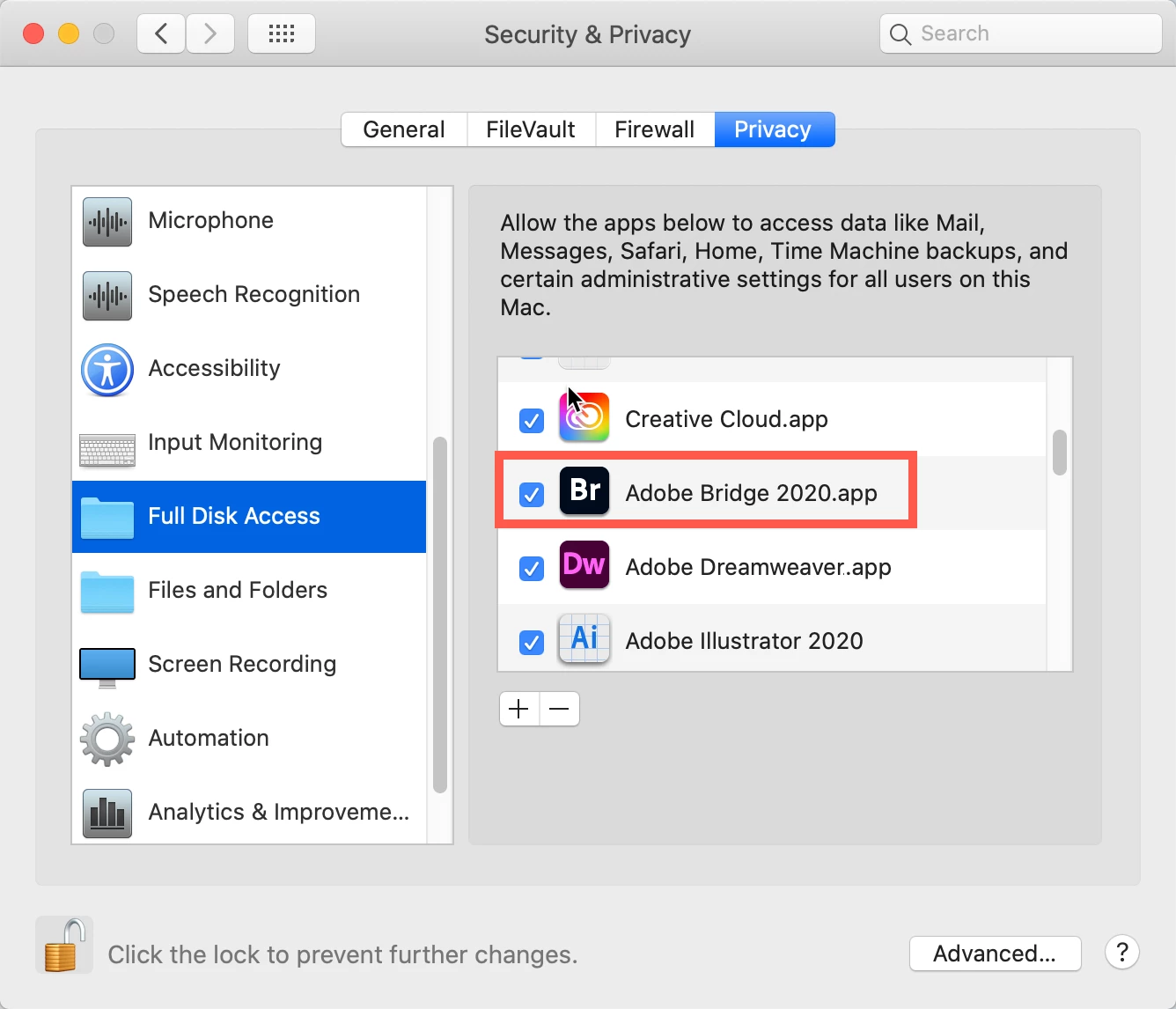
Go to your System Preferences and select Security and Privacy (found in the top section). Now click on the Privacy setting (last tab). Now click on the lock on the bottom left and provide your Administrator code. Now select the Full Disk Access option and click on the "+" symbol. This will bring up the standard Mac Open window and let you add any application you want or need to have full access. Look for Bridge, select it, it will now appear in that window and make sure it's checked. Next, go to the Files and Folders option and do the same thing as above (although there's nothing to check, just add. Close everything down and see if that makes it all work.

Please let me know

[Note: these images are from an older OS, the process is the same.]


6 replies

Known Participant
January 22, 2023

Can I get the same set of instructions but for Windows 10. Much appreciated. Thanks.


Participant
January 26, 2023

I also struggled to find a solution for Windows, but View/Show Hidden files then close/restart Bridge worked for me.

Participant
January 26, 2022

I have followed these steps and I still cannot access my Desktop with Adobe Bridge 2022.  I have been using Bridge for years and have not had this issue occur before.  It was working fine earlier today and now I cannot access the Desktop or Documents for that matter


gary_sc
Community Expert
Community Expert
January 26, 2022

Hi Spartan,


First, go to your computer's System Preferences and verify that Bridge has the same access you had before. There's no reason why it wouldn't be there but these are computers, you never know...


I have a hunch that your computer may be having a glitch. First, please try restarting your computer. If that doesn't work, I suggest you go to HTTP://www.northernSW.com and download the appropriate Cache Cleaner for your computer. You have a 10 day (I think) trial period with full use. Go to the Maintenance tab and click on "ALL." After running that, restart your computer and see if Bridge can access those areas. IF NOT, please go back to your computer's System Preferences and verify that Bridge has the same access you had before.


I know this sounds annoying but what you're experiencing should not be happening so this is what I'd be doing if I was having your issues.


Good luck!

Participant
December 2, 2021

Thank you! it worked for me and your steps were easy to follow


gary_sc
Community Expert
gary_scCommunity ExpertCorrect answer
Community Expert
November 23, 2021

When you update either applicatios or your system, you need to re-ok the Permissions.


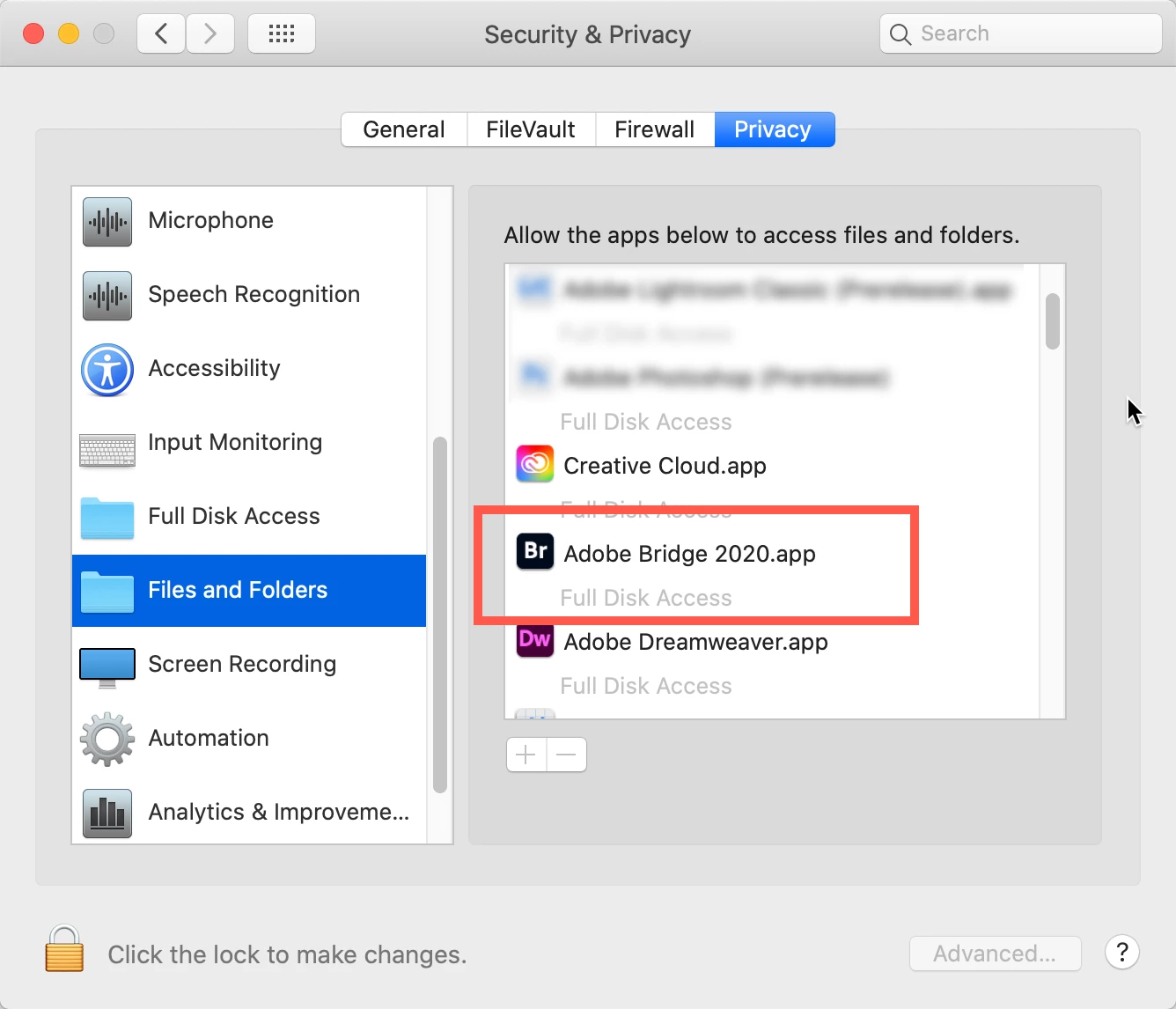
Go to your System Preferences and select Security and Privacy (found in the top section). Now click on the Privacy setting (last tab). Now click on the lock on the bottom left and provide your Administrator code. Now select the Full Disk Access option and click on the "+" symbol. This will bring up the standard Mac Open window and let you add any application you want or need to have full access. Look for Bridge, select it, it will now appear in that window and make sure it's checked. Next, go to the Files and Folders option and do the same thing as above (although there's nothing to check, just add. Close everything down and see if that makes it all work.

Please let me know

[Note: these images are from an older OS, the process is the same.]


Participating Frequently
November 23, 2021

Gary,


It worked.

Thank you!!!

Have a happy Thanksgiving


gary_sc
Community Expert
Community Expert
November 23, 2021

:>)

Participating Frequently
November 6, 2021

...Sick and tired of CC endless issues, I reinstalled an older version of Bridge that now works just fine...

Participant
November 6, 2021

Actually it took me about 3 hours to try to go through all comments of others with the same problem from last year. I had to go to System Preferences, Security and Privacy then click Full Disk Access to allow Bridge to be able to see all folders. That helped and now I am able to get to all folders through Bridge.

Participant
March 10, 2023

lana5FFE, I read a bunch of different threads to solve the same problem you had...and your reply was perfect.  It worked.  Just wanted you to know that you saved me some frustration!.  Thanks!

Participant
November 6, 2021

I have the same problem! I can't open any of my desktop folders through Bridge.  Someone, please help!
