
Participant
April 28, 2017
Answered

Bridge adding colour settings to RAW files - never happened before and freaking out! Please help!

  • April 28, 2017
  • 2 replies
  • 279 views

Hi!

I have a iMac 2010 and using CS5 for over 6 years. Neer had this issue but when I click on a RAW file to preview it, the images change form lovely and contrasty and correct WB to washed out and slightly green. I have no idea how to fix this and have tried many suggestions in the forums and I'm still struggling. I do all colour editing by hand and dont use any presets or batch colour changes. Please help!

Thanks, Amelia
    This topic has been closed for replies.
    Correct answer Ronald Keller

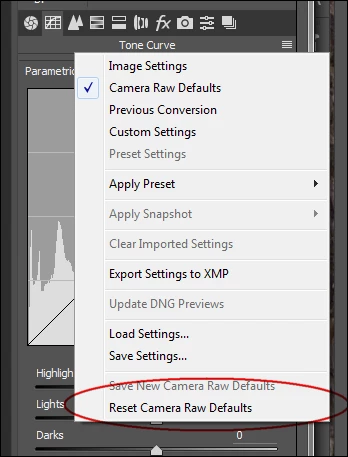
    Try going to the menu > Reset Camera Raw Defaults and see if this makes any difference

    2 replies

    Ronald KellerCorrect answer
    Legend
    April 28, 2017

    Try going to the menu > Reset Camera Raw Defaults and see if this makes any difference

    shrimp_54Author
    Participant
    April 28, 2017

    Icon (good) versus preview (crap). As you click on it you can watch it chnage, lighten and wash out...

    Sahil.Chawla
    Adobe Employee
    Adobe Employee
    May 2, 2017

    Hi shrimp,

    Are you still facing this issue? If yes, then please follow the steps as suggested by Ronald, if no, then please let us know so that we can mark this query as resolved.

    Regards,

    Sahil