
Known Participant
November 11, 2021
Answered

Bridge automatically creates fisheye effect

  • November 11, 2021
  • 2 replies
  • 1654 views

Hello everyone,


I'm using Camera Raw 13.0 in Photoshop Elements 2021 to apply camera profiles (created with ColorChecker) to a bunch of RAF images (and also crop/rotate them, if necessary), then save the changes in the xmp files and export them as TIFF in Bridge 2022. This has been working great the last couple of days but now I've got another batch of images that were taken with a different camera model and there's a weird problem:


The images look fine in ACR but in Bridge a fisheye effect is applied to all of them automatically, to both the preview image and the exported one! If I double-click an image, it opens in ACR and there it's looking fine again.


I found a suggestion in another thread:

In Camera Raw, under "Optics", uncheck "Use profile corrections".

"Optics" doesn't exist in my ACR, I've only got "Basic", "Detail" and "Calibration".


How do I disable this (and whatever other "corrections" Bridge applies automatically)?
This topic has been closed for replies.
Correct answer Jeff Arola

Yes the suggestion you found about optics may be correct, since Bridge uses the full ACR version that includes the Optics panel that has the on/off for using lens profile corrections. Unfortunately, because photoshop elements is not a qualifying creative cloud application you won't be able to access the bridge acr version.


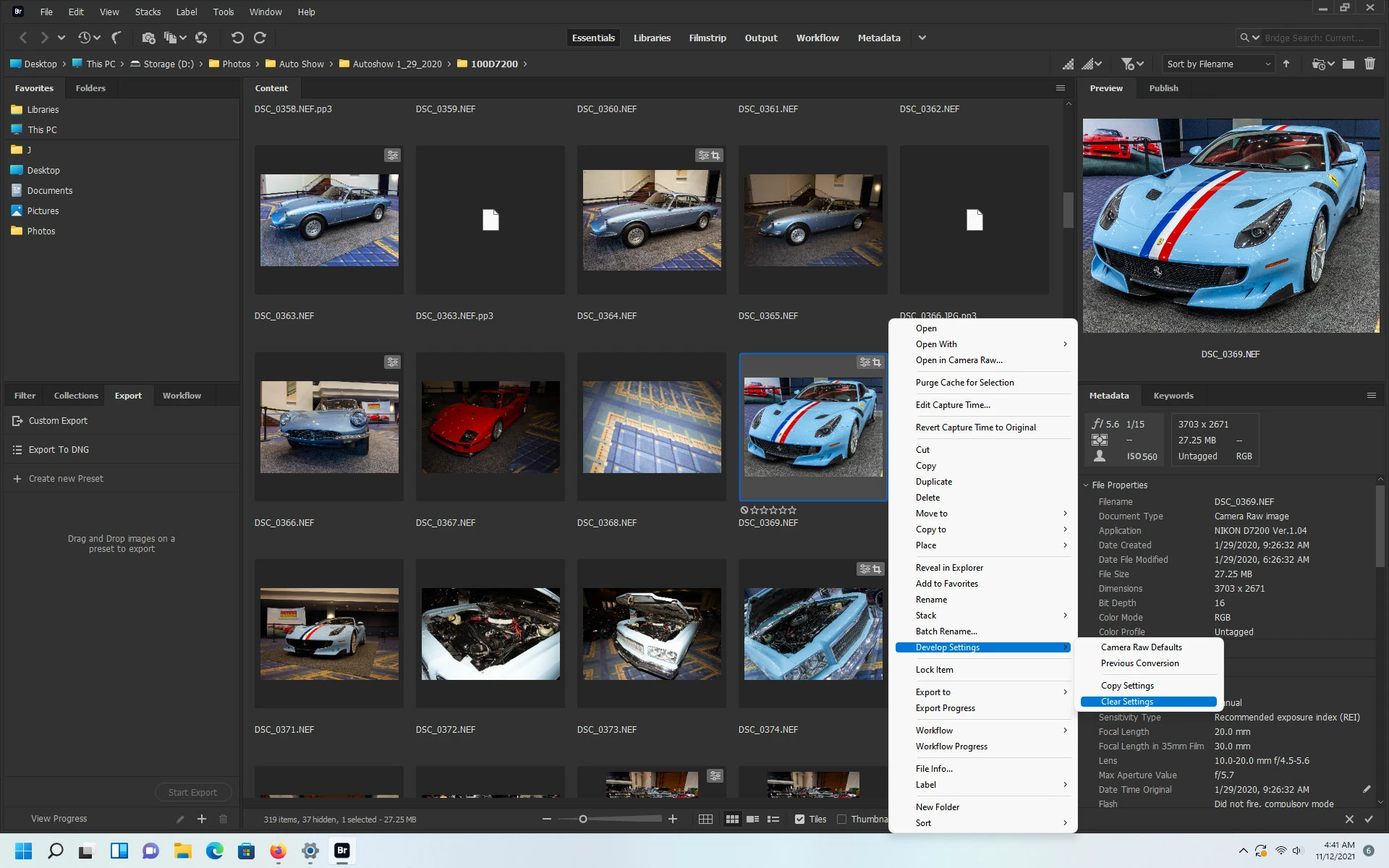
If in Bridge you right click on one of the affected thumbnails, click Develop Settings and then click Clear Settings, does that make a difference?


2 replies

Legend
November 12, 2021

Is your camera supported in ACR 13? If not, what you are seeing is the RAW file before any corrections.

JJ5C39Author
Known Participant
November 15, 2021

Not sure why it wouldn't be. There aren't any camera settings in PSE's ACR 13.0, I only noticed them in the "full" PS 14.xx version. How do I check that?

Images of both cameras look fine in PSE's ACR, as long as the xmp file was created by the 13.0 ACR and then they've only got the fisheye effect in Bridge/the images that were exported with Bridge. If the xmp file was created with PS's 14.xx version, then the fisheye effect shows up in ACR 13.0 - so far I've only tested it with the images that were taken with the second camera (Fujifilm X-S10).

Jeff Arola
Community Expert
Jeff ArolaCommunity ExpertCorrect answer
Community Expert
November 12, 2021

Yes the suggestion you found about optics may be correct, since Bridge uses the full ACR version that includes the Optics panel that has the on/off for using lens profile corrections. Unfortunately, because photoshop elements is not a qualifying creative cloud application you won't be able to access the bridge acr version.


If in Bridge you right click on one of the affected thumbnails, click Develop Settings and then click Clear Settings, does that make a difference?


JJ5C39Author
Known Participant
November 12, 2021

I get a pop-up:

Camera Raw editing is not enabled.

Camera Raw editing requires that a qualifying product has been launched at least once to enable this feature.

Same thing if I go through "Edit -> Developer Settings".

Here are two images of the problem: Original in ACR:

Exported image in PSE:

Bridge is an image editing software and image editing softwares must NOT automatically and secretly tamper with images! There has to be a proper way to turn this off!

Jeff Arola
Community Expert
Community Expert
November 13, 2021

Sorry about the triple-post (can't edit my previous posts).

A PC restart didn't help either, I'm still getting the same error.

To make matters worse: If I change a couple of settings in the PS trial (including setting it to "Default", which also creates the xmp files), then open the same images in PSE, the fisheye effect shows up there. Switching to one of the other profile presets and back doesn't fix it, so in the end I can't even quickly finish fixing these photos because the xmp files are going to become useless once the trial ends!


Something that might work for you after the photoshop cc trial runs out is to make a preset in acr that has lens corrections on, then use that preset in the camera raw preferences to set the default settings for the Fujifilm X-S10

by doing the steps below:


1. open one of the Fujifilm X-S10 rafs in bridge or photoshop cc acr

    verify that the Use Profile Corrections and Remove Chromatic Abberation  is checked


2. click on the area highlighted in red below to see a flyout menu and click on Create Preset

   then name your preset and create a Group making sure Optics is checked first


3. click on the Gear in upper right as highlighted below to open the Camera Raw preferences.

   click on where it says Raw Defaults


4. check Override global settings for specific camera, select your preset you made from the above steps.

    the click on Create Default


So hopefully now whenever you view/save the files from the Fujifilm X-S10 in bridge they will look the same as they do in the pse acr version.


sample image used is from here:

https://www.photographyblog.com/reviews/fujifilm_x_s10_review#sample_images