
Known Participant
February 6, 2019
Answered

Bridge - Image Processor option gone?

  • February 6, 2019
  • 4 replies
  • 5901 views

I recently downloaded the new Adobe Bridge 2019 program on my Win10 SurfacePro. At the same time updated the 2018 version as it was a while.

The new 2019 has some serious slow-down issues, which is a separate issue (it chugs, sloooowly).

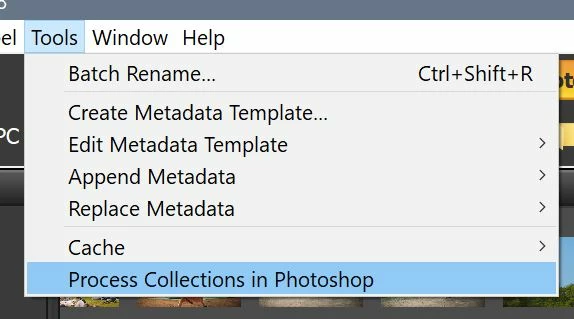
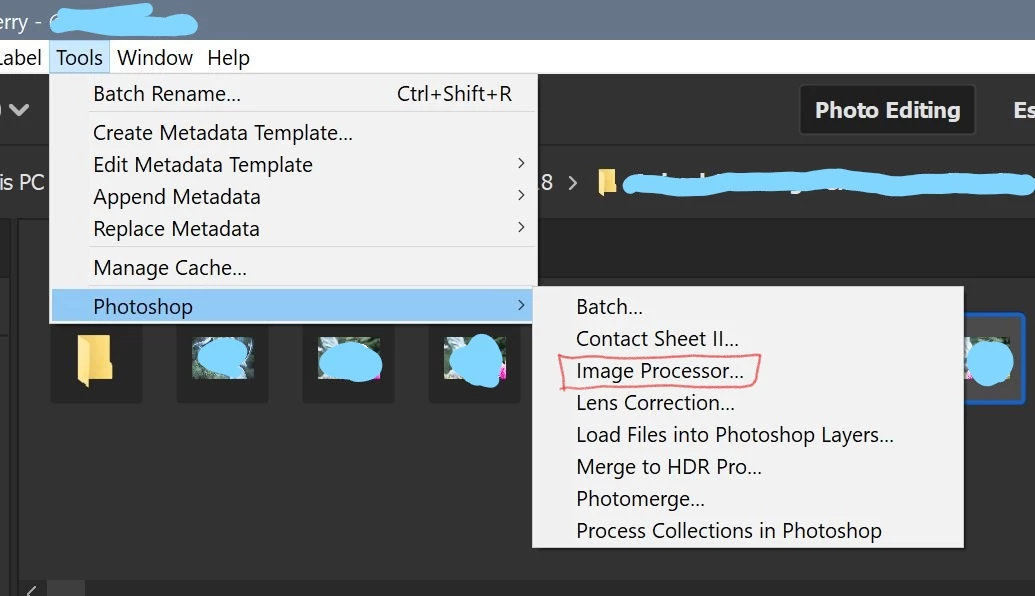
Before, I could go to the toolbar to Tools - Photoshop - Image Processor.   But now, it's Tools - Process collections in Photoshop in the 2018 version, while the 2019 is how it always was. I'm confused.

I run actions on my images, but now I can't. Does anyone know what happened?
Thanks
    This topic has been closed for replies.
    Correct answer jbm007

    Adobe does not like the concept of mix and match.

    They want you to install the current version of Bridge and then install the current version of PS that works with that version of Bridge.

    There does not appear to be a work a round either.

    4 replies

    kjpeters
    Participant
    August 12, 2022

    Having this same problem as well.  I work at a modeling agency and we rely on the image processor function to resize photos for our website.  Not sure why this function was pulled from the current version of bridge. 


    Legend
    August 12, 2022

    Image processor has not been pulled. You may have gotten versions out of synch or need to do an uninstall/reinstall to get everything working again.

    kjpeters
    Participant
    August 12, 2022
    I have tried uninstalling and reinstalling Bridge.

    The option to Image Process is no longer in the same area and I can't seem
    to find where it would have gone.

    The option under tools, where it used to say photoshop has now been
    replaced with Premiere Pro, Illustrator, and Media Encoder.
    Participant
    December 3, 2021

    I have intentionally NOT kept PS updated because of this problem - which is still not resolved as of the latest updates.  I HAVE UPDATED BRIDGE and PHOTOSHOP together and I have made certain that all PS versions are clicked in BRIDGE prefences.  In reading through these posts - I still see no solution and must return once again to earlier versions of both BRIDGE and PS or resized thousands of images with individual file names each day one at a time.  This stab in the back was done in an earlier update and then corrected but now seems to be written in granite.   For some of us the system of grouping/filing collections of images available in LightRoom does not fit our business needs - I don't understand why oft used PS tools even need to be removed from PS it's satelite apps need to remove these tools.

    jbm007
    Community Expert
    jbm007Community ExpertCorrect answer
    Community Expert
    December 3, 2021

    Adobe does not like the concept of mix and match.

    They want you to install the current version of Bridge and then install the current version of PS that works with that version of Bridge.

    There does not appear to be a work a round either.

    Legend
    December 3, 2021

    You can mix and match but it doesn't always work, especially throwing Camera RAW in and especially if you have multiple versions of Photoshop installed.

    Legend
    February 6, 2019

    Are you using Photoshop 2018 or 2019? Photoshop installs a script that creates those menus in Bridge and there can be version mismatch problems.

    Participant
    February 11, 2020

    There are so many things missing in the new Bridge.
    Tools > Photoshop > Image Processor is gone!

    In Photoshop they have changed the Photography access in Adjustment layers. Why?
    We spend a lot of time learning photoshop to get things right and then Adobe changes things on us.

    No bueno!

    Legend
    February 12, 2020

    Bridge does NOT install the Tools->Photoshop menus. That is done by the Photoshop installer. You must update both Bridge and Photoshop together.

    Sahil.Chawla
    Adobe Employee
    Adobe Employee
    February 6, 2019

    Hi there,

    It is available at my end:

    Could you please go to Bridge's Preferences > Startup Scripts and make sure that Adobe Photoshop CC is checked?

    Regards,
    Sahil