
Known Participant
October 31, 2021
Answered

BRIDGE THUMBNAILS HAVE VANISHED on Monterey OS

  • October 31, 2021
  • 3 replies
  • 2918 views

I'm running the latest version of Bridge on a MacBook Air on Monterey OS. This morning I launched Bridge and no thumbnails for any folder show. I tried resetting preferences at startup and that didn't work. Restarting laptop didn't work. What's going on Adobe? Is this because Bridge is not compatible with Monterey. I will try uninstalling and reinstalling.


Help please!
This topic has been closed for replies.
Correct answer gary_sc

Hi Norman,


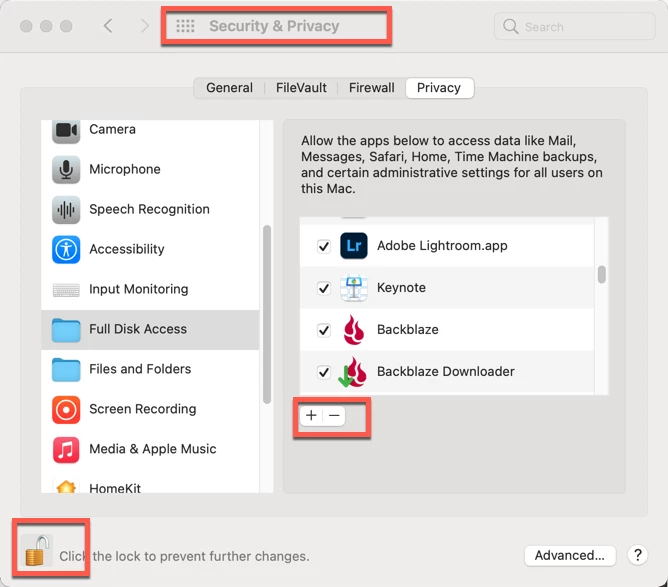
You have to OK permissions for all. To access more application, click on the lock on the bottom left corner, than click on the "+" to open a Finder window to navigate to Bridge.


Let me know if that works.


3 replies

Participant
April 26, 2022

Hello!  I installed the new Monterey OS on my Mac desktop last week and now I can not access my Bridge, Photshop or Lightroom The apps do nothing!!  I am not a computer person so I have no idea what to do here. Very frustrated becasue I need to edit for clients!!  

Inspiring
April 26, 2022

This may be too simple an answer, but have you tried re-logging in to Creative Cloud? Open it in Applications then enter name/password. 

jesser11747414
Participant
January 13, 2022

I have a new Mac with Monterey 12.0.1. Photoshop and Lightroom work just fine, but I cannot get Bridge to even open up for me. I have tried Bridge 11.1.1, 12, and 12.1. I have tried to OK permissions like Gary suggested below. Nothing is working. Help!


gary_sc
Community Expert
Community Expert
January 13, 2022

Hi Jesser,


Have you tried to rebuild Bridge's Preferences. 


If that doesn't work, I'd suggest uninstalling Bridge (do not drag to trash) and do not save Preferences if asked.


Let us know what happens, good luck!

Inspiring
April 13, 2022

I just rebuilt the preferences (I think), and uninstalled then reinstalled as per your instructions, and still get the same files that show as in the attachment. Also, my version seems to be the most recent, according to Adobe (see attachement). That seems to be 12.0.1. I've also tried increasing the cache to max. Anything else I might try? Thanks.

gary_sc
Community Expert
Community Expert
October 31, 2021

Hi Norman,


The thing that puzzels me is that you state this is a sudden change. Am I to understand it was working yesterday with no issue? If so, what change might have happened that you did/didn't realize might also cause this?


You also state that you're not seeing any folders, do you see ANYTHING else?


When did you upgrade to Monterey? 


Oh, just to let you know, anyone from Adobe seldom shows up here, mostly it's just folks like you who are willing to help folks like you.


ConquestAuthor
Known Participant
October 31, 2021

Thanks Gary.


Yes, everything was working correctly yesterday. But last night I was uploading files to Adobe Cloud. That's the key to the problem I think.  Today I opened a project in Indesign and the images were just gray boxes. So I searched on Google and found a solution. I had to go to Mac's Privacy settings and manually allow ID and other apps to access files.  This is weird because I never changed any settiings and everything worked.  Anyhow, it solved the issue with InDesign but Bridge is still not working...no thumbnails. It shows my file folders on the left, but selecting one just shows a black space. And Bridge is not listed in the apps where the privacy settings are.  Go Figure.


I updated to Monterey the day after it was launched.


One  other conundrum is that I have an 5 year old MacBook Pro which has been upgraded to Monterey as well. And everything there (including Bridge) is working fine.


One last point. I have 

gary_sc
Community Expert
gary_scCommunity ExpertCorrect answer
Community Expert
October 31, 2021

Hi Norman,


You have to OK permissions for all. To access more application, click on the lock on the bottom left corner, than click on the "+" to open a Finder window to navigate to Bridge.


Let me know if that works.