Participant
August 10, 2021
Question

camera raw \ camera profile corrections

  • August 10, 2021
  • 2 replies
  • 406 views

Help

Help, i am trying to get bridge to use camera profiles for my canon cameras and lens.

i have reinstalled bridge and nothing has changed can anyone help?

thanks


This topic has been closed for replies.

2 replies

Legend
August 24, 2021

If you have a Canon mirrorless, most lenses don't have profiles and instead use the built-in camera profile. You won't see corrections in ACR.

JuebagAuthor
Participant
August 27, 2021
thanks i ve managed to sort it now, i dont have mirrorless camera.
gary_sc
Community Expert
Community Expert
August 10, 2021

Hi Juebag,


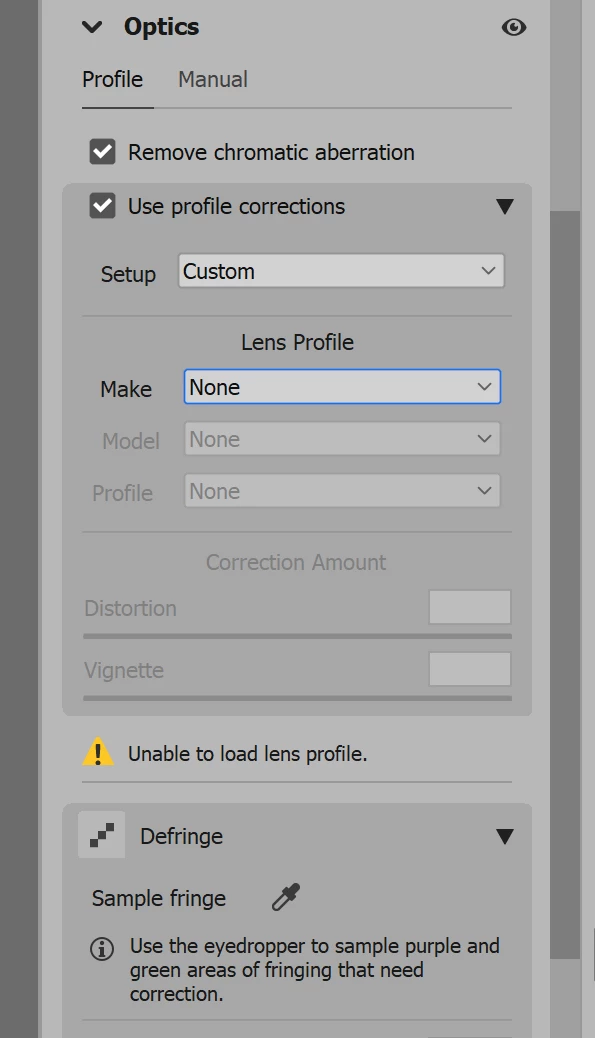
I agree, it's very annoying that you select Adobe Camera Raw (ACR)* and check the "Use Profile Correction," and nothing happens. I do not have a clue as to why this happens but it often does. The way around this is in the first first dropdown, select your camera and invariably the rest follows. That is, after selecting the make, it will automatically select the model and lens. 


If you're doing this to a bunch of images, select them all in the folder of images you're looking at, open them all into ACR, and in ACR Command/Control-a to select them all and then do this to one, they all will be "profiled."


*Technically ACR is not Bridge. Rather, it's a special plugin that can be run from either Bridge or Photoshop to process raw images.


Hope this all helps,

JuebagAuthor
Participant
August 17, 2021

thanks for the info unfortunately i cannot select the cannon camera options in the drop down all the others are there but cannon not working...

Adobe Employee
August 24, 2021

Hi @Juebag 

Can you try selecting "Default" for the setup field of the Optics panel instead of "Custom".
If that does not work, can you please share a sample file.

Thanks,

Bridge Team
