
Known Participant
October 16, 2018
Question

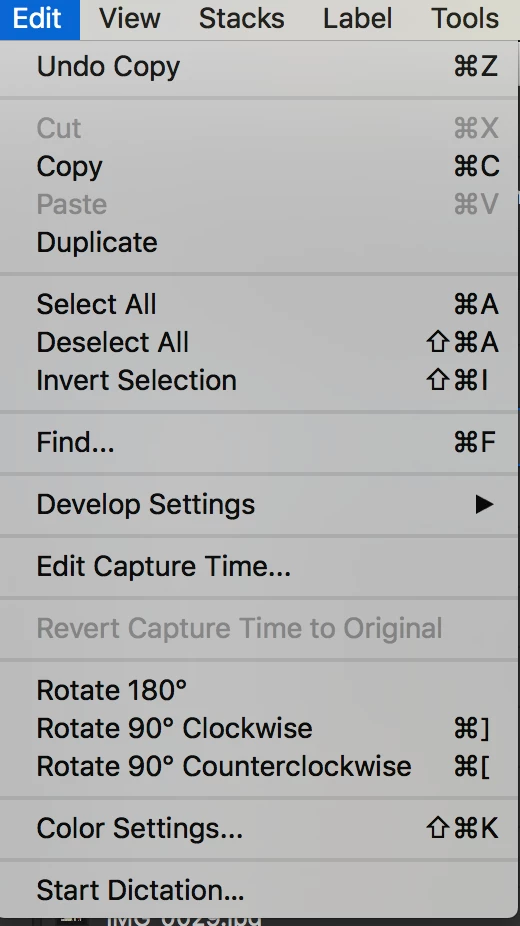
Can't use the "cut and paste" function, only "copy and paste" in Bridge CC 2019

  • October 16, 2018
  • 7 replies
  • 8066 views

I just installed Bridge CC 2019 yesterday on MacOS Sierra. On local and Network drive files, the option to perform an EDIT -> Cut the file is greyed out. Command + X doesn't work either. I can only Copy and Paste. I tried uninstalling and reinstalling, didn't work. I tried running Bridge 2018 separarely on my MacOS system, and the file cut function works as is it's supposed to. It also works on my Bridge CC 2019 on Windows 10 system as it should, so this is really limited to my install of Bridge 2019 on my iMac.

Anyone else having this issue or facing this problem?
This topic has been closed for replies.

7 replies

Known Participant
June 23, 2023

Hear's an idea, Adobe: Why not remove the never-going-to-work-always-greyed-out CUT option and the also-never-going-to-work keyboard command-X shortcut hint from the Edit menu altogether?? Maybe you can replace it with a note in the drop down menu that says something like "YOU CANNOT CUT ON MAC OS. NOT EVER. USE COMMAND-C TO COPY, THEN COMMAND-OPTION-V TO MOVE." It doesn't have to be that wordy, or all caps. At least people would know what's going on, instead of that for 4 or 5 years you've had the same, invalid menu item and keyboard shortcut in your menu.

gary_sc
Community Expert
Community Expert
June 23, 2023

Hi, @MarshalSerna have you updated your Bridge lately?


Your wish has been granted (some time ago).

Known Participant
June 23, 2023

@gary_sc good to know. I've downgraded for BR2022 for some time.... at least until Adobe either restores the "New Window" functionality, or makes Content Windows as functional as opening a new Bridge instance. (You know... independent filters, metadata, and previews concurrently viewable, etc.) 

Participating Frequently
December 7, 2021

Not being able to cut/paste is absolutely rediculous. 

Someone at Adobe, please answer me this: How was this decision made? A board meeting where someone suggested 'Hey, let's just disable a universal shortcut that has been used for decades across operating systems and all kinds of software!' and everyone else in the meeting was like 'Hell yeah, that sounds like a sweet idea!'.


I mean, SERIOUSLY guys. Adobe, please do get your affairs in order because you software and consequently your user satisfaction are greatly going downhill at the moment. 

Legend
December 8, 2021

I recommend not using cut and paste. Bridge has enough reliability issues to make it a bad idea. Just use the shortcuts shown above if you really want to use the Move functionality, which matches the Mac Finder.

richardf48537383
Participating Frequently
August 21, 2020

For most if not all COMPUTER users (forget Mac vs PC), "Cut" and "Paste" is as intuitive an action as using 'esc' or 'delete'. 


To remove/amend this function in an application that's designed to "bridge" the gap between applications and to manage files... is utterly bonkers UX.  


What researchers are making the fundamental decisions? Why on earth would you sit around a table and think, "I tell you what peeps... let's scrap the cut and paste .. get rid of it... no one uses it anyway right? If they do they can utilise the 'copy and move ... '" 


Bridge - workflow ruined (had to revert to a legacy version)

Illustrator - workflow destroyed on a number of levels (have had to revert to a legacy version) 

Photoshop - crashes more now than ever (have had to revert to a legacy version)


What is happening? Why are you making your user's workflow so much more difficult all the time? 


Is anyone else dumbfounded by this - "cut and paste" ... I mean ... R E A L L Y

Participant
February 8, 2021

I dont get it too! If they somehove decide to change it why is there no option to use it the old way. They do it again and again, changing somethisg without ever caring about people using it. Like they sit in their office and say "now you are going to work this way, you pay us and really dont have any other alternative so keep silent - we decide!" I really miss the box versions...

Participating Frequently
November 12, 2019

Hi all,

I have just experienced this problem after updating to Bridge 2020.

Can someone resolve this??

Thank you!

samubinas
Participant
October 17, 2018

Also having this issue of the 'Cut' command being greyed out in Bridge CC 2019. Really annoying to an otherwise great update (FINALLY).

Now downgrading back to Bridge 2018 until this issue is resolved.

Adobe Employee
October 18, 2018

Dear users,

Steps  mentioned by Ankur in the post above are also applicable when we try to cut\move assets with in Adobe Bridge.

Please let us know if you face any issues .

Regards,

Abhishek.

Known Participant
October 20, 2018

You just said that the shortcut for copy is command+C and that the shortcut for cut is command+C.

I don't think you understand the problem. There is no option for "cut" either by shortcut or menu. There was in Bridge 2018 and it's gone now. We want to know if there's a way to re-enable it.


It's frustrating since Bridge has always used traditional Linux/Windows style "cut and paste" operations (and the similar keyboard shortcuts) to move a file/folder, but from the answers I've seen and the documentation that was mentioned earlier How to view & manage files in Adobe Bridge​, it's clear to me that the developers on the Bridge for Mac team decided to do away with the standardized, expected behavior of the Command+X, Command+V keyboard shortcuts and went with the native macOS FINDER "method". macOS Finder basically uses the logic that there is no real "cut & paste", only "copy and move", with the shortcut being COMMAND+C (Copy) and then COMMAND+OPTION+V (Move). See: https://appuals.com/cut-paste-mac/https://appuals.com/cut-paste-mac/​. So the only way to have the cut and paste function we're all already used to is to relearn this new keyboard shortcut, or remember to use the option key when right clicking and pasting...'Sigh'

This makes sense if you're familiar and used to managing files in macOS's FINDER, but is totally new to Bridge users on macOS with Bridge 2019. I love using Bridge to organize my files, specifically since it's far superior to FINDER, AND consistent with both mac and windows versions for this reason. But now, such is not the case!

I really hope that this will be reverted back or at least give us users the option to have the keyboard shortcut of COMMAND+X, COMMAND+V restored; this is seriously a pain in the neck to relearn this simple file operation, especially with muscle memory in place for many of the Bridge user base! It's fine to introduce new features that require a new keyboard shortcut, but just bad practice to go back and force users to relearn an established shortcut to do the same thing they are already used to!

NOTE: I have a strong feeling that this issue stems from the 2019 Bridge updated feature​ that enables support for files to be copied, moved and pasted between Bridge and Finder on macOS. It's likely due to to some limitation with the macOS Finder clipboard not being able to track the file between Bridge and Finder.

On the Windows version of Bridge, of course, there is no issue, so at least that's a relief!

Sticking with Bridge 2018 until this issue is resolved...there isn't much more to be won with the update to 2019 in my books!

Adobe Employee
October 17, 2018

Hi bigfish2224 ,

You can simply copy by pressing Command + C or clicking Copy from the context menu and then while pasting, you can press option key. This will enable the "Move" option. If you click on move, it will perform the cut operation. Please refer to How to view & manage files in Adobe Bridge to know about more about the cut, copy and paste functionality. We have enabled the cut/copy and paste between Bridge and Finder/Explorer. So we tried to keep the behavior same as Finder/Explorer.

Known Participant
October 17, 2018

Hi Ankur, thank you for your response, I have ready the article as well, but that doesn't address to the problem I'm having of working within Bridge to perform Cut and Paste file operations. I understand that in Bridge 2019 you've enabled cut, copy, and paste between Bridge and Finder/Explorer, which is great for those that use it, but I am not trying to go between Finder and Bridge, I use Bridge exclusively for most of my graphic files management. If I select a file or multiple files in Bridge, then press COMMAND+X, and then move to another folder in Bridge, and press COMMAND+V, it should perform a cut and paste function, as expected (and as it always has in Bridge previous versions on Mac and Windows). In fact, in the Windows version of Bridge 2019, it still works this way, as it does in the macOS version of Bridge 2018.

The keyboard shortcut that has always worked for decades of COMMAND+X, and then COMMAND+V shouldn't change or break as a result.

It's clear that in Bridge 2019 you have taken away this behavior and are using the macOS native Finder behavior where you have to copy a file with COMMAND-C, and then use OPTION-COMMAND-V to perform a move or "cut" operations. Upgrading to a new version shouldn't require a user to adapt common, established keyboard shortcuts for BASIC file operations that all applications use. There's even still an EDIT->CUT (COMMAND+X) in the menu bar...what is the purpose of having that if it doesn't perform as designed?

Please don't hesitate to let me know if I can provide more information on my system.

I am downgrading back to Bridge 2018 in the meantime until this issue is resolved.

Participant
October 16, 2018

I have exactly the same problem.

In the meantime, I have been using copy and paste and then going back and deleting the file I copied. An inferior way of getting the same result.

Known Participant
October 16, 2018

Thanks, not happy about it, but happy it's not just me . I am going back to using Bridge 2018, since the cut and paste works fine in that version. I do not normally use macOS Finder for organizing files, I much prefer to use Bridge. I've also documented the "bug" if that's what it trully is here: Can't use the "cut and paste" function, only "copy and paste" in Bridge CC 2019 – Adobe Bridge Feedback .

I wonder if this is just related to macOS Sierra or does High Sierra or Mojave have the same issues?

Participant
November 5, 2019

And now Bridge 2018 is gone. I just updated to 2020 versions, which removed older versions and it's no longer installable.