
Participating Frequently
April 23, 2012
Answered

Can you import metadata from an excel database to images (JPG, PSD, TIF) in bulk?

  • April 23, 2012
  • 3 replies
  • 42449 views

I am very new to working with metadata. I have a microsoft excel file with the IPTC Core fields I need for each image file.

(Creator, Headline, Description, Keywords, Title, Job Identifier, Credit Line, Source, Rights Usage Terms, Copyright Status and Copyright Notice)

Is there a way to get the metadata into the files without having to copy from a cell into each metadata field individually?

I am hoping some for sort of script, possibly...

Also, if only ONE of these fields needed updating in all of the files (i.e. Rights Usage Terms) can that be done?

I have Bridge 5.1 (and earlier versions CS3/CS4)
This topic has been closed for replies.
Correct answer Stephen Marsh

Perhaps try tab delimited format instead of comma separated value format.


Edit – Paul Riggott originally wrote the following instructions:


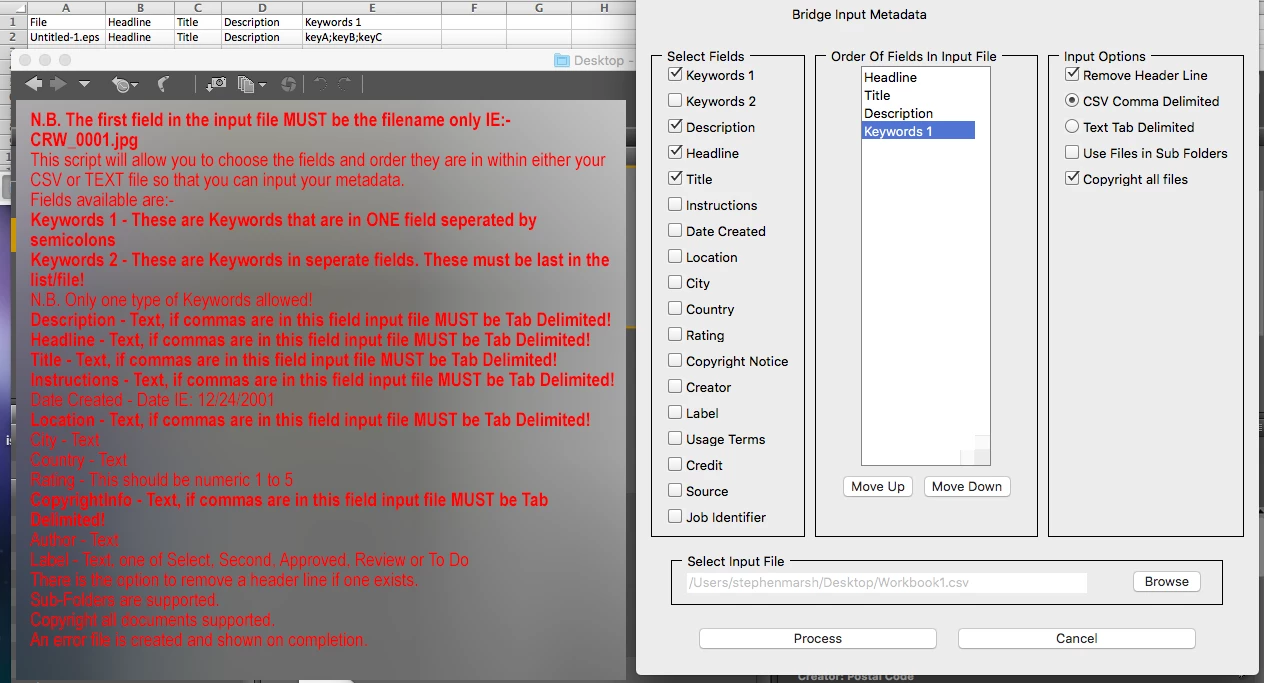
N.B. The first field in the input file MUST be the filename only IE:- CRW_0001.jpg

This script will allow you to choose the fields and order they are in within either your CSV or TEXT file so that you can input your metadata.

Fields available are:-

Keywords 1 - These are Keywords that are in ONE field seperated by semicolons

Keywords 2 - These are Keywords in seperate fields. These must be last in the list/file!

N.B. Only one type of Keywords allowed!

Description - Text, if commas are in this field input file MUST be Tab Delimited!

Headline - Text, if commas are in this field input file MUST be Tab Delimited!

Title - Text, if commas are in this field input file MUST be Tab Delimited!

Instructions - Text, if commas are in this field input file MUST be Tab Delimited!

Date Created - Date IE: 12/24/2001

Location - Text, if commas are in this field input file MUST be Tab Delimited!

City - Text

Country - Text

Rating - This should be numeric 1 to 5

CopyrightInfo - Text, if commas are in this field input file MUST be Tab Delimited!

Author - Text

Label - Text, one of Select, Second, Approved, Review or To Do

There is the option to remove a header line if one exists.

Sub-Folders are supported.

Copyright all documents supported.

An error file is created and shown on completion.

3 replies

Known Participant
November 7, 2018

Hi!

Can we use the exact same script for EPS files? I noticed that in Bridge CC 2019 when we click a EPS we can edit it's metadata (title, description, keywords) directly in Bridge.

Knowing this, would a script be possible to read a CSV and import those fields into a EPS instead of a JPG?

Stephen Marsh
Community Expert
Community Expert
November 7, 2018

Hi!

Can we use the exact same script for EPS files? I noticed that in Bridge CC 2019 when we click a EPS we can edit it's metadata (title, description, keywords) directly in Bridge.

Knowing this, would a script be possible to read a CSV and import those fields into a EPS instead of a JP

Yes, the DIY Metadata script works with a Photoshop EPS file (I have not tested with Illustrator EPS):

And it also works for the VRA tool as well:

Known Participant
November 8, 2018

Ok, in the past I tried DIY Metadata script and I didn't seem to work with illustrator EPS (that is the kind of EPS I am trying to work on). I will give it another try along with VRA panel and will post here if it works with Illustrator EPS. Thanks a lot for the suggestion.

Stephen Marsh
Community Expert
Community Expert
April 14, 2016
Paul Riggott
Inspiring
April 23, 2012

This might be of use...

DIY Metadata.jsx


EDIT: the link is there now: DIY Metadata.jsx

Participant
December 9, 2017

Hey Paul, I'm trying to edit your script to fill in the "IPTC Subject Code" and keep getting an error from the log for my added input/variable. I basically used other fields as an example to edit the code. I can get your predefined fields to work when using a csv for the input, but can't get my own added IPTC Subject Code to to write. Please help 

Stephen Marsh
Community Expert
Community Expert
February 7, 2019

SuperMerlin, My GPS data is still not getting updated.  I wanted to double check and make sure the namespace for the [composite] section was not supposed to be something else.

I also discovered that my data has some differences.  I had the ° symbol after Degrees where the existing data in the EXIF has " deg " following the degrees.  This is for Lat and Lon.

Also my Altitude is 148.931 (3 decimal places).  The existing data in EXIF is whole number only (no decimals) and it contains the text " m Above Sea Level" after the altitude. 

So i am going to alter my CSV file to reflect the same format and see if it will accept it.  Any insight will be appreciated.  My CSV file did have Dec Degrees and I have since converted that to DMS.  Now I just need to fix the other minor formatting details.

Below is existing EXIF data that has not yet been updated.

-------------------------------------

[Composite] Aperture: 5.6

[Composite] CircleOfConfusion: 0.011 mm

[Composite] DOF: inf (0.00 m - inf)

[Composite] DateTimeCreated: 2018:12:22 13:00:29

[Composite] FOV: 73.7 deg

[Composite] FocalLength35efl: 8.8 mm (35 mm equivalent: 24.0 mm)

[Composite] GPSAltitude: 148 m Above Sea Level

[Composite] GPSLatitude: 34 deg 57' 6.74" N

[Composite] GPSLongitude: 89 deg 55' 48.98" W

[Composite] GPSPosition: 34 deg 57' 6.74" N, 89 deg 55' 48.98" W

[Composite] HyperfocalDistance: 1.26 m

[Composite] ImageSize: 4864x3648

[Composite] LightValue: 13.3

[Composite] Megapixels: 17.7

[Composite] ScaleFactor35efl: 2.7

[Composite] ShutterSpeed: 1/320


If these “composite” tags have come from inspection with ExifTool, it should be noted that they are indrect “computed” tags that are generated on the fly from existing metadata and are not directly available in the file.