
Participant
January 13, 2017
Answered

Custom File Info / Metadata

  • January 13, 2017
  • 3 replies
  • 4539 views

I created a custom File Info panel in Photoshop. I am wanting the same metadata to show up in bridge. But as I was following the tutorials it seems the correct folder to place the xml files is missing. I was using this forum post:

How to install correctly XMP Metadata UI sdk CC 2014 "sample extension" in CC application and Bridge to get data sync ?

I have my extension in Adobe/XMP/Metadata Extension. My extension folder includes a manifest.xml, a view folder with my view.xml, and a schema folder with my schema.xml

Everything shows and works correctly in Photoshop, but nothing appears in Bridge. The articles mentions putting a file in Custom/File/Info/Panels/4.0 but no such folder exists in my Bridge installation. I'm guessing because of the recent update. I am using Adobe Bridge CC 2017.
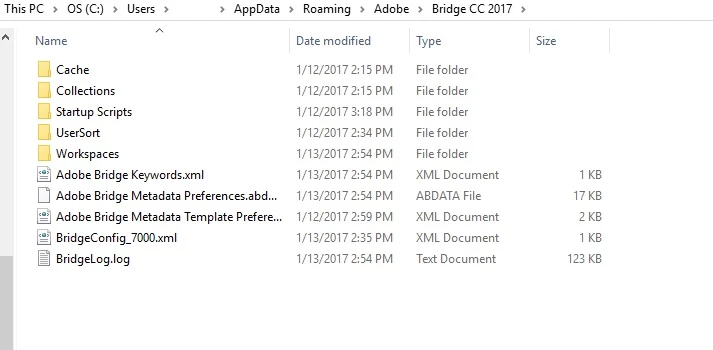
Here is what my bridge folder looks like. Please help! How do I get my metadata to show and sync in Bridge?

Thank you!

    This topic has been closed for replies.
    Correct answer SuperMerlin

    You will need the subfolders to get it to work, here is my layout, Windows 10, Photoshop CS6

    3 replies

    dijatekAuthor
    Participant
    January 16, 2017

    Oh my goodness I had a small typo which was preventing it from working. Thank you so much!

    dijatekAuthor
    Participant
    January 16, 2017

    Thank you so much! I copied my customSchema.xml file to the new folder path I created and now the metadata panel is showing in bridge!!

    Still have another issue though. My file info that is entered in Photoshop, is not syncing the metadata panel in Bridge. It's like they are saving two separate things. How do I get them to link and sync?

    SuperMerlin
    Inspiring
    January 16, 2017

    I have found that most of the times I have to purge the cache (for selected files) in Bridge to get them to sync.

    Stephen Marsh
    Community Expert
    Community Expert
    January 13, 2017

    Perhaps try:

    On the Mac:

    /Library/Application Support/Adobe/XMP/Custom File Info Panels

    Win, similar to:

    C:\Program Files\Common Files\Adobe\XMP\Custom File Info Panels

    dijatekAuthor
    Participant
    January 14, 2017

    I don't have that folder. These are my two options. The Metadata Extensions folder is where my files currently are, that are being displayed correctly in Photoshop.

    SuperMerlin
    Inspiring
    January 14, 2017

    If folders do not exist you have to create them.
