Participating Frequently
February 26, 2018
Answered

DOUBLE CLICKING IN BRIDGE NOT WORKING WITH PHOTOSHOP 2018CC

  • February 26, 2018
  • 1 reply
  • 4127 views

Hi

I need some help restoring functionality to bridge. Double clicking on a thumbnail of a jpeg file no longer opens the image in Photoshop, similarly right clicking and using "open with" has the same result and likewise dragging the thumbnail onto the Photoshop icon in the dock no longer works.

File type associations in the preferences is set to Adobe Photoshop CC 2018 for jpeg files.

This lack of functionality became a problem following an upgrade of the Photoshop application.

The application is being used on an IMac running Mac OS Sierra 10.12.6

Adice and help would be appreciated.

G.Brown

    This topic has been closed for replies.
    Correct answer gener7

    Thanks that worked. However it does not make any difference to Bridge.

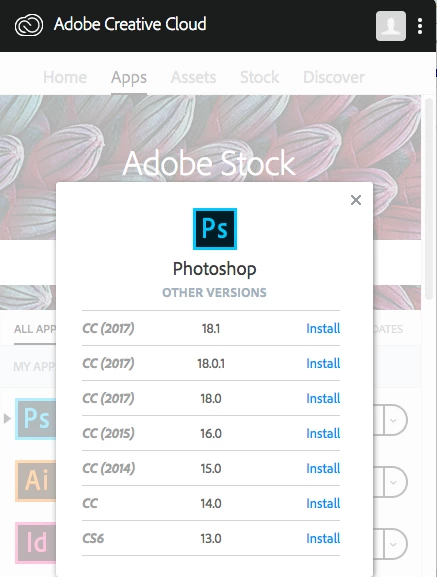
    Is it worth trying to install an earlier version of PhotoshopCC say 2017?


    Of course. You are free to and it does not cost extra. In fact it's smart to have that back-up, especially if you are a professional and your clients won't understand delays caused by CC 2018 somehow raising issues.

    So here's how to do it from the CC Desktop app.

    1 reply

    gener7
    Community Expert
    Community Expert
    February 26, 2018

    Let's see if a Preference Reset restores your settings:

    Start Adobe Bridge and immediately press Ctrl+Alt+Shift (Windows) or Command+Option+Shift (Mac OS) until the Reset Settings dialog box appears. Select all three options--Reset Preferences, Reset Standard Workspaces, and Purge Entire Thumbnail Cache--and then click OK.

    Participating Frequently
    February 26, 2018

    Thanks for your response.

    I have actioned the three resets as suggested. Double clicking on a jpeg thumbnail succesfully launches Photoshop and nothing more1

    gener7
    Community Expert
    Community Expert
    February 26, 2018

    I'm using the exact same version of Bridge CC 2018 (8.0.1.282) and Photoshop CC 2018 19.1.1 on a 2012 MBP.

    It works normally here.

    Some users complain that when they double-click in Bridge, there is a thumbnail in the layers panel and a title tab, but no image in the work area. Is that what you see?

    Anyway, you can also reset Photoshop's Preferences in case they somehow got damaged in the update.

    Open Photoshop, Cmd k to get to Preference, Reset and Restart.