

Giulio fa cose
Inspiring
September 28, 2023
Question

HDR: Lost lens profile on DNG files

  • September 28, 2023
  • 2 replies
  • 744 views

Good morning, I'm writing because since I switched from Nikon D800 to Nikon Z6II (about 5 months ago), I've been experiencing an issue with creating HDR images in Lightroom Classic. Nothing too terrible, but it's still a bothersome problem that seems a lot like a bug.


Here's how to replicate the issue:


Open the bracketed images in Adobe Bridge and select "Remove Chromatic Aberration" for all the images. The lens profile correction is already preselected, so just click "Save."
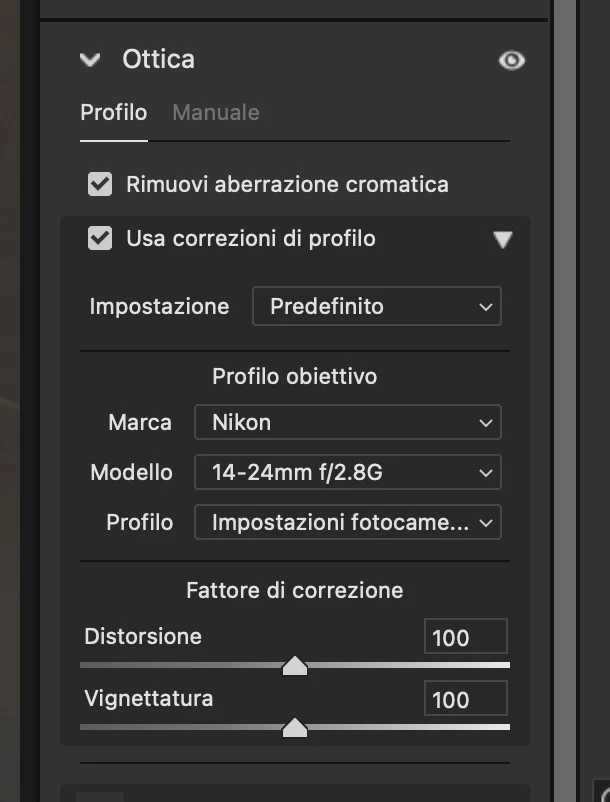
 

Import the images into Lightroom and proceed with the HDR merging and DNG creation.


Return to Bridge and open one of the created DNGs in Camera Raw. You'll notice that the lens profile section has lost its automatic selection.
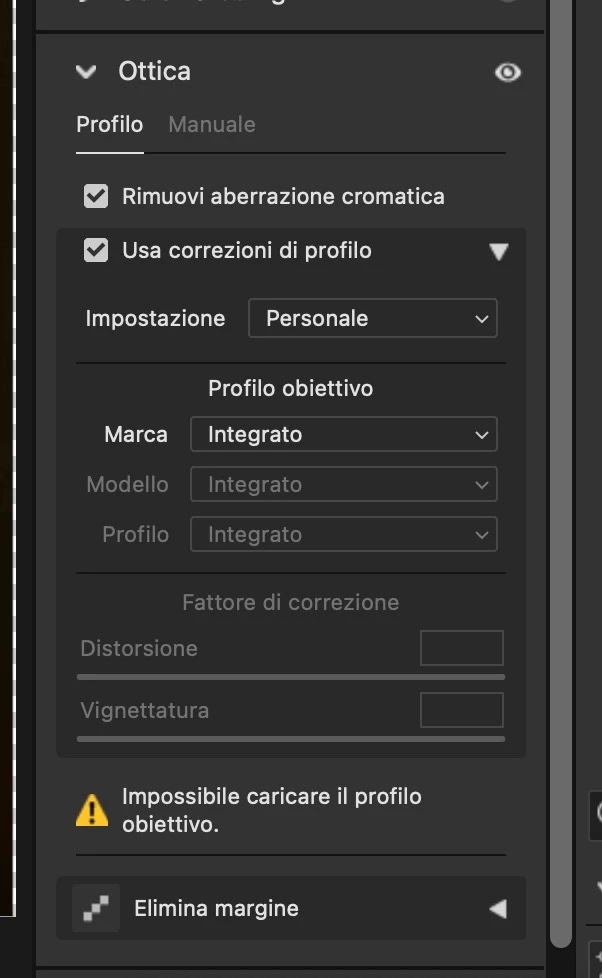
 

To resolve this issue, manually set the lens profile back to "Automatic" to reapply the correct lens profile.


I hope this bug gets resolved. Thank you!

This topic has been closed for replies.

2 replies

johnrellis
Legend
September 28, 2023

Immediately after creating the merged DNG, what does Lightroom's Lens Corrections panel show? If it correctly shows "Profilo: Impostazioni fotocame…" (Profile: Camera Settings), then this is a problem in Adobe Bridge (or perhaps Camera Raw), and you should post in the Adobe Bridge forum.


But if LR's Lens Corrections panel shows "Profilo: Integrato" (Profile: Built-in), then please upload the original raws to Dropbox, Google Drive, or similar and post the sharing link here. We can see if the problem occurs in other LR installations or is specific to yours and file an actionable bug report if necessary.

Giulio fa cose
Inspiring
September 28, 2023

Wow, you hit the jackpot. Indeed, on Lightroom, the lens profile is set correctly. This suggests it's a Bridge issue, evidently. But can't some moderator move the thread over there?

johnrellis
Legend
September 28, 2023
JohanElzenga
Community Expert
Community Expert
September 28, 2023

Out of curiosity: why do you go back and forth between Lightroom and Bridge for this? You could merge to HDR in Camera Raw just as well as in Lightroom Classic, or use Lightroom Classic all the way. BTW, when I merge to HDR in Lightroom Classic and check the lens profile section, Remove Chromatic Abberation and Lens Profile are both correctly applied.


-- Johan W. Elzenga
Giulio fa cose
Inspiring
September 28, 2023

I devised this workflow a few years ago. I've been following it for at least 4 years now. The reason is simple; back then, I noticed that the algorithm used in Lightroom for HDR processing was superior to that of Bridge and Photoshop. Over time, I've seen that they introduced the option to create HDRs in Bridge as well, but honestly, I've never given it a try. I'm comfortable with my current method, and that's how I've always worked.


I'd like to add that I'm using the latest versions of Lightroom Classic, Adobe Bridge, and Photoshop.

D Fosse
Community Expert
Community Expert
September 28, 2023

Camera Raw (whether hosted by Bridge or Photoshop) and Lightroom are identical as long as versions are corresponding. They use the exact same processing engine.


There is no reason to go back and forth.