
Inspiring
October 10, 2018
Answered

How do you use Bridge to find photos by Keyword?

  • October 10, 2018
  • 2 replies
  • 8235 views

I have over 230,000 photos on my hard drive. They are placed in hundreds of different folders which are all collectively located in a single folder called Pictures. My grandchildren are in their own folders. Our vacations are all in separate folders. etc, ect.

I'm aware of how to locate a photo by keyword after I've selected a specific folder in Bridge.

Bridge has been used to assign keywords to all of the photos of people in my collection. Each person's name is a keyword. My wife is named Larisa and that is the keyword I have assigned her in Bridge. Photos of her will probably be found in 40 - 50 different folders. Is there a way to assign Bridge to search through all of the folders in this collective Picture folder and locate and display, all the photos of "larisa"? If this is possible, then could I instruct Bridge to locate all photos of Larisa on the entire hard drive?
    This topic has been closed for replies.
    Correct answer Conrad_C

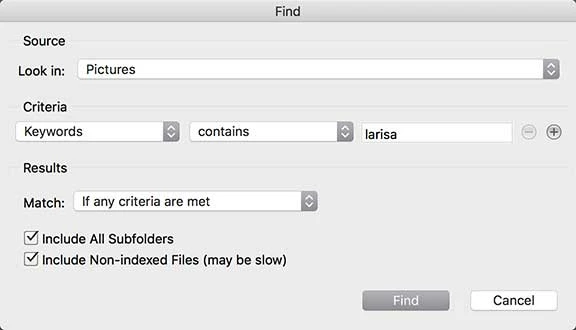
    If you've only used the search box in the top right corner of a Bridge window, the search might not be precise enough. Instead, choose Edit > Find. When you use the full Find dialog box, you can tell Bridge:

    • Which folder to search, in this case Pictures
    • What criteria to use, such as "Keywords" "contains" "larisa"
    • To search everything inside the Pictures folder, by turning on "Include All Subfolders"

    If it's a search that you'll want to do regularly, create a Smart Collection of it, which works like a saved search. You can set up a Smart Collection with exactly the same criteria.

    2 replies

    Conrad_C
    Community Expert
    Conrad_CCommunity ExpertCorrect answer
    Community Expert
    October 10, 2018

    If you've only used the search box in the top right corner of a Bridge window, the search might not be precise enough. Instead, choose Edit > Find. When you use the full Find dialog box, you can tell Bridge:

    • Which folder to search, in this case Pictures
    • What criteria to use, such as "Keywords" "contains" "larisa"
    • To search everything inside the Pictures folder, by turning on "Include All Subfolders"

    If it's a search that you'll want to do regularly, create a Smart Collection of it, which works like a saved search. You can set up a Smart Collection with exactly the same criteria.

    Inspiring
    October 10, 2018

    Conrad, thank you very much. I felt certain this function would be available but didn't know where to find it. I appreciate your help.

    Adobe Employee
    October 16, 2018

    Hi,

    We have released a new version of Adobe Bridge CC (9.0.0.204) which is now available to download using Adobe Creative Cloud Desktop Application.

    You can also download it from https://www.adobe.com/products/bridge.html

    Digital asset management software | Download free Adobe Bridge CC trial

    This release contains lots of new and exciting features New and enhanced features | Latest release of Bridge CC

    Regards,

    Abhishek Seth

    Participating Frequently
    October 10, 2018