
Exit
  • Global community
    • Language:
      • Deutsch
      • English
      • Español
      • Français
      • Português
  • 日本語コミュニティ
  • 한국 커뮤니티
0

How to see description field in Metadata in full

Explorer ,
Oct 30, 2022 Oct 30, 2022

Hi there, I'm just starting to use Bridge 2023 on my Mac (OS Monterey 12.6) and am working on captioning pictures int he Metadata fields. Does anyone know why the Description field does not show the whole field like the keywords does. It makes editing the information very difficult as it's all on one line. See attached. I'd really like to know how to fix this. Thanks!
TOPICS
How to , Metadata
1.5K
Translate
Report
Community guidelines
Be kind and respectful, give credit to the original source of content, and search for duplicates before posting. Learn more
community guidelines

correct answers 1 Correct answer

Advocate , Oct 30, 2022 Oct 30, 2022

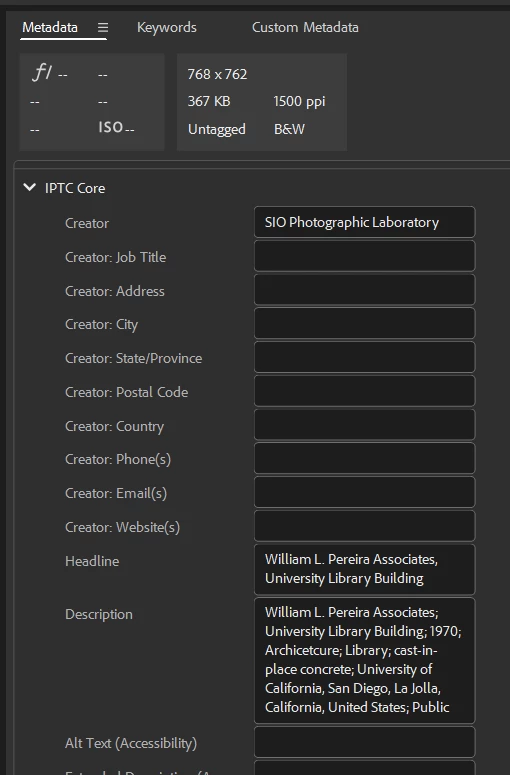
Unless you must use IPTC IIM, use the IPTC Core fields instead. The description will wrap and Core preferred over IPTC IIM. 


gregreser_0-1667145155366.png


Translate
Advocate ,
Oct 30, 2022 Oct 30, 2022

Unless you must use IPTC IIM, use the IPTC Core fields instead. The description will wrap and Core preferred over IPTC IIM. 


gregreser_0-1667145155366.png


Translate
Report
Community guidelines
Be kind and respectful, give credit to the original source of content, and search for duplicates before posting. Learn more
community guidelines
Explorer ,
Oct 30, 2022 Oct 30, 2022

Thank you as ever Greg. That works for the description field. I only use the IPTC IIM as I also have to fill out and be able to view: Categories - Supplemental Categories, Transmission reference and Urgency for my Metadata to be compatible with uploading to my agency so that pictures are accepted. All that information could be in the IPTC IIM section, even though I have to use Photo Mechanic to drop in the Categories and Supplemental Categories as I can't do that in Adobe Bridge. It's a complication, but I don't think there's a way around it! Thank you. Mike

Translate
Report
Community guidelines
Be kind and respectful, give credit to the original source of content, and search for duplicates before posting. Learn more
community guidelines
Advocate ,
Oct 30, 2022 Oct 30, 2022

It is still a bug that IIM the description field doesn't expand to show all the text.

I'm also not sure why Bridge doesn't allow IIM Categories and Supplemental Categories to be edited. I know IPTC deprecated them, but they also say that they can be synchronized with the IPTC Core XMP properties “photoshop:Category” and “photoshop:SupplementalCategories”. I would think Bridge could support editing and synchronizing these just as Photo Mechanic does.


Translate
Report
Community guidelines
Be kind and respectful, give credit to the original source of content, and search for duplicates before posting. Learn more
community guidelines
Explorer ,
Oct 30, 2022 Oct 30, 2022

If only Greg! It would save me a whole extra element of my workflow which you'd think Adobe would be interested in keeping within the Adobe family as opposed to users who need this functionality to have to 'go elsewhere' to Photo Mechanic.Any idea where / how I could request this to Adobe? Cheers for your help.

Translate
Report
Community guidelines
Be kind and respectful, give credit to the original source of content, and search for duplicates before posting. Learn more
community guidelines
Advocate ,
Oct 30, 2022 Oct 30, 2022
LATEST
Translate
Report
Community guidelines
Be kind and respectful, give credit to the original source of content, and search for duplicates before posting. Learn more
community guidelines