
Inspiring
August 8, 2023
Question

Is anyone smart enough to know how to avoid duplicate sub-keywords?

  • August 8, 2023
  • 3 replies
  • 26402 views

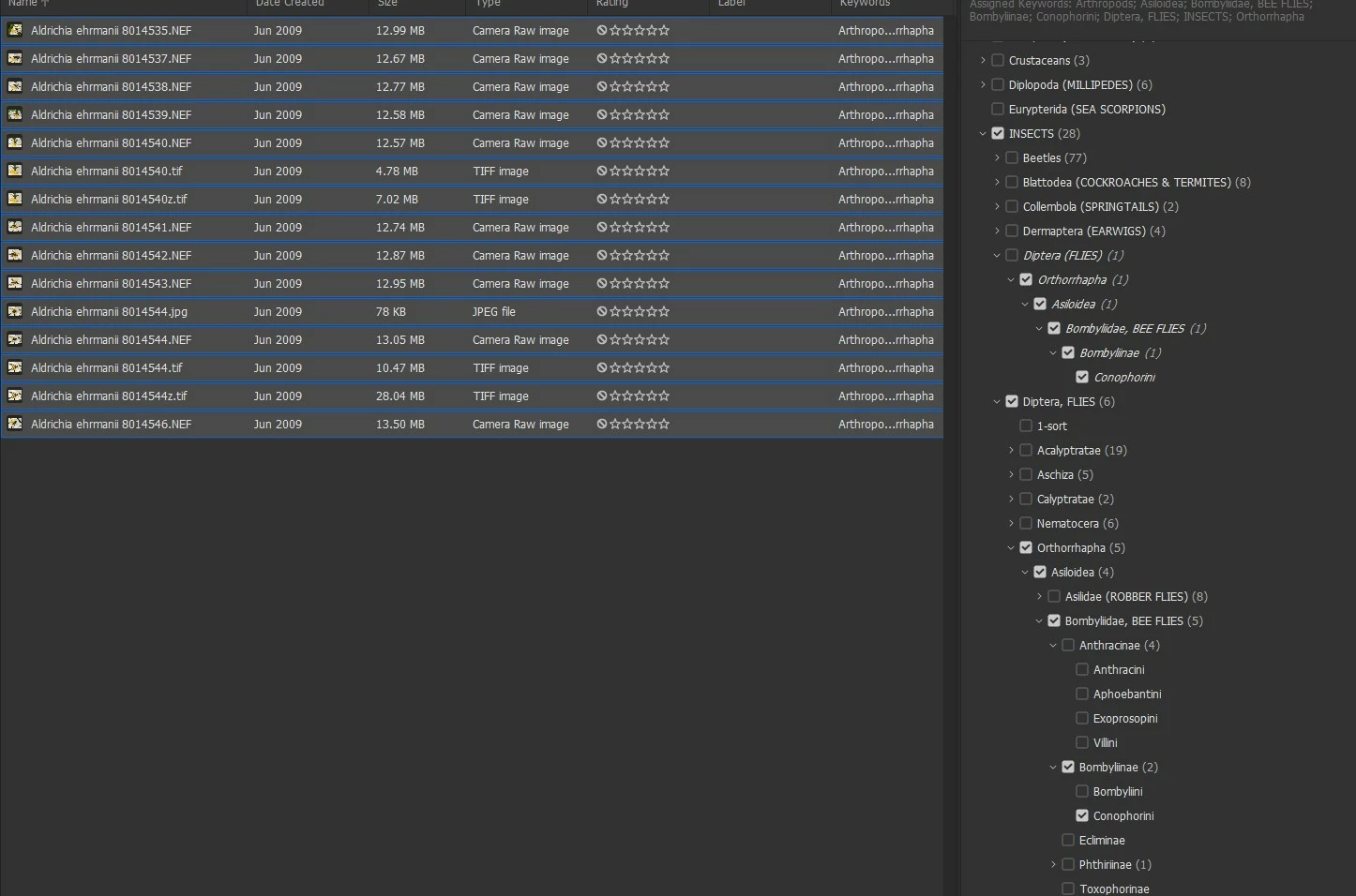
Is anyone smart enough to know how to avoid duplicate sub-keywords? I am not. I had made phylogenetic keywords originally, in the form, Diptera (FLIES).  I found out, importing to my website, that the proper separation is with commas, and () causes problems.  So I decided to rename to Diptera, FLIES,


This is an Order of Insects, and there are Families, Subfamilies and Tribes below this. And there are parents, Arthropods and Insects above.  I was first just trying to work on one family of Bee Flies, Bombyllidae, whose format I thus changed.  But then I found when I checked one of the subkeywords, the same one in the older one would also check.  Likewise with uncheck.  I spent hours, trying to view all the subkeywords and starting over, unchecking all the levels but they still came duplicated.  that when I then went to the parent keyword Diptera and did the same thing, but it made no difference except creating another duplicate of Bee flies in the new format.  Then I selected all the images in the family folder and selected every level and uncheck all the way up to Arthropods. I deleted all levels of duplicate keywords. I I closed and reopened the Bridge and tried again, all to no avail. I had also tried deleting both instances of a subkeyword in the old and new keywords and then putting back in the new and checking.  The old came back with all the levels.. I changed the preference to not apply parents, but the subkeyword still duplicates.
This topic has been closed for replies.

3 replies

Inspiring
August 9, 2023

I did not perfectly understand your case – I would advise provoking a dead simple case with apples and pears and leave animal taxonomies away. 

Yet, the situation looks to me as if some keyword-swap hadn't worked properly. The keywords in italic are (no longer?) in your keyword list, but seem still to be assigned on file-level. Bridge requires a rigid workflow for deleting or renaming keywords. You need to have absolutely all items that have a keyword-old assigned on screen and selected to perform a keyword deletion that applies both to your keyword list and your files.

This is a mayor difference from programs that use a catalogue, where you may freely rename and delete keywords and this metadata-change will get written back to all files / their database record – whether or not they are visible or selected. 

Inspiring
August 9, 2023

Based on the link suggesed, I tried something similar.  I had an arrangement with an examples such as thus: Arthropods>Insects>Diptera, FLIES,>Acalyptratae>Tephritoidea>Ulidiidae (PICTURE WINGED-FLIES)>Otitinae>Cephalini. 

  I lready had duplicates of almost all the subfolders in two places from previous parent folder renames, the old ones of which were Diptera , and Diptera (FLIES).  So almost all below that was twice duplicated and I wanted to get rid of.  I decided to work with all under Acalyptratae, and renamed that "Acalyptrate" and then all the FAMILIES ( end in dae) below it I changed to the comma format, so the example above became Ulidiidae, PICTURE-WINGED FILES. All child levels below that, I renamed with a period after. So Otininae becomes Otininae.  .I'd go to a family folder where images are stored, and since Bridge removed the ability to find 'ALL' that it once had, I choose find all images that don't contain 'zzz'.  this pulls up everything in the subfolders as well.  Then in the folder panel I select a lowest level child keyword, such as Cephalini, and in the keyword panel, check the Cephalini. (with the period), then uncheck all the ones without the period and I can delete that keyword., from the other levels,  I go up to the family level and delete that. Once the family was gone, I'd also remove parents above that if they didn't automatically. I would look on the folder panel with all selected and see if there were any old keyword, check them and uncheck in the keyword panel.  Several hours of this worked well for quite a few families that didn't come back.  It got harder when Acalyptratae would show once in the folder panel but be in 2 different old parent FLY keywords. Earlier, it seemed one check on the folder panel would show all checked in the keywords and I'd uncheck and they'd all be gone.  but then I started getting cases where the 2 on the right would show (-) and I'd have to start doing smaller selections of images till I'd get a solid check and then uncheck and get rid of that group.  sometimes it would only be one image that would allow a single check.  Tedious.  But then a stranger thing happened, before I could finish the last families in the group.  "Acalyptratae" became uncheckable.  Earlier as a parent, anything below would check it, now the non quote Acalyptratae would check when I checked a family or its child instead and if I checked "Acalypratate" the check would go away. Mind boggling, but I got rid of all the extra families and their children of the 25 families in the one subgroup. Not perfect, but I was able to export less cluttered keywords to the metadata file being prepared to re-import into my website.


Inspiring
September 30, 2023
quote

It would be great if there was a script or macro to manually cut and past the date/times.  Based on the time to do several, it looks like over 10 hours to do all.


By @robirdman1


Perhaps you could provide clear, concise info and upload two or three sample files with explanations about which metadata date fields are wrong and how they should be corrected...


That was buried above in this long thread.  Exported dates were changed to a format that Bridge doesn't recognize, so when a RAW file is opened in Photoshop, a warning is given that data can't be read.  the resulting tiff is stripped of all metadata.  The incorrect date format is in the IPTC core, while the correct fomat remains under the thumbnails and in the camera data (exif).  I can copy and paste that from the exif into the IPTC core Date created box and the problem for that file is solved, but there are about 3800 files that were changed, and attempts to re-export and change the format in Excel were unsuccessful because the seconds are actually gone.


Stephen Marsh
Community Expert
August 8, 2023

Hierarchical keywords are designed to peacefully co-exist.


Take for a simple example the parent of "House" or "Car". Both of which can have valid sub-keywords of "Door" or "Window", however selecting the Door sub-keyword in House shouldn't include the Door sub-keyword in Car.


gregreser
Brainiac
August 9, 2023

I think I found the problem, or at least I figured out why @Stephen Marsh example works. 

If you enable Preferences > Keywords > Options  "Write Hierarchical Keywords", the duplicate child keywords can be edited independently.

When "Write Hierarchical Keywords" is selected, the dc:subject is "Test - Car; Test - Car|Door; Test - House; Test - House|Door"


When "Write Hierarchical Keywords" is NOT selected, dc:subject is "Test - House; Door; Test - Car"

I think the problem is that "Door" and "Car" only exist once here and that affects how the Keyword panel edits them. When I delete "Door" under "Test-Car", "Door" under "Test-House" is also deleted. This is not apparent until you click off the thumbnail then click back on refreshing the keyword panel display.


When I re-saved my keywords with "Write Hierarchical Keywords" enabled, I was able to delete the child keywords independently.

gregreser
Brainiac
August 9, 2023

I should add that you can't just enable "Write Hierarchical Keywords" and solve the problem if your previous keywords were not saved in that form. The dc:subject (IPTC Core) keywords would have to re-written in hierarchical form which would require re-selecting them in the Keyword Panel or by using a script.

gregreser
Brainiac
August 8, 2023

Have a look at this post. It might explain what's going on. I think your case is more difficult to solve because you have a lot of deelpy nested keywords.

Unable to delete identical but re-assigned child-keyword