
Participant
March 1, 2018
Answered

Keywords are no longer linked to pictures

  • March 1, 2018
  • 3 replies
  • 620 views

Hello,

I am using Bridge CS6 and have added keywords to my pictures.

After a new installation of my Comupters I imported the keywords.

However, many images are no longer linked to the keywords.

How can I restore the link without having to start over?

Greetings, Julia !
This topic has been closed for replies.
Correct answer Todd Shaner

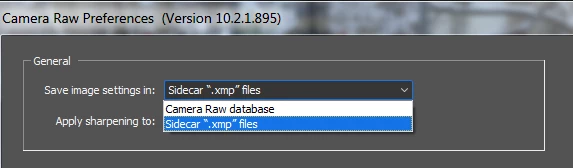
Are these raw files? If so check your Camera Raw Preferences and make sure your using the same setting for 'Save image settings in:' as the previous installation. If you used the Camera Raw database you'll also need to make sure that has been moved to the computers with the "new installation" and the same for the Adobe Bridge Cache folder.

3 replies

Stephen Marsh
Community Expert
Community Expert
March 2, 2018

Julia, are you out there?

I was thinking about metadata in rendered files, while other forum members have raised the possibility that this may be for raw files.

Can you please confirm if your issue is with rendered files (JPEG, TIFF, PSD etc) or proprietary raw files (ORF, CR2, NEF and possibly DNG).

Participant
March 1, 2018

the keywords are no longer associated with the pictures. Although I had already done so. The keywords are also not shown in italics.

Todd Shaner
Todd ShanerCorrect answer
Legend
March 1, 2018

Are these raw files? If so check your Camera Raw Preferences and make sure your using the same setting for 'Save image settings in:' as the previous installation. If you used the Camera Raw database you'll also need to make sure that has been moved to the computers with the "new installation" and the same for the Adobe Bridge Cache folder.

Stephen Marsh
Community Expert
Community Expert
March 1, 2018

Do you mean that there are missing keywords in the images?

Or do you mean that keywords are missing from their respective categories in Bridge keywords panel and when you view images the keywords show up as italic text under the other category?

Or do you mean something else?