

BWats-8504
Inspiring
July 12, 2017
Answered

Loupe tool does not work in Preview panel

  • July 12, 2017
  • 2 replies
  • 1720 views

We recently installed Bridge Creative Cloud. The loupe tool does not appear anywhere. I have read the tutorials on usage and multiple forum posts, but none address what to do when the loupe tool is missing completely. It never shows up in the Preview panel and does not show up in Preview mode.

I just need to enable the loupe tool, but would prefer not to re-install since I have multiple customizations I don't want to lose. (Previously, with Cs5 Premium I was a heavy user of the loupe and really miss the capabilities it provides.)
This topic has been closed for replies.
Correct answer Jeff Arola

What operating system are you using?

Normally in Preview mode or the Preview panel the cursor shows as a magnifying glass cursor and clicking gets the Loupe.

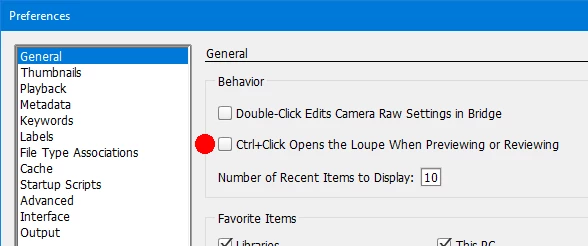
There is a setting in the Bridge (Edit)>Preferences>General that instead requires the Command/Ctrl key to be pressed when clicking in the Preview to get the Loupe, so see if that is checked.

2 replies

BWats-8504
Inspiring
July 18, 2017

Thank you! That is quite obvious when pointed out, but I completely missed it. All works in the customary fashion, now.

Jeff Arola
Community Expert
Jeff ArolaCommunity ExpertCorrect answer
Community Expert
July 13, 2017

What operating system are you using?

Normally in Preview mode or the Preview panel the cursor shows as a magnifying glass cursor and clicking gets the Loupe.

There is a setting in the Bridge (Edit)>Preferences>General that instead requires the Command/Ctrl key to be pressed when clicking in the Preview to get the Loupe, so see if that is checked.