



Samuel Hoffe
Participating Frequently
Jan 21, 2023 7:28 PM UTC
Question

Metadata Changes made in Bridge not Reflected Elsewhere

Hello friends,


After many years of lurking these forums for various solutions over the years, I have finally come across an issue perplexing enough to warrant a post. For some background info, I recently updated all my devices and CC apps and am running macOS Ventura and Bridge 13.0.2.636


I'm in the process of consolidating my iPhone photo and videos backups to iCloud to free up space on my iMac/generally making my workflow more efficient. Previously, I would use Apple Photos to import images and videos from my iPhone onto my iMac and export them as "unmodified originals" to annual archive folders. However, last year I discoverd a batch of ~500 videos from 2019 that were in a different format (.m4v instead of the usual .MOV) and they'd somehow had their metadata stripped away and replaced with an incorrect creation date - I assume this date delineates when this disaster occured. Whats more bizarre, all the photos from this period (May-September) didn't have their metadata affected, but are .jpg images instead of the usal .HEIC, and can still be sorted chronologically. I've tried to recreate this error by exporting from Apple Photos with different settings but so far I'm still stumped as to what happened to this batch of media.


Anyway, over the past week, I've been tediously sorting the videos manually by comparing the dates to photos, trying to delineate different events and occurences, and using instagram to further corroborate dates. Once I've established the date and rough time of a video, I have been typing the corrected date and time into the "Camera Data (Exif)" drop down area of the Metadata viewer, altering the "Date Time Original" field to the corrected date/time. This change is also reflected in the "File Properties" drop down area of the Metadata viewer, showing the correctly altered "Date Created", as shown below.
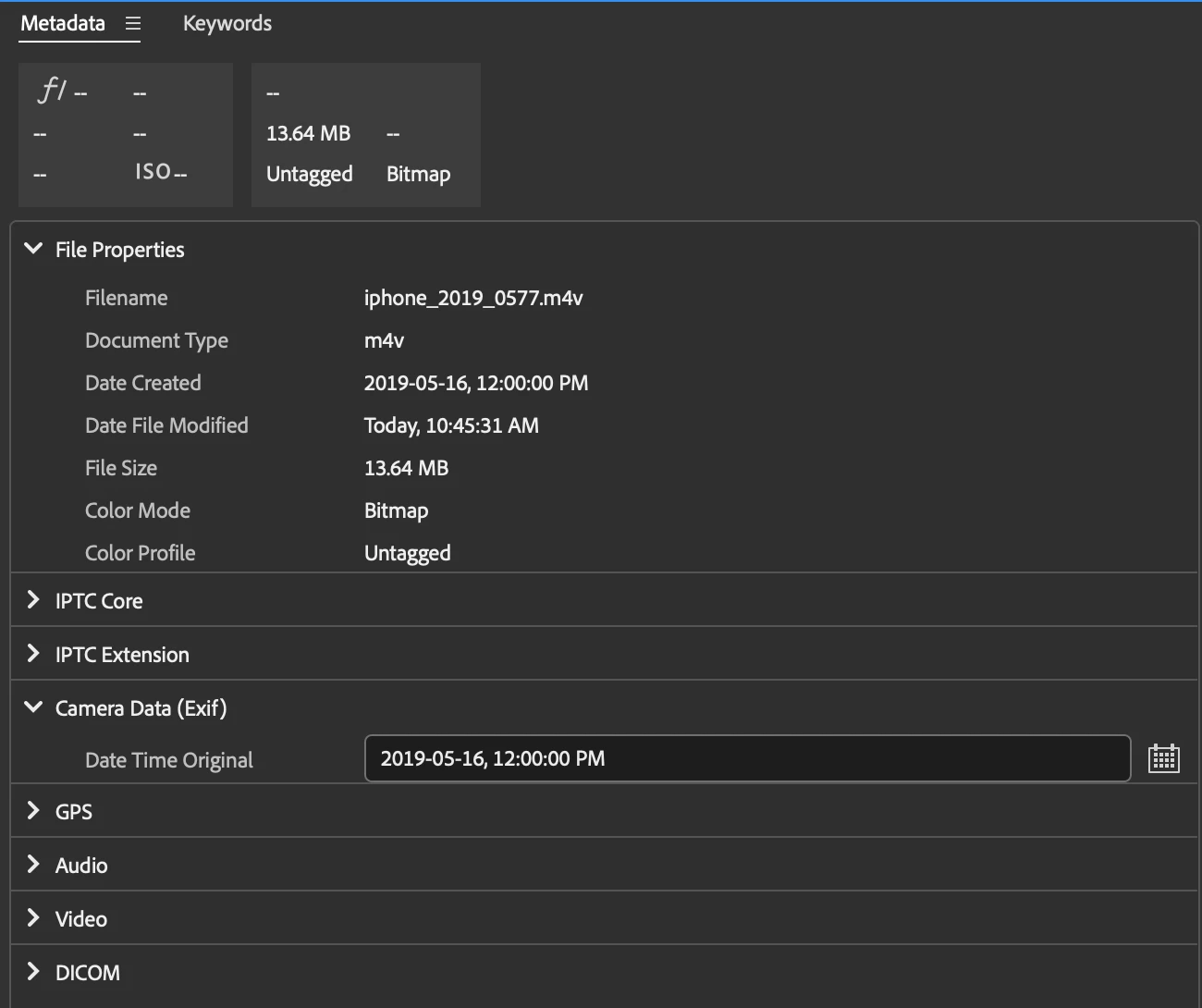


After hours upon hours of this, I finally finished yesterday and went to import everything into Apple Photo/sync with iCloud and once again, these ~500 videos were recorded as having the incorrect creation date of September 25th, 2019 and were placed in a randomized order depending on their supposed time of creation. I removed them from Apple Photos, came here, found a couple of suggestions like the "Edit Capture Time" feature, which does in fact reflect my corrected dates, or clicking the "Apply" checkmark in the bottom right corner to make sure the change was applied. Even more perplexing is the fact that Bridge can now correctly sorted these videos by date created, but the "File Info" still shows the incorrect creation date (shown below) as does the file info provided in Finder. Note: all screen captures are for the same file.
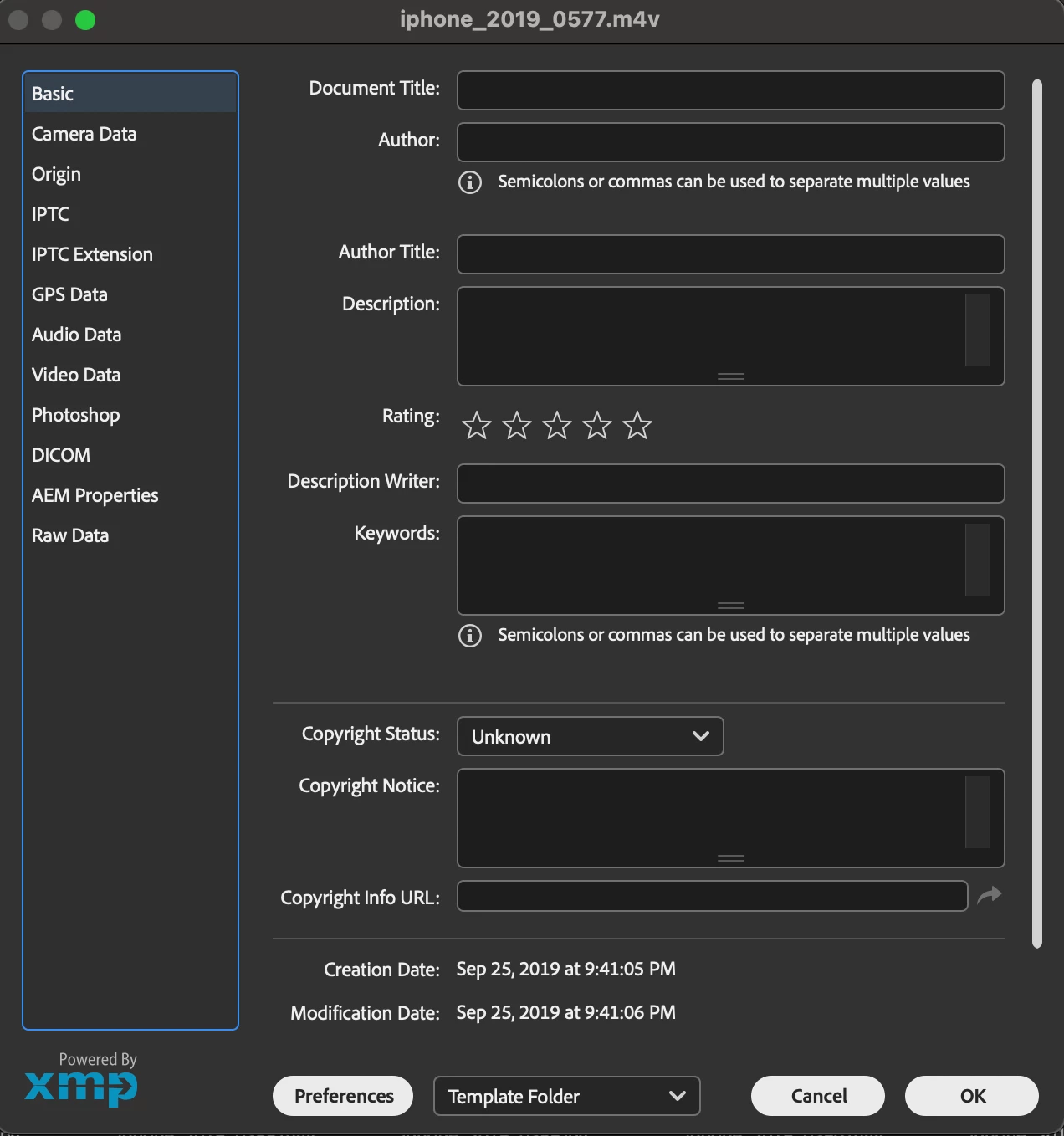
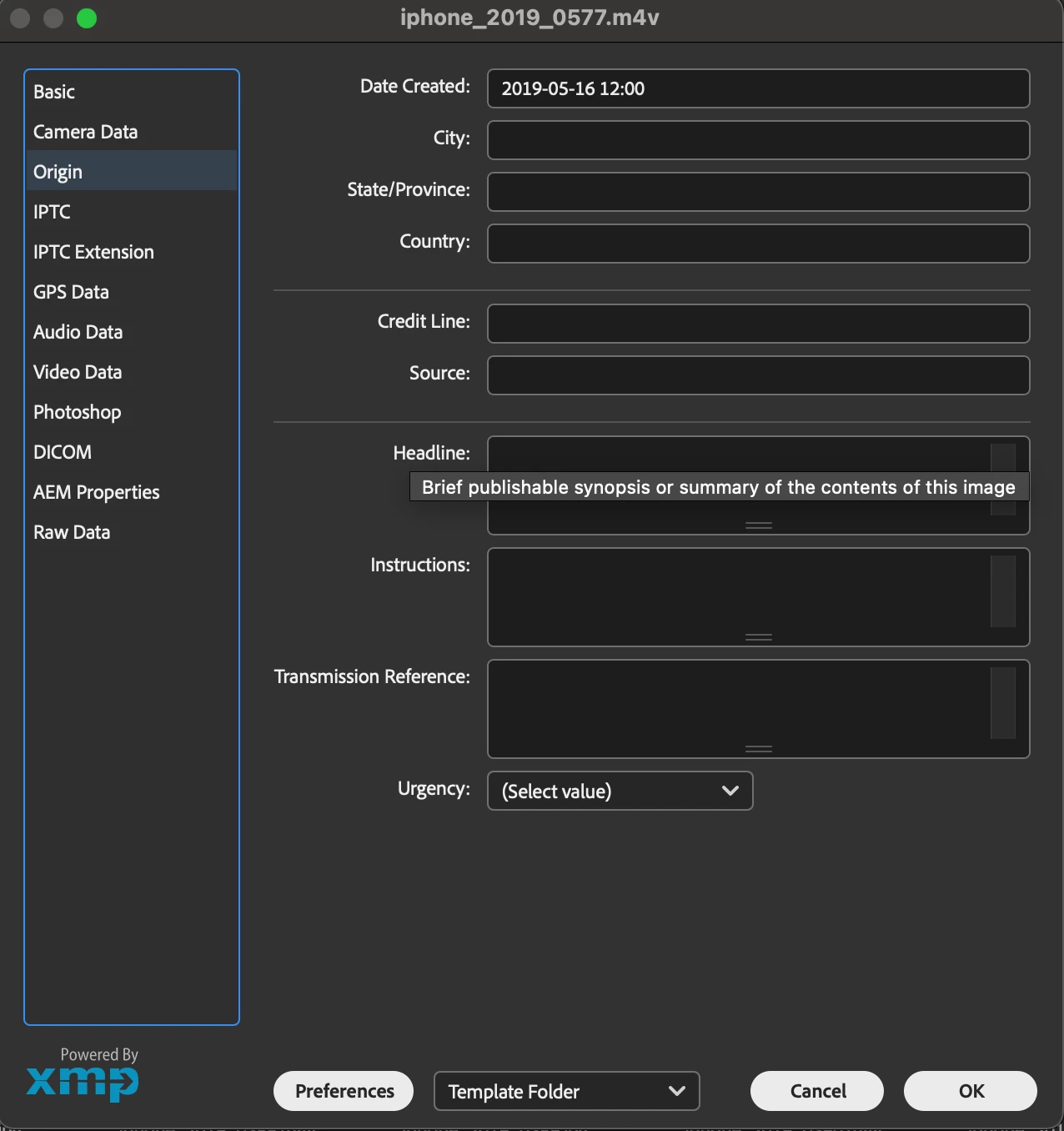


Can anyone advise on how to solididy the metadata changes I've made to be reflected outside of Bridge so I can finally sorted these videos chronologically? I am desperately hoping that this can be achieved in a batch processing method because I've poured way too many hours into tediously and manually sorting these videos already and am terrified of it all being for nothing. Thanks for your help,

Sam


This topic is closed to new replies. Start a new post to keep the conversation going.

13 replies

gregreser
Legend
Jan 22, 2023 5:19 PM UTC

A big part of this puzzle is knowing which date field Apple Photos sorts on, there are several: date file created, date created (content created), exif dates, XMP dates (many different types). I don't have any .m4V files to analyze, so I'm at a slight disadvantage.


I notice in your File properties that Date File Created is not showing. Would that be September 25th, 2019?

Turn on Date File Created in Preferences > Metadata.


I think the File Info Basic and Origin panels are reading different dates, which only adds to the confusion.

First, let's look at the embedded XMP metadata. 

Open the File Info panel (File > File Info…) and click on "Raw Data" (in the list of panels on the left side).

Click on the XMP data. Select all then copy and paste it into a reply here.


Translate
Samuel Hoffe
Participating Frequently
Jan 22, 2023 5:59 PM UTC

Hi there, thanks for your help with this. After enabling the additional metadata fields, this is the what I've found. The date created and date time original reflect the corrections I've made, but now there's a further mismatch between the Exif date time and date file created listed under file properties. Clearly something went very askew from September 25th-26th, 2019, possibly during an export procedure that was going on in the background. I'll post a screenshot of this below.


RAW Data as per your request:


<x:xmpmeta xmlns:x="adobe:ns:meta/" x:xmptk="Adobe XMP Core 7.1-c000 79.4d2f597, 2021/09/01-20:51:22 "> <rdf:RDF xmlns:rdf="http://www.w3.org/1999/02/22-rdf-syntax-ns#"> <rdf:Description rdf:about="" xmlns:xmp="http://ns.adobe.com/xap/1.0/" xmlns:tiff="http://ns.adobe.com/tiff/1.0/" xmlns:xmpMM="http://ns.adobe.com/xap/1.0/mm/" xmlns:stEvt="http://ns.adobe.com/xap/1.0/sType/ResourceEvent#" xmlns:kbrg="http://ns.adobe.com/bridge/1.0/" xmlns:exif="http://ns.adobe.com/exif/1.0/" xmlns:photoshop="http://ns.adobe.com/photoshop/1.0/" xmlns:xmpDM="http://ns.adobe.com/xmp/1.0/DynamicMedia/"> <xmp:CreateDate>2019-09-26T04:41:05Z</xmp:CreateDate> <xmp:ModifyDate>2019-09-26T04:41:06Z</xmp:ModifyDate> <xmp:MetadataDate>2023-01-21T10:45:31-08:00</xmp:MetadataDate> <tiff:Orientation>1</tiff:Orientation> <xmpMM:InstanceID>xmp.iid:b2255872-8197-4686-92d7-be1a6c0cea85</xmpMM:InstanceID> <xmpMM:DocumentID>xmp.did:4401b4b8-33c6-4fbb-84df-9934344ac881</xmpMM:DocumentID> <xmpMM:OriginalDocumentID>xmp.did:4401b4b8-33c6-4fbb-84df-9934344ac881</xmpMM:OriginalDocumentID> <xmpMM:History> <rdf:Seq> <rdf:li rdf:parseType="Resource"> <stEvt:action>saved</stEvt:action> <stEvt:instanceID>xmp.iid:4401b4b8-33c6-4fbb-84df-9934344ac881</stEvt:instanceID> <stEvt:when>2023-01-15T10:20:26-08:00</stEvt:when> <stEvt:softwareAgent>Adobe Bridge 2023</stEvt:softwareAgent> <stEvt:changed>/metadata</stEvt:changed> </rdf:li> <rdf:li rdf:parseType="Resource"> <stEvt:action>saved</stEvt:action> <stEvt:instanceID>xmp.iid:b2255872-8197-4686-92d7-be1a6c0cea85</stEvt:instanceID> <stEvt:when>2023-01-21T10:45:31-08:00</stEvt:when> <stEvt:softwareAgent>Adobe Bridge 2023</stEvt:softwareAgent> <stEvt:changed>/metadata</stEvt:changed> </rdf:li> </rdf:Seq> </xmpMM:History> <kbrg:InitialEditCaptureTime>2019-09-26T04:41:05Z</kbrg:InitialEditCaptureTime> <exif:DateTimeOriginal>2019-05-16T12:00-08:00</exif:DateTimeOriginal> <photoshop:DateCreated>2019-05-16T12:00</photoshop:DateCreated> <xmpDM:duration rdf:parseType="Resource"> <xmpDM:value>6299</xmpDM:value> <xmpDM:scale>1/600</xmpDM:scale> </xmpDM:duration> </rdf:Description> </rdf:RDF> </x:xmpmeta>


And as a screenshot:


Translate
gregreser
Legend
Jan 23, 2023 5:22 PM UTC

Hi Greg,


This is correct, I have not been able to replicate the issue by exporting "normal" .MOV files from Apple Photos that came from before and after the May-September period and to be honest, I don't even know where the .m4v extension came from - perhaps previous version of Apple Photos handled file export differently? Looking at previous years, I have .m4v files from 2015 that also have bizarre file creation dates shown in Finder but are still correctly sorted in Apple Photos and when exmained, show the correct capture time.


Examining a "normal" .MOV video in Apple Photos vs one of the September 25th .m4v anomalies doesn't provide much information either as the software is more user friendly to a fault and doesn't provided detailed metadata about each file - as seen below


 Anomaly                                      Normal


The user in the link you've provided seems to be having a similar problem in that Finder uses file creation dates and not Exif data to sort, probably irrespective of the file format - which is certainly a scary proposition: that Apple Photos could have stripped out the actual date and time the photo/video was created. I know that for the ~500 videos I appended, there was no sign of the original creation date/time anywhere to be found so I was mostly using educated guesses when I input the Date Time Original myself.


As you've suggested, syncing the file creation date to the Date Time Original I've manually input in Bridge would be the ticket. It would be good to test this on a single file and then see if Finder and Apple Photos can read the altered metadata correctly before proceeding with any batch processing. Let me know your thoughts.


Hi Samuel,


One drawback to editing the File Creation Date is that it might be changed during a future backup/sync/upload. Still, it would be good to try it, as you said, to determine if that is the date Finder and Apple Photos are sorting on.


As a side note, I wonder if converting your m4V files to MOV, in case they would work better in the Apple environment.


To sync the file creation date to the Date Time Original, I would ExifTool. It's a very well established tool and is very powerful and fast for batch processes. It is a command line tool, so that can take a little getting used to.

https://exiftool.org/


Have a look at it and perhaps start with just reading the metadata from a few files. There are some tutorials on YouTube, and elsewhere, to help. There are also some Mac GUI wrappers that provide a friendlier interface. Given you are doing a single, straightforward edit, the command line version should get the job done quickly.


Here is the command to sync the file creation date to the Date Time Original:

exiftool "-filecreatedate<datetimeoriginal" [path to video file]


If this works, you could change the command to process an entire folder and subfolders:

exiftool -r "-filecreatedate<datetimeoriginal" [path to folder of video files]


Note that while testing this, I found that Bridge would not display the edited file creation date until I purged the cache. I was getting frustrated that the edit did not work until I saw the new date in File Explorer. After purging the Bridge cache the date displayed correctly. Yeah, that's Bridge problem.


I can help you with Exiftool, but I will be offline for a few days starting tomorrow.

Translate