
Exit
  • Global community
    • Language:
      • Deutsch
      • English
      • Español
      • Français
      • Português
  • 日本語コミュニティ
  • 한국 커뮤니티
0

Multiple instances of "Documents" and "Downloads" in Adobe Bridge

Participant ,
Nov 27, 2024 Nov 27, 2024

Adobe Bridge keeps displaying multiple duplicate folder names, such as several instances of "Documents" and "Downloads" (see screenshot below). What could be the cause of this?

Thank you

Panos
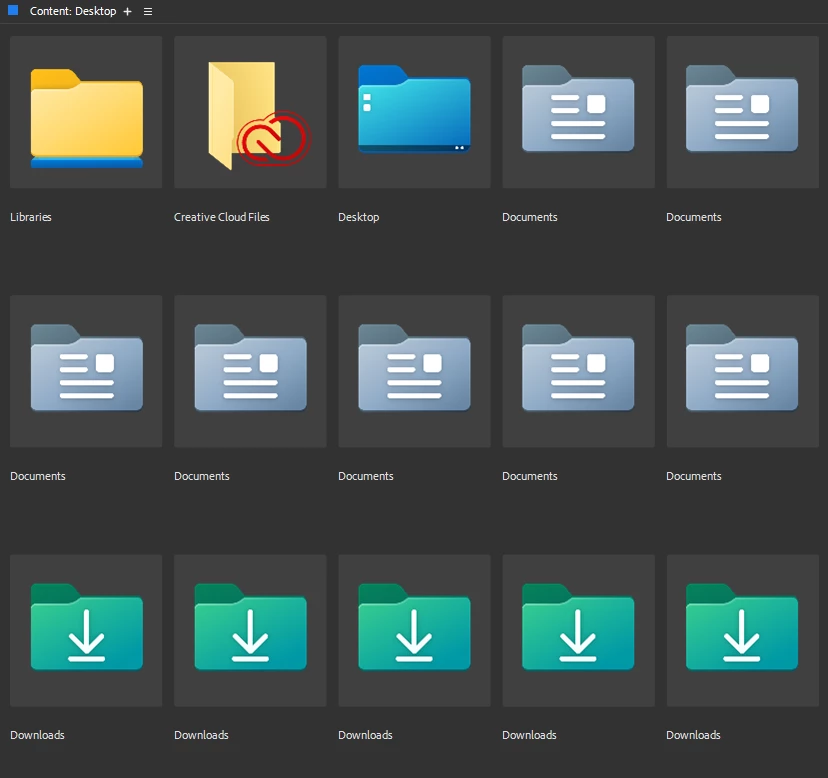

2024-11-27 11_11_11-Desktop - Adobe Bridge.png

TOPICS
Problem or error
113
Translate
Report
Community guidelines
Be kind and respectful, give credit to the original source of content, and search for duplicates before posting. Learn more
community guidelines
Participant ,
Nov 28, 2024 Nov 28, 2024
LATEST

Update:

I've noticed that Adobe Bridge displays multiple instances of the 'Documents' and 'Downloads' folders when I use Alt+Tab to switch to another app and then return to Bridge using Alt+Tab. Additionally, Pressing F5 results in displaying two instances of each folder. Could this be a bug in the app or a glitch related to the operating system (Windows 11)?

If any Adobe technician is reading this, I’d appreciate your assistance!

Translate
Report
Community guidelines
Be kind and respectful, give credit to the original source of content, and search for duplicates before posting. Learn more
community guidelines