

Dynamic_beauty15A8
Participating Frequently
July 17, 2013
Answered

Output Module (Bridge CC) not working on Mac

  • July 17, 2013
  • 17 replies
  • 58299 views

As suggested here

http://helpx.adobe.com/bridge/kb/install-output-module-bridge-cc.html

I downloaded and tried to install the Bridge CC Output Module. I could not find the "Bridge CC Extensions" folder only "Bridge CC"
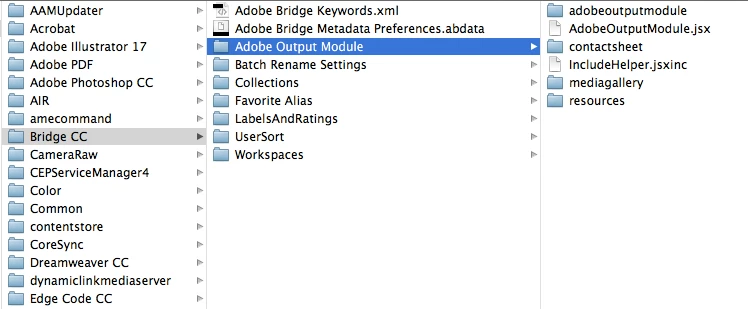
I can see the output name inside Bridge when I try to install it but nothing happens when I try to click it, it's just greyed out
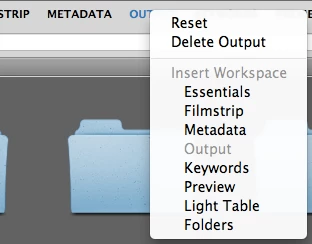
I using Bridge 6.0.0.151

On OS X 10.8.4

This topic has been closed for replies.
Correct answer AnnShelbourne

The only major difference I can think of is that I have CS6 & CS5 installed at work and only CC at home


You may have found the vital Link.

The replacement AOM for Bridge CC installed without any problems and works perfectly here on OSX 10.8.4 -- but I also have CS6 installed on the same machine.

Try re-installing CS6 and see if the Bridge CC Output Panel then works.

My guess is that a vital component in Bridge CC is missing and suggest that  Adobe need to post a completely new Update on the Cloud for Bridge CC (with a properly integrated AOM incorporated into the Build).

The current idea of  offering the AOM as an add-on has proved to be far too difficult and burdensome for the average User to handle.

17 replies

jannellemoore
New Participant
April 1, 2015

I can't find the Bridge CC Extension folder under the Application Support in the Library. I have a folder called Bride CC but I went through everything thing and nothing.

Estethia
New Participant
December 11, 2014

Gosh... I've done exactly as it says, and double checked it, even triple checked it... Still doesn't work! Should I just give up or what?

Participating Frequently
October 21, 2014

Whoever posted that this needs to be put in root folder thanks, I stumbled over that as well.

CC6 is not that great with stupid stuff like this to waste my time

New Participant
September 19, 2014

C:\Program Files\Common Files\Adobe\Bridge CC Extensions\Workspaces

That's where it is.

New Participant
September 21, 2014

Thank ti Sinkromone.

But adobe did this on purpose.

From the Birdge product page.

Features not available in Bridge CC

Unavailable in Adobe Bridge CC

The following features are no longer available in this version of Adobe Bridge.

  • Adobe Output Module
  • Export Panel
  • Compact Mode
  • 3D File format thumbnails and previews
  • Synchronized window

Adobe Output Module

The Adobe Output Module is now available as a separate module that can be installed after you've installed Adobe Bridge. For detailed instructions see, Install Adobe Output Module for Bridge CC.The functionality to create contact sheets, PDFs, and web galleries is also available in Adobe Photoshop and Adobe Lightroom, which are included in your Creative Cloud subscription.

See on the link below.

Bridge Help | What's new in Adobe Bridge CC

So it may still work for a while but Adobe is probably going to withdraw it from the installation pckage.

Philby

New Participant
June 12, 2014

Hi

Is anyone having problems with the link to download the output module? When I click on this, the address bar starts flickering constantly..

New Participant
June 13, 2014

All working today.. Followed sinkronome's instructions and works fine!

New Participant
May 13, 2014

Not sure if anyone out there is still struggling with this, but I think I've figured out the problem as clearly as can be. The problem isn't the program itself, the problem is that Adobe did a poor job of explaining how to install it.

When you download the module from the Adobe site, you'll get a folder called AOM_Mac. This is just a package folder, it doesn't need to be moved anywhere.

Inside that folder are two items: a folder called Adobe Output Module and a file called AdobeOutputModule.workspace. They both need to be moved to different places.

The Adobe Output Module folder should be put in the Bridge CC Extensions folder (HD:Library/Application Support/Adobe/Bridge CC Extensions), and the AdobeOutputModule.workspace file should be put in the Workspaces folder that is in the Bridge CC Extensions folder (HD:Library/Application Support/Adobe/Bridge CC Extensions/Workspaces). Then, the next time you open Bridge, it should ask you if you want to install the Output extension, and click yes.

The problem we've been having is that we've been moving the .workspaces file without moving the folder to the correct place, so the workspace can't find the tool files contained in the folder, creating an empty window. Adobe should really rewrite their instructions to make this more clear.

New Participant
September 5, 2014

Thank you! I've just spent the last hour trying to figure this out and this was the only REALLY helpful post with clear instructions. I've finally got the output module working

Omke Oudeman
Participating Frequently
July 17, 2013

I downloaded and tried to install the Bridge CC Output Module. I could not find the "Bridge CC Extensions" folder only "Bridge CC"

That's because you are looking in the wrong library. Your screenshot shows content of the user library (the one in your user account itself and hidden by default per OSX 10.7)

You have to be in the library at root level. In Finder navigation column select the hard disk where your system is installed on e.g.: Computer/ Macintosh HD (but this is the default, if you have a custom name select the start up disk where your system is installed on.

There you will see:

-Library

-Users

-Applications

-System

Choose the upper one: Library / Application Support / Adobe and inhere is a folder called 'Bridge CC extensions'

Dynamic_beauty15A8
Participating Frequently
July 17, 2013

Sorry that was my fault.

But that still only leaves it blank like this user describes http://forums.adobe.com/message/5511475

I have tried to reset prefrences by holding down the option on launch. Still nothing

Omke Oudeman
Participating Frequently
July 17, 2013

But that still only leaves it blank

I'm sorry to hear that and I don't know a solution to this problem. As I am on a Mac (10.8.4) to and have no problem with installing and using AOM it is a strange problem.

Be sure to have tried all solution give in the Adobe KB document (double check on the correct locations and correct folders.

And here is a copy of the tips I gave in an other thread to try also:

Also delete the Bridge6 Plist file (com.adobe.bridge6.plist) from the preference folder in the user library before again reset the prefs voor Bridge with option key on restart.

Download the zip file again and install it again, overwriting the older files.

Also reset prefs and workspaces in CS6 Bridge.