Participant
November 1, 2022
Answered

Photoshop vanished from Tools in Bridge 2023?

  • November 1, 2022
  • 6 replies
  • 8406 views

Hello, 


Many people have written on why Bridge 2023 is a mess, but I couldn't find anything on this particular issue: I want to open multiple pictures as layers in Photoshop. This option could be found under tools > Photoshop > open as layers. As you can see below, this option doesn't exist in Bridge 2023. Beind fed up with it, I reinstalled 2022, but apparently it doesn't recognize PS 2023 and asks me to install the newest version of PS. 


Honestly, I can't tell you how many days this update has cost me so far. Each picture takes more than a second to load in Bridge now, just to skip from one picture to the next. I have to cull about 5000 pictures per wedding and it has become an ordeal now. 
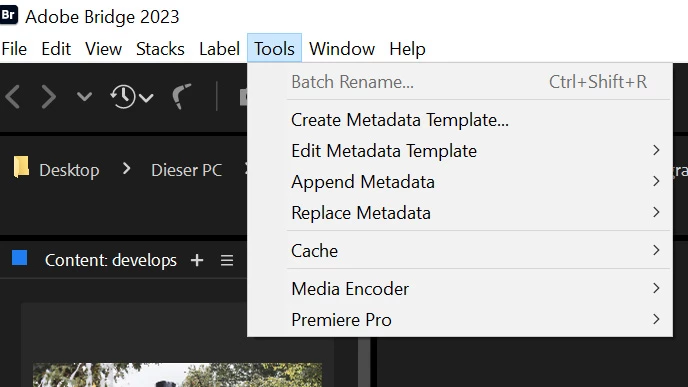
This topic has been closed for replies.
Correct answer gary_sc

Hello @julias1741454 


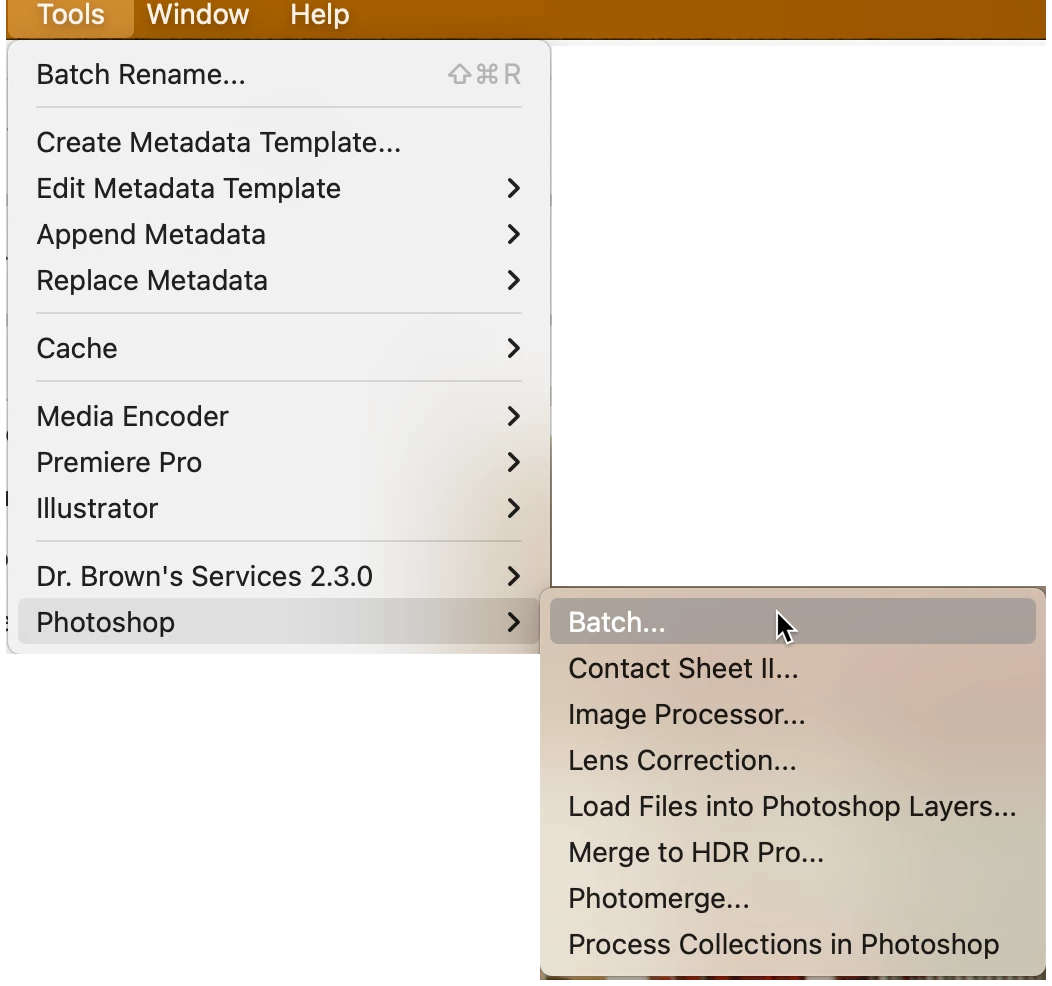
And here's my screenshot inside Bridge 2023

What I believe happened is that you installed Bridge AFTER you installed Photoshop. The scripts you see in the Tools menu are installed not by Bridge but by Photoshop. However, if you installed Bridge AFTER PS, when PS was installed there was no Bridge 2023 installed so it couldn't insert the scripts into Bridge.


To fix this, uninstall PS and then reinstall PS. That "should" fix it. SOMETIMES, you have to reboot your computer before reinstalling PS but this has not been consistent. So, I do not want to say this is something you need/must do.


Please let us know if this solves your issue.

6 replies

Participating Frequently
November 12, 2023

I am experienceing the same issue in Bridge 2024. Photoshop has vanished from Tools in Bridge. I was attempting to "open in Layers in Photoshop". It cannot be done. I suppose I will uninstall Photoshop 2024? Thanks.

gary_sc
Community Expert
Community Expert
November 12, 2023

Hi, @bucaru, please see my "correct answer above. The one thing to add to that answer is that you may need to match your applications. For example, if you're using Bridge 2023 with PS 2021, that could also cause PS to not install the scripts into Bridge.


Good luck!

Participating Frequently
November 12, 2023

Thanks gary_sc,

I uninstalled both Photoshop 2024 and the latest version of Bridge and that corrected my problem. Thanks! - Steve 

Participant
August 15, 2023

I'm trying all of these methods and none are working. I'm currently going back and forth between PS2023 and Beta. Still can't get PS back in tools. 


gary_sc
Community Expert
Community Expert
August 15, 2023

Hi @adriennelongo, there is a bug in the latest beta version of PS that causes the Tools in Bridge to not display the PS Tools. To fix this, uninstall the release version of PS 2023 and then reinstall it. 


That should fix the issue, please let us know.

Participant
August 15, 2023

@gary_sc Thanks! How do I avoid losing all of my settings, hotkeys, and actions with the uninstall?

Participant
August 15, 2023

I believe Adobe has removed the option Bridge/Tools/Photoshop in Bridge version V13.  One needs to load V12.  I, like others make much use of this option in Bridge Tools yet Adobe, as far as I know, has never mentioned this change.   I do hope they can restore it.  Brian

Adobe Employee
August 15, 2023
Hi @brianh9 ,
Thank you for reaching out with your concern. It looks like you're encountering an issue with the Tools -> Photoshop options missing from Adobe Bridge 2023 after installing the latest Photoshop beta build. We understand how important this functionality is for your workflow. We have internally raised a ticket and tracking that with the Photoshop team.
To address this, here's a workaround that should help resolve the issue:
  • Uninstall the current Photoshop 24.x version.
  • Reinstall Photoshop 24.x.
  • Launch Adobe Bridge.
This should restore the Tools -> Photoshop options in Bridge 2023.
If you're interested in using the Photoshop Beta build, we recommend installing the latest Bridge Beta build (14.0.0.57). This should ensure smooth interoperability between the Photoshop beta build and the updated Bridge beta build.
We appreciate your patience and hope this solution resolves the issue for you.

Best regards,
Bridge Team
Participant
August 10, 2023

this worked for me too! thank you so much! 


Dan Greyhound
Inspiring
August 11, 2023

If I have to uninstall PS how do I keep all my actions, etc? I seem to remember it deletes them all which is really annoying.

Dan Greyhound
Inspiring
August 11, 2023

Ah, save put them in a set and then you can save them

Inspiring
January 10, 2023

Ditto here, Windows 11 and all Adobe versions current. Tried to load files as layers for the first time in a long time apparently and found the Tools/Photoshop menu missing. But I kept the old Bridge and Photoshop installed and the Tools/Photoshop is missing there too. I swear it used to be there in the old versions. Maybe installing 2023 messed things up?

gary_sc
Community Expert
Community Expert
January 10, 2023

Hi, @redcrown on guard This is NOT a Bridge issue but is the order of installation issue.


The scripts for Photoshop Tools in Bridge are installed by PS. During installation, PS looks to see if a compatible version of Bridge is installed (not PS 2023 with Bridge 2022). If not, than the tools are not installed. If you install Bridge first, then PS can see it's there and install the tools. 


If you do not see the PS Tools in Bridge, uninstall both. Install Bridge, then install PS. That should solve your problem.

Inspiring
January 11, 2023

Thanks, but I fixed mine by poking it in the eye with a sharp stick. In both Bridge 2022 and 2023, I went to Preferences/Startup Scripts and disabled everything. Shut down, restarted Windows. Back in to Bridge Preferences/Startup Scripts and enabled everything. Close, re-launch Bridge, and Volia!, the Photoshop Tool is back and Load files into Layers is there.


So, basically, I tricked Bridge into reloading startup scripts. YMMV. 

gary_sc
Community Expert
gary_scCommunity ExpertCorrect answer
Community Expert
November 1, 2022

Hello @julias1741454 


And here's my screenshot inside Bridge 2023

What I believe happened is that you installed Bridge AFTER you installed Photoshop. The scripts you see in the Tools menu are installed not by Bridge but by Photoshop. However, if you installed Bridge AFTER PS, when PS was installed there was no Bridge 2023 installed so it couldn't insert the scripts into Bridge.


To fix this, uninstall PS and then reinstall PS. That "should" fix it. SOMETIMES, you have to reboot your computer before reinstalling PS but this has not been consistent. So, I do not want to say this is something you need/must do.


Please let us know if this solves your issue.

Participant
November 2, 2022

Hi Gary, 

I tried that solution, but sadly, it didn't work. I've uninstalled photoshop a few times now, but that hasn't solved the problem, sadly. 

Legend
November 2, 2022

Check your Startup Scripts (under Edit->Preferences) and make sure all the scripts are activated.