
Inspiring
October 20, 2018
Answered

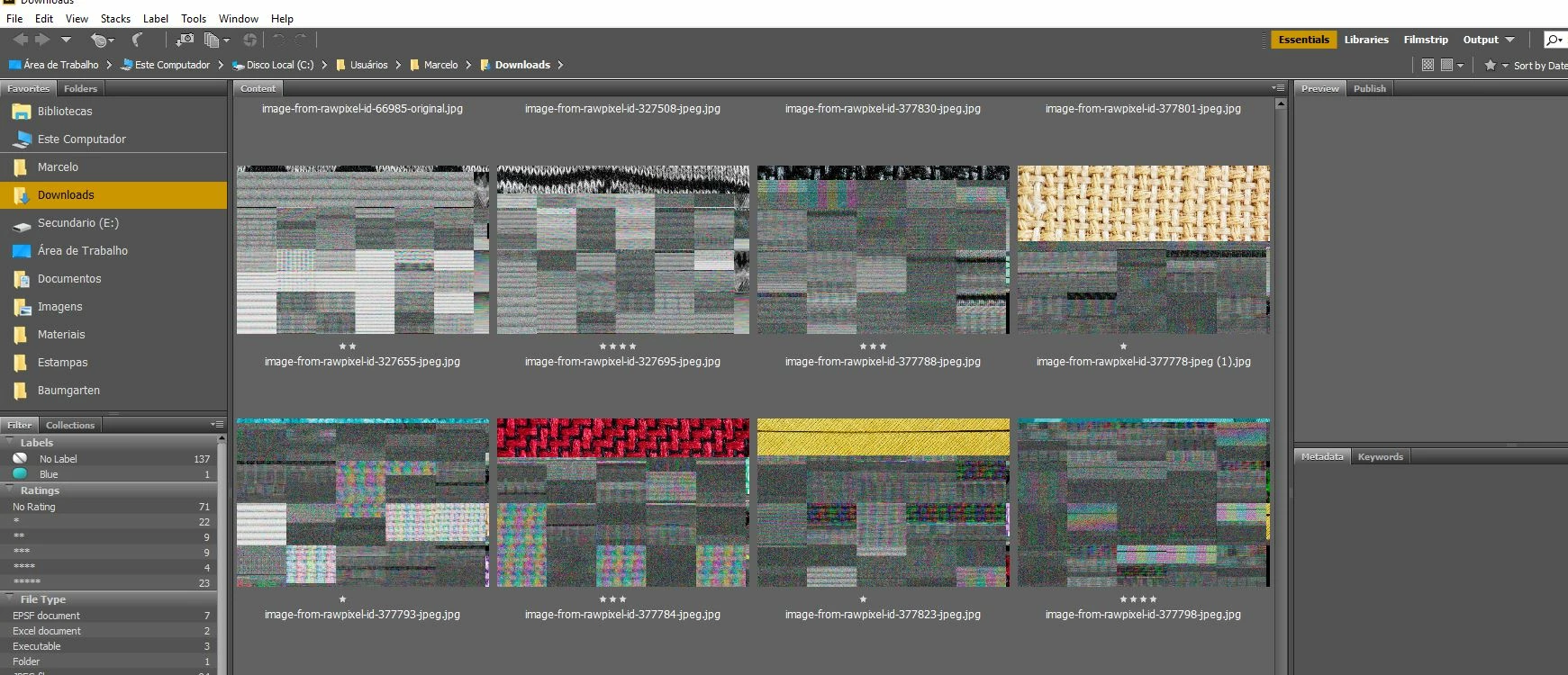
Problem - Gray noise spots in thumbnails

  • October 20, 2018
  • 2 replies
  • 602 views

Today I downloaded some images from an image bank and then went to see and it was with those gray noise spots.

I do not know if it was Bridge or Windows that caused this.

Has anyone had this problem?

Do you know what the cause is?
This topic has been closed for replies.
Correct answer marcellomds

the problem did not occur again.
I think it was a mistake in the site downloads. I'll keep watching.

2 replies

marcellomdsAuthorCorrect answer
Inspiring
December 4, 2018

the problem did not occur again.
I think it was a mistake in the site downloads. I'll keep watching.

Legend
October 21, 2018

What format are these files in? What kind of computer, and are your graphics card drivers up to date?

jbm007
Community Expert
Community Expert
October 21, 2018

Looks like a windows 10 machine probably with a Nvidia card.

I have had BW thumbnail images appear like that.

Abhishek_Seth2
Participating Frequently
November 2, 2018

Dear Users,

We have released a new version of Adobe Bridge CC (9.0.1.216) which also includes fix for this issue.

Request you upgrade your Bridge version from Adobe Creative Cloud Desktop or https://creative.adobe.com/products/download/bridge 

Please let us know if you face any issues.

Regards,

Abhishek Seth.