
Art-Gent-Œil
Inspiring
November 23, 2016
Answered

probleme d'ouverture de fichier PSD depuis bridge vers cc 2017?

  • November 23, 2016
  • 1 reply
  • 693 views

Bonjour,

I can't open psd file from bridge to cc2017. I've got the message " Window don't find adress C:\prog........cc2015.5"?

depuis la mise a jour de bridge cc2017 il m'est impossible d'ouvrir un fichier PSD depuis bridge vers Photoshop.  j'ai un message d'erreur me disant que window ne trouve plus cc2015!

comment modifier ce chemin d'acces ?

Pour information, je peux ouvrir les raws et depuis photoshop je peux reouvrir les psd.

merci de votre aide
    This topic has been closed for replies.
    Correct answer GautamBahl

    Please see the below screenshot.

    Regards,

    Gautam

    1 reply

    GautamBahl
    Inspiring
    November 23, 2016

    Hi Samuel,

    Please rename the Photoshop.exe file to OldPhotoshop.exe located in the location C:/program Files/Adobe/Photoshop CC 2017

    Then try to open the .psd file from Bridge in Photoshop.

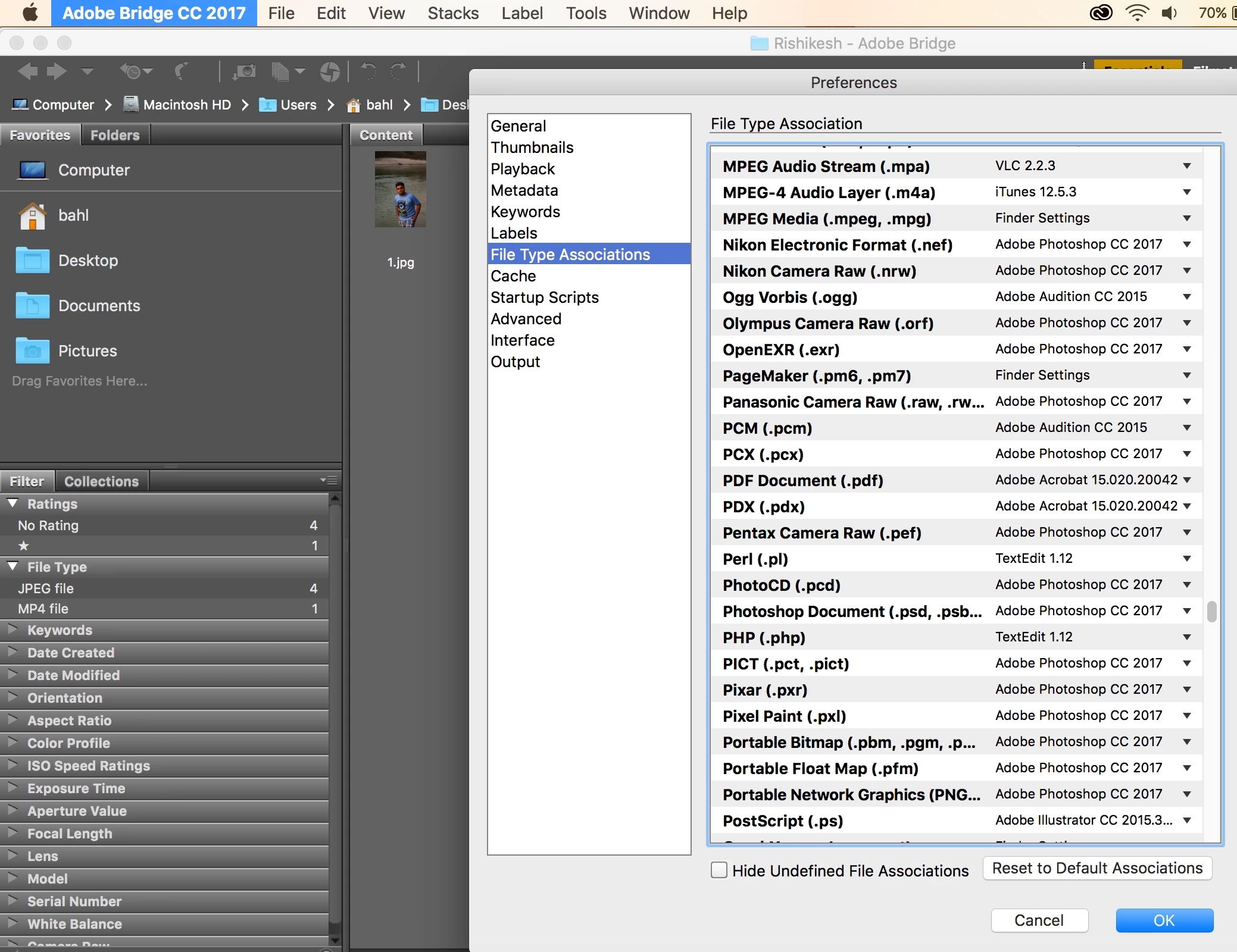
    Also, check the file association for .psd file from within Adobe Bridge.

    Regards,

    Gautam

    Art-Gent-Œil
    Inspiring
    November 24, 2016

    thanks a lot Gautam

    I'll be  not in front of my PC  before next monday. Then I'll try this slution and I'll answer to you

    but all the same where to check the file association .psd?

    Sam

    GautamBahl
    GautamBahlCorrect answer
    Inspiring
    November 24, 2016

    Please see the below screenshot.

    Regards,

    Gautam