Known Participant
October 22, 2021
Question

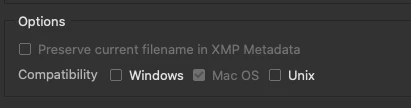
"Preserve current filename in XMP metadata" grayed out on Mac Catalina?

  • October 22, 2021
  • 2 replies
  • 1673 views

Hi, folks. Long-time Bridge user but maybe not as savvy as I'd like. I just noticed that I cannot save my current filename in XMP when doing batch renames because the function is grayed out. Using latest Bridge 11.1.1.185 on Mac Catalina 10.15.7. Are there any workarounds for this or did I just miss a settings button somewhere?


Thanks!
 

This topic has been closed for replies.

2 replies

Stephen Marsh
Community Expert
Community Expert
October 23, 2021

A couple of things to try:


* Right click on the image and purge the cache for the selected file, then see if you can preserve. One can also purge the cache for the entire directory/folder via the Tools menu


* Reset Bridge Preferences:

https://helpx.adobe.com/bridge/kb/troubleshoot-errors-freezes-bridge.html


Outside of Bridge, one can use 3rd party software such as ExifTool to embed this metadata:


Add/Copy filename to Adobe Preserve Original Filename metadata entry (excluding file extension), -Preserving the modified date/time:


exiftool -P -overwrite_original_in_place '-XMP-xmpMM:PreservedFileName<${filename;s/\.[^.]*$//}' -r '/Users/username/Desktop/file to rename.png'


Add/Copy filename to Adobe Preserve Original Filename metadata entry (including file extension):


exiftool -overwrite_original_in_place '-XMP-xmpMM:PreservedFileName<${filename}' -r '/Users/username/Desktop/file to rename.png'


These commands are formatted for the Mac, Windows would use double straight quote/inch marks and OS specific paths to directories or files. Always work on copies of your images until you know that all is working as intended.

Anon1066Author
Known Participant
October 23, 2021

Thanks for the tips!


Resetting the cache did not work. Nor did temporarily disabling my antivirus. Between each of these attempts, I restarted Bridge. I haven't tried EXIFTool because, while I'm sure it would work, I'm less interested in actually saving my file names than I am in trying to figure out why Bridge isn't giving me the option.


At the moment, I'm thinking it might have to do with my OS (Catalina). My system is too old to upgrade to Big Sur, but I am going to look into recreating the problem on a computer that is running Big Sur.


This is very strange. Maybe I'll open a support ticket with Adobe, too.

Legend
October 22, 2021

Not all file types support XMP metadata.

Anon1066Author
Known Participant
October 22, 2021

Understood, but it won't work on TIF or JPG files for me, both of which I believe do support XMP. This suggests the problem is specific to my system.

Legend
October 22, 2021

Good points, but alas--no luck.


I keep my files on a RAID array (not networked). So, to be safe, I dragged some of the files to my local system. Didn't work.


Next, I checked that Bridge at full disk access. It didn't. So I changed that. Still didn't work.


Please post a screenshot with some of the original filenames shown.