Participant
July 6, 2023
Question

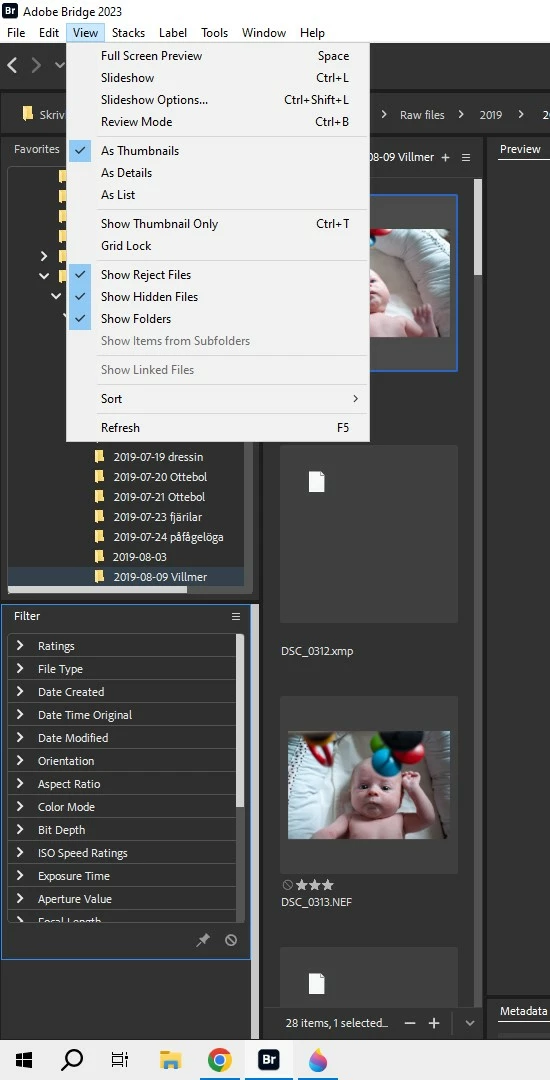
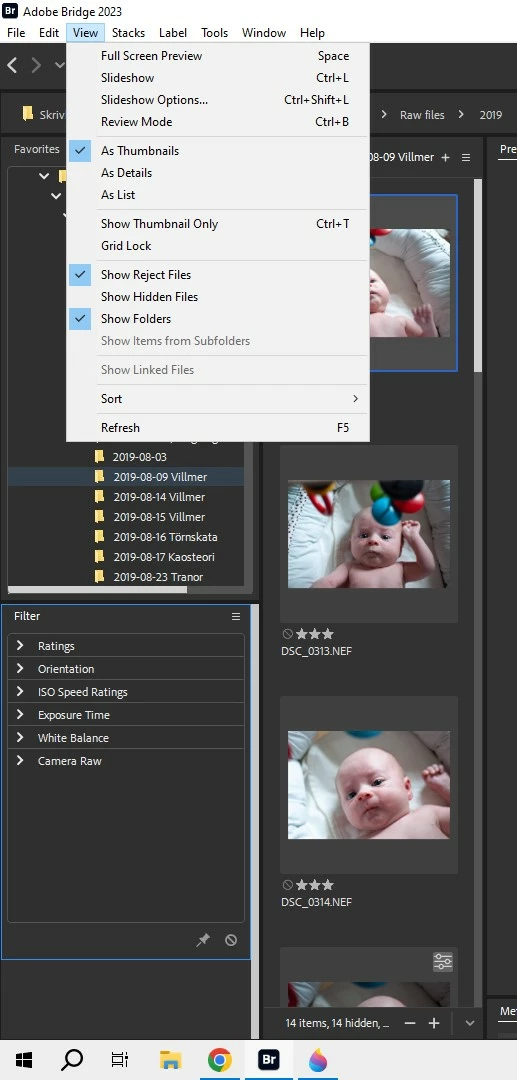
"show hidden files" has to be activated to see all metadata?

  • July 6, 2023
  • 1 reply
  • 4851 views

Just started with Bridge (v 13.03.693 with win10). Some learning curve but I enjoy the fast file handling. It seems though that I have to activate in "view" "show hidden files" to all see headers to metadata as shown from screenshots. It is annoying too see the xml-file for every picture in the file folder. Info about lens type, focal length,  camera model and so forth are independent from XML-sidecar files, right? Are there any solutions?

Greetings!

Mikael


This topic has been closed for replies.

1 reply

gregreser
Legend
July 7, 2023

The filter panel is populated based on the metadata in the visible files. I think the Filter panel is only reading XMP metadata which would only be in the sidecar file. Yes, that does severely limit filtering capability for RAW files unless you show hidden files.


The metadata panel will read and edit sidecar metadata even if the side car is hidden. (go to Preferences > Metadata and deselect "Hide Empty Fields"

Participant
July 7, 2023

Thanks gregreser! Unfortunately deselcting "Hide empty fields" made no differnce.

gregreser
Legend
July 7, 2023

I should have specified that "Hide Empty Fields" only works for the metadata panel, or it should. 

I can't find a way to make the filter panel work when sidecar files are hidden.