
Inspiring
November 1, 2022
Answered

RANT WARNING: Bridge 2023 is awful

  • November 1, 2022
  • 4 replies
  • 2219 views

I'm not sure what's going on with the new Bridge, but I finally got fed up with it enough to remove it and go back to the previous version. While 2022 isn't perfect, it's at least usable.


I'm not sure why a software company would remove features that have been baked into their product for years, but it is extremely annoying and gives the impression that the developers don't have any idea what's important to their users. This is glaringly obvious with the newest version of Bridge. Stuff that has been a part of my normal workflow either isn't available anymore or doesn't work as it should. BASIC functions like deleting files, opening multiple windows, and even knowing what file or folder is selected are either gone or are glitchy. 


I've joked for a while now that Adobe started following the Microsoft model for rolling out products before they were thouroughly vetted and tested, but the newest Bridge takes the cake for what not to do when developing a new version of a product. It's awful.


I hope that there's a fix soon. Adobe owes it to their users to do better than they have lately.
This topic has been closed for replies.
Correct answer Erik Bloodaxe

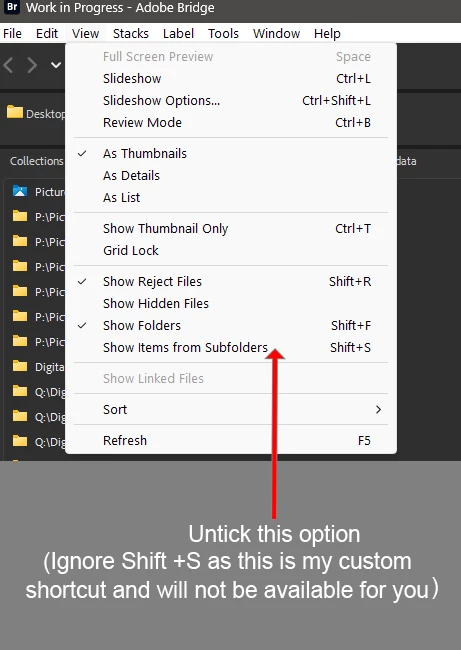
'...has this stupid feature "show items from subfolders" that slows everything down'

Look in the View Menu:

4 replies

markm34441459
Participating Frequently
March 21, 2023

The clowns at Adobe have not fixed anything - Bridge is an absolute trainwreck and its development team idiots.

Known Participant
December 1, 2024

And nearly two years later it's still a trainwreck—unusable—a total piece of crap! I used to use Bridge all the time back 4-5 years ago, now when I really need it most helping to sort 80K images, it is slow, has this stupid feature "show items from subfolders" that slows everything down (yes, they warn you that it will impact performance.) It's sad that you have companies like Adobe with developers sitting around making big bucks with nothing to do, so let's put them to work—change the applications, the UI and basically how it all works so we can show they are earning their money. DOGE is needed here! Make Adobe Great Again!

Erik Bloodaxe
Erik BloodaxeCorrect answer
Legend
December 1, 2024

'...has this stupid feature "show items from subfolders" that slows everything down'

Look in the View Menu:

Participating Frequently
February 15, 2023

No folders showing up in adobe bridge folder nor preview section, only in light table? I view the solutions in the adobe help section and they must be very outdated because they tell me to look in places that do not exist. It would be nice if adobe would go to the trouble to create a decent online manual with the correct steps instead relying on user comments to find the answers. That is the only problem, this version bridge is nothing but a headache, I had to revert back to the old bridge, but then I couldn't use it with the new photoshop. I have been using adobe ps and bridge for as long as it has been out and this new version is pitiful in terms of user friendliness. I believe that adobe has too many computer engineers and programers that feel the need to just change things to justify their jobs. I have notice this happening with other software companies as well, not just adobe. It is a problem with the industy now, over development for the sake of job security leading to programs that are no longer user friendly. I have two sons with degrees in Computer Engineering and they tell me that most of the workers don't really do anything anymore, no wonder Elon had to fire most of them at Twitter, lol. Hopefully, this is just a period we are going through as technology develops. The bottom line is keep it simple and user friendly. 

Participant
March 21, 2023

Have to totaly agree! Cant open seperate new windows, I have 3 screens & used to have one bridge open on each.

When i make a new folder, I want to move whats on my card to that folder, i have to go & look for the folder.

Nightmare! 

You have messed up big time & I am now looking for new provider....

Unless you have new news?????? & yes i ve done all the updates

Rahul Saraogi
Participating Frequently
November 24, 2022

Hi,


Many issues reported in different threads are fixed in the latest patch release #13.0.1.583. Please install and confirm if it fixes the issues you are facing.


You can refer to the issues fixed in the patch at the following link https://helpx.adobe.com/bridge/kb/fixed-issues.html


Thanks,
Bridge Team

Inspiring
December 17, 2022

NOPE NOT FIXED in the latest and ONLY patch release.

1. Move to BIN. An utterly unnecessary change for no good reason. Please fix it and make it Move To Trash like it used to be. It also used to have the numberof items being deleted but no more.

2. Pressing Red Button in upper left now shuts down Bridge rather than just closing the session and leaving Bridge active.. Now Bridge unlike PS or any other product must be totally reinitialized  This used to stay activve in 2022 and all prior releases. 

3.Stack - multiple problems. a.When a stacked group is reopened (click on the number) only the first item is selected not the entire group. This used to work correctly in 2022 and all prior releases where STACK was implemented . b. If an item is deleted from the stacked group the count of the items in the group is not decremented. This used to work properly. One must UNGROUP FROM STACK and restack to get the count to be correct.

4. The BASIC panel in Fileinfo now spans two panels and one must move the slider to access the bottom half. It is also not sticky so the size varies. This used to fit on one screen in 2022 and prior. 


Please, who the heck reworte this and who the heck QA'd this. 

I have my suspicions a new and less experienced group was given the honor of working on BRIDGE.


PLEASE PLEASE just fix this. 


Inspiring
December 23, 2022

And the response from our friends at Adobe .... CRICKETS 

Participating Frequently
November 5, 2022

i couldn't agree more. what a God-awful hash they have made of an otherwise useful image file viewer. Who asked for this anyway?