February 4, 2013
Answered

Share or export ratings and labels

  • February 4, 2013
  • 1 reply
  • 3021 views

Is there a way to share my ratings and labels that I made in Bridge with other people?

I usually work with my editor, we both have all the clips on our computers (we work in different places).
What I'd like to do is to give him all the ratings and labels I've done in Bridge without sending him all the files again.
Can I do something like this, maybe using some script?

Thank you

Stefano

This topic has been closed for replies.
Correct answer Paul Riggott

To install the script:

Download and unzip the script.

Start Bridge

Edit - Preferences -Startup Scripts

At the bottom click the "Reveal Button" this will open the folder where the script should be placed.

Close and restart Bridge.

Accept the new script.

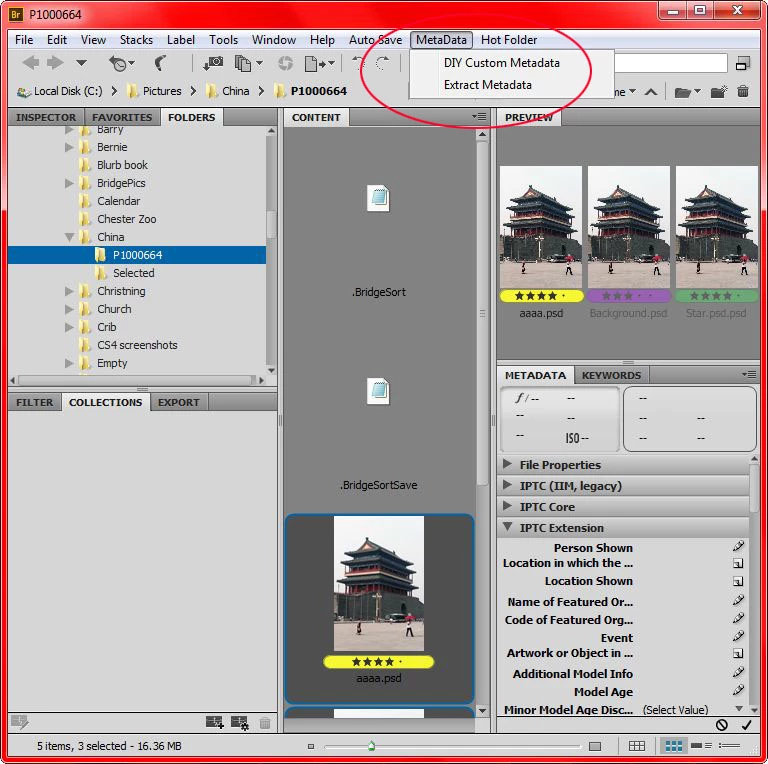
You will then have a new Menu item..

To use select the files, Metadata - Extract Metadata

This will create a CSV file or a TAB delimited file depending on what you select and the new file will be put on the desktop.

This file can be sent to whomever you want, your files are not altered in anyway.

The second script is used by the person whom you are sending the data to want to set their files to the same as yours if that is required.

Hop this helps

1 reply

Paul Riggott
Inspiring
February 4, 2013

If you want to create a csv file with this data you could use....

http://www.scriptsrus.talktalk.net/Extract%20Metadata.htm

Also if this data needs to be put into the remote files you can use...

http://www.scriptsrus.talktalk.net/DIYmetadata.htm

February 4, 2013

Thank you so much!
Let me get this:
I create a csv file using the first script and then I can send the csv file to my editor but... how does it affect all my files? I just need to put the csv file in the same directory?
And what does the second script do exactly? I can select the metadatas I want and then select a csv file... Is it maybe useful to update a csv file? If I send a new csv file to my editor it does the same thing, isn't it?

Last question: how can I install the scripts in Bridge so everytime I open Bridge I have the scripts immediately usable?
(well, I already got this answer, I just didn't realize! :-P)
Thank you again! You are savign me a lot of time!

Stefano

February 4, 2013

Ok, I also answered to the other questions.
I create my csv file with the first script and I load the datas on the files using the second script.
At the end I have this "Error log.txt" files with this text in it:
Processing :: C:\Users\(...).csv Total Files = 4
Is it right?
Stefano