
Known Participant
July 22, 2018
Answered

Starting Photoshop

  • July 22, 2018
  • 2 replies
  • 485 views

I work on a Mac with limited internal storage so when I installed Bridge and Photoshop I moved both folders to an external usb-3 ssd and have been running them from there. They work just fine individually if started from my shortcuts, but Bridge will not call Photoshop, probably because it does not know where the app is located.

I looked through the Preferences trying to find some place to specify where the app is actually located, but could not find anything that was appropriate, so I have two questions. First, is there any real problem relocating Photoshop and Bridge? And, second, how can I tell Bridge where PS is located so I can use it to start PS?

Thanks.
This topic has been closed for replies.
Correct answer Chuck Uebele

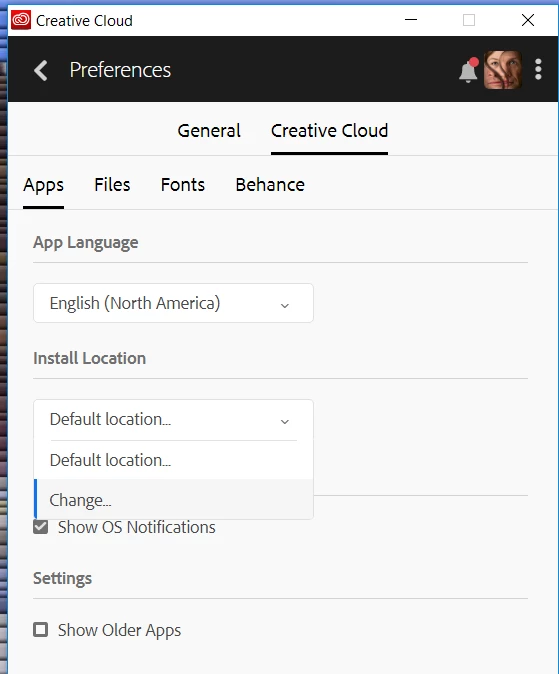
Rather than moving the folders, have you tried installing the programs on the external SSD? That might set things right with the registry, or whatever internal reference is needed.

2 replies

Known Participant
July 22, 2018

Ah. Yes. Thank you again.

The whole process turned out to be easy once I knew where the set the correct path, but then again things are generally easy if you know how to do it.

Chuck Uebele
Community Expert
Chuck UebeleCommunity ExpertCorrect answer
Community Expert
July 22, 2018

Rather than moving the folders, have you tried installing the programs on the external SSD? That might set things right with the registry, or whatever internal reference is needed.

Known Participant
July 22, 2018

I did not know you could set the install location. The CC installer just installed it where it wanted to, but I can see from your screen shot that perhaps I can change the location.

Thanks for the information. I will sign out, uninstall and then reinstall and see if that works.