
AkaMedia
Known Participant
February 18, 2025
Question

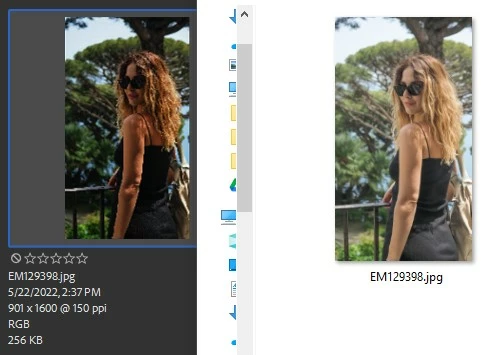
Thumbnails in Bridge do not agree with Win Explorer

  • February 18, 2025
  • 2 replies
  • 183 views

Lately I noticed the thumbnails in Bridge (version 15.0.2.432) do not agree with what I see in Win Explorer as you can see from the attached file. I set the color profile to Monitor in Bridge and when I open the file using another app (Irfanview) the colors agree with Explorer.  Even if I do a Refresh it does not help.  Opening the file in ACR or Photoshop also gives the wrong colors. I tell PS to ignore the Color Profile or convert to Color Space currently in use...

Does anybody know why it's behaving like this ?
2 replies

Community Manager
March 7, 2025

Hi,


Thanks for reaching out. 
Would you be able to provide the sample on which you are observing the issue? This will help reproduce the exact issue that you are seeing.

Please share the asset at sharewithbr@adobe.com.


Thanks,

Bridge Team

AkaMedia
AkaMediaAuthor
Known Participant
March 7, 2025

This problem has been resolved.  It had to do with the Color Space setting in Windows.   It's not a problem of Adobe.  Thank you for reaching out. 

See: https://community.adobe.com/t5/color-management-discussions/color-space-is-wrong/m-p/15166791#M5050

AkaMedia
AkaMediaAuthor
Known Participant
February 19, 2025

An update along this problem.  When I open the file in PS the colors space is set to sRGB IEC31966 the colors are off also.  However if I select Monitor Color in View ...Proofing ....Monitor color,  the colors become correct.  But in Bridge if Color Settings are set for Monitor,  the Thumbnails still show Wrong Color and Tone.   Although for a brief moment they are correct when it opens and but reverts to wrong colors instantly.  I suspect this is a bug.  Can someone verify this?