
Inspiring
December 9, 2024
Answered

tranferring old Bridge preferences on a new Mac

  • December 9, 2024
  • 2 replies
  • 1509 views

I am most concerned dabout retaining labeling on my folders and files in Bridge.  I can see where the preferences are in User>Library>Applifation Support>Adobe>Bridge folder, but I am not sure which one handles this?  Is it possible to replace the ones on my new mac with the old ones to get that labeling back?


I should note, on the old mac all the info including worksspaces is in a folder: Bridge 2025.  On the new mac there is an "Adobe Bridge2025" folder and a "Bridge 2025 Extensions" which does not exist on the old mac. 


Can I just replace the Adobe Bridge 2025 with the Bridge 2025 from my old mac?  Or maybe just the contents?


Any helpful advice would be appreciated. thanks.
This topic has been closed for replies.
Correct answer Stephen Marsh

@Regina 7 


Labels, ratings, keywords and other metadata are stored in supported file formats such as JPG, PSD, TIFF, PNG, WEBP, DNG (except for proprietary raw camera file formats, which use XMP sidecar files) – so these metadata entries travel with the file.


The same is not true for a folder/directory, as it isn't a file.


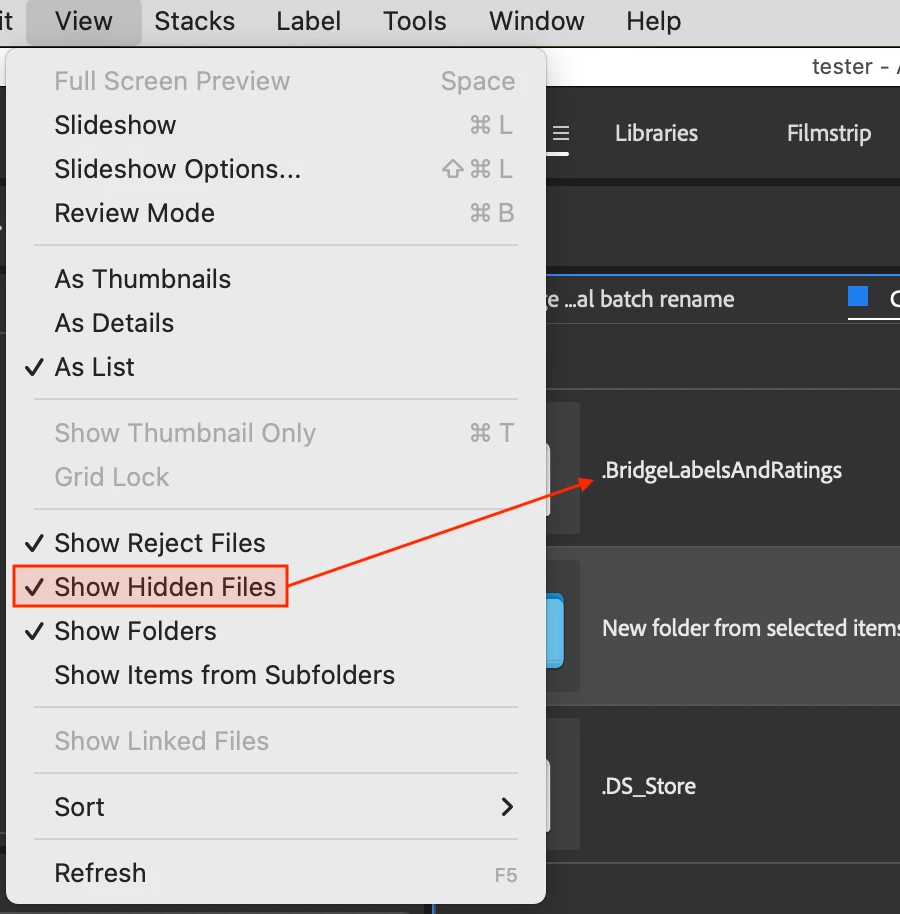
Bridge uses an invisible file/s to store folder related info such as labels and ratings, or custom sort order:


In a quick test, using the Finder to copy the folder copied the invisible file which contains the labels and ratings, as did copying using Bridge.


2 replies

Stephen Marsh
Community Expert
Stephen MarshCommunity ExpertCorrect answer
Community Expert
December 10, 2024

@Regina 7 


Labels, ratings, keywords and other metadata are stored in supported file formats such as JPG, PSD, TIFF, PNG, WEBP, DNG (except for proprietary raw camera file formats, which use XMP sidecar files) – so these metadata entries travel with the file.


The same is not true for a folder/directory, as it isn't a file.


Bridge uses an invisible file/s to store folder related info such as labels and ratings, or custom sort order:


In a quick test, using the Finder to copy the folder copied the invisible file which contains the labels and ratings, as did copying using Bridge.


Regina 7Author
Inspiring
December 12, 2024

Thank you.  I am beginning to understand this.  I think part of the issue was not having my cloud files downloaded on the local drive too.  After I fully downloaded when I switched macs and drives, the folder labels started to appear. Learning as I go. My initial post was working off of the files as seen while still online only and I didn't understand.


I really appreciate the time and attention you all gave to helping me out.  It is appreciated.

gary_sc
Community Expert
Community Expert
December 9, 2024

By far, the easiest way to do this is to use Apple's Migration Assistant Tool. I've been using that since it first appeared, and it does a pretty good job and is far easier and more reliable than trying to remember what to move and where to put it yourself.


As far as Labels and Ratings, those are stored in each file's metadata. So, if you move the file, you'll move the respective labels and ratings with them.


One item of note: IF you shoot raw images and IF you leave them in the native raw format (e.g., CR2 or CR3 for Cannon), the metadata is stored in the .xmp files found in the same folders as the file. So, moving the whole folder around is very important, not just the image file itself. Remember, the metadata not only stores the labels and ratings, but any adjustments you've made in Adobe Camera Raw.


IF you convert your raw images to the DNG format, these, like JPG and TIF files, are container files, and all metadata is stored inside the file.


I hope that helps

Regina 7Author
Inspiring
December 9, 2024

hey,


Thank you for the reply.  My files are mostly AI and PSD files, I don't shoot photographs. 


I was going to use the migration assistant, but I am moving to a new mac provided by my company vs the old one which was mine.  So I was running into a user conflict while trying to migrate info. Not sure if there is a workaround for that and is why I was asking about specific files/preferences.  I hope that makes sense. thanks.

gary_sc
Community Expert
Community Expert
December 9, 2024

Ah!  I see what you mean.  I have my files in Dropbox.  I just made a few offline and while the folders have lost their color labels, the files contained inside still have them.  A bit annoying to lose the folder color label, but the files are defintiely of superior importance.  Thanks for that info. 


Dropbox was behaving differently on this new M4 mac vs my old intel imac.  files could be made offline through Bridge on the Intel, but on this new M4 I have to do it in Finder, then go to Bridge and view the available offline files.  An extra step I wasn't aware of yesterday when I posed my original question and which caused the confusion on my part.  I appreciate your time and consideration.


OK, be aware that Bridge does NOT play well with Cloud files (including DropBox). If you've had success in the past, that was luck and nothing intended by Adobe. Are you using DropBox to share files? That's OK if you only wish to transfer them to others on a permanent basis. But if you're using DropBox as a server, there will be issues, and that is NOT reliable. Please do not tell me that it's been working fine because Bridge was never intended to be used on servers, either. It was designed and made as a single-user, direct connection with hard drives — period. If your company needs a company DAM, they need to find a professional company DAM. DropBox and Bridge will not cut it.


If your Folders lost their color labels, my guess is that you gave them custom names in the Preferences? Custom names are not transferable across a Cloud service.


Sorry for the extra bad news.