eddie michela9900799
Participating Frequently
November 6, 2017
Answered

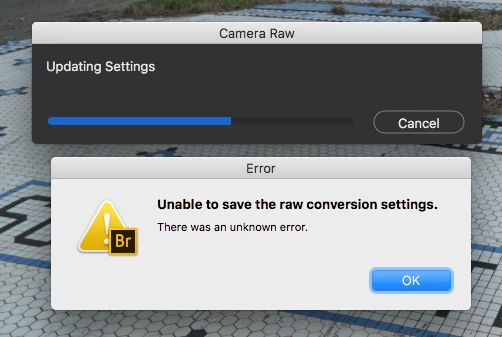
UNABLE TO SAVE THE RAW CONVERSION SETTINGS

  • November 6, 2017
  • 7 replies
  • 10562 views

Hi… I’ve just updated to Bridge 2018 and every time I’ve worked on a photo and I’m done and want to save it this box keeps showing up: UNABLE TO SAVE THE RAW CONVERSION SETTINGS? I've had to reinstall to 2017 to my work done and keep my deadlines. And besides that the 2018 version has soemhow slowed everything down in the programme ... it takes forever to save a photo after its done, and writes UPDATING SETTINGS

This topic has been closed for replies.
Correct answer gary_sc

I have two brandnew macs ... macbook pro and a full optional imac! same problem on both machines. pretty sad abobe does not find any solution!! specialy as we are all payimg quite some money for it!!


Hi rkiaulehn,

I'm truly very sorry you continue to have problems.

Just out of curiosity, have you done ANY of the suggestions that have been offered to you? You may have but have not told us what you've tried (and what you haven't tried) and what the results were.

Forgive me but it's very hard to help you when you've not told us what you've done and insist that Adobe help you solve this problem. How can anyone help you when valid suggestions have been put forth for you to try and you've not told us what the specific results of those tests were.

I'm using the latest software and I'm not having any problems. Most people are not having the problem that you're having and it is very difficult for Adobe (or anyone) to fix what they are not experiencing.

Simply, please help us help you.

7 replies

Participant
March 7, 2019

The photos must be locked. You can see a small locker icon over them.

In Adobe Bridge, with all photos selected, I just right-click over them and select "unlock all items" to be able to go ahead, apply the corrections and save them.

Participant
June 22, 2018

In my case it only appears when im trying to update jpg thumbnail (in Adobe Camera Raw). It saves settings, but not embedded thumbnails and periodically crashes that moment.


I am professional drone photographer and DJI files are 40% smaller after you update thumbnails to medium. When shooting terabytes per year, its very good way to optimize space and expences. But it just doesnt work anymore...

Participating Frequently
August 7, 2018

ADOBE support!! Any news on that problem?? I can't believe there is still no solution on that. i still need to work with bridge 2017 after all this time. tried everything. really disapointing! And both 2017 and 2018 are so incredible slow. so much lost time and money!! and one even has to pay for it! did all what adobe tells you to do... and still not getting any slower. what a drag to work with bridge!! need to find a alternative and change my workflow after almost 20 years!

https://helpx.adobe.com/bridge/kb/troubleshoot-errors-freezes-bridge.html
danielr5342801
Participant
August 16, 2018

Same for me. Hughe problem with Bridge CC 2018 on my brand new macbook Pro (2,9 GHz Intel Core i7, 16GB RAM, 1TB SSD) running Sierra and reading writing both to the internal Apple-SDD (2GB/sec) and my Lacie 6Big TB3 hardrive in Raid5 . It is so slow I just cant not work. Tried all kind of different settings without any success. Cleaning cache och running maintance regular with Clean My mac. I know my way around computers/mac but is stuck on Bridge CC 2018. I also have the "can not save Raw conversation settings). I  work with DNG, TIFF and PSD files. Everything I do in Bridge CC 2018 takes forever!

Participating Frequently
December 26, 2017

I downgraded back tp ps cc2017. everything works fine!!

hope the problem will be solved on ps cc 2018!! anyway... this should not be happening. lost hours and hours of work!

gary_sc
Community Expert
Community Expert
December 26, 2017

Hi rkiaulehn,

Since the vast majority of folks are not having the issues you are having there are two possibilities: either there is something wrong with your instillation OR there is something wrong with your machine.

Of the former there could have been some glitch during instillation of the latter there is something corrupted in you OS over time. Plus, something of the latter could affect something of the former.

The reason why 2017 is working and 2018 is not is because the applications are different and one may be going to sections within the OS that the other one does not. I am speculating here and do not know for sure but I've seen things like this in the past.

I strongly suggest you get either Onyx (free) or (your os)* Cache Cleaner (small charge). Personally I like the Cache Cleaner application, I've had excellent results from that. Either way, run the maintenance operations and see what they do.

I can very much appreciate how this is profoundly frustrating for you and a big time waster overall. But ignoring the problem will not make it go away and it does need to be dealt with eventually.

I do wish you all speed and luck in your actions.

* Yosemite Cache Cleaner, Sierra Cache Cleaner, High Sierra Cache Cleaner, (you get the deal).

joycew3220999
Participant
March 14, 2018

Having the same problem on a Mac with the latest version of Photoshop.

I found a temporary solution by changing the camera raw prefs for embedded jpeg previews to medium size NOT full size. Get the error when saving full size but no error when saving as medium size.

I really would like to save full size so I'm still hoping someone finds a solution.

Stephen Marsh
Community Expert
Community Expert
December 23, 2017

If you are using the Camera Raw Database, try using XMP Sidecar files. If you are using XMP Sidecar files, try using the CRDB.

Camera Raw Preferences:

Participating Frequently
December 23, 2017

thanks a lot for your reply!

my problem is that the CRDB is not working.

using sidecar .xmp is not a option for me. I need to have updated jpg previews to see the actual image in my archive software.

and this is the way I deliver images to my clients.

BUT... why is it not working anymore? I was using CRDB ever since i am shooting digital images (ca. 15 years). everything worked fine on my old early 2008 Mac with ps cc 2017.

any chance to download to previous working version??

thanks a lot for your help in advance!!

gary_sc
Community Expert
Community Expert
December 26, 2017

Hi Eddie,

Very sorry for all of the suggestions on can you save the files to your HD but that's only being suggested to try to pin down the problem/issue.

One question and one suggestion: Are your files the original raw files or have you converted them to DNG? It shouldn't make a difference but I'm asking. I always save out to an external drive and have not had any issues or problems but I always convert my images to DNGs so if you do not, than I cannot compare. But again, this shouldn't make a difference.

One thing that can happen is if the Preference settings for a specific folder on the external system got flipped. It's happened to me.

Before you do the following, see if you can save a raw file settings to an earlier location in the external drive. For example, if your folder system is:

A

    B

        C

and you have been trying to save files in the C folder, try the B and then the A folder. If one of these works, go to the offending folder, select it, and do a Command-i (for info). This will bring up a long new window on the left side of the screen. Take a look at the bottom where it shows Sharing & Permissions. It should look like the following:

but your name should be where mine is.

If it doesn't show the same Privilege, than click on the lock, provide your system password and change the Privilege as shown.

If you have folders within that folder, than click on the gear icon and select "Apply to enclosed items..."

BIG WARNING: Never ever do that to a system folder or to your user folder on your computer. If you do you may need to reinstall your system (It'l work until you need to restart. Trust me, I did this early early on with Mac OS X and it was a nightmare day). This is perfectly safe however on folders that just contain files.

Let us now if this works

Participating Frequently
December 21, 2017

i have the same problem. brand new mac book pro + ps cc2018. doesn't work on both. external and internal drive! as a professional photographer this is a huge issue for me and slows down my work extremely! any solution??

Deepak_Gupta1
Community Manager
Community Manager
November 8, 2017

Hi eddi,

Can you confirm if you are using the latest version of CameraRaw? Do you see an update for CameraRaw in your Adobe CreativeCloud application?

What is the version of CameraRaw on your computer? Please suggest.

Thanks,

Deepak Gupta

eddie michela9900799
Participating Frequently
November 8, 2017

Hi Deepak,

Yes according to my Adobe CreativeCloud application I have the latest updated version of Camera Raw ... as you can see on this screendump.

Kind regards,

Eddie

Sahil.Chawla
Adobe Employee
Adobe Employee
November 6, 2017

Hi Eddie,

Could you please let us know where are you trying to save the images? As it looks like the issue might be related to permissions.

Regards,

Sahil

eddie michela9900799
Participating Frequently
November 6, 2017

Hi Sahil,

It occurs every time after I've pressed DONE (in the low right corner of the programme) to save the changes I've made to my RAW file. By the I'm a Mac user.

Many regards,

Eddie

Sahil.Chawla
Adobe Employee
Adobe Employee
November 6, 2017

Are you trying to save the image on your computer or on an external drive?