ABNB
Participant
November 1, 2021
Question

Unable to see Google Drive in Bridge anymore

  • November 1, 2021
  • 5 replies
  • 8525 views

Suddenly Bridge has stopped showing Google Drive (virtual drive) in the Folders panel. I can see its alias under Users (in the Content panel), but it's not clickable. It doesn't work in the Favourite panel either. Everything was working fine until two days ago, though. 


Systems:

  • MacBook Pro 15-inch, 2019
  • MacOS Catalina 10.15.7
  • Adobe Bridge v 11.1.1.185
  • Tried Adobe Bridge v 12 but it didn't work either


Google Drive:

  • They're all stream files, not mirror files (= all files are in the cloud, and nothing is on my Mac).


Mac:

  • Security & Privacy > Full Disc Access > Adobe Bridge "ticked"
  • Security & Privacy > Files and Folders > Adobe Bridge "Full Disc Access"


Bridge (Folders panel on the left): 

  • It used to show Google Drive on top of everything, just like an external HD or a business server. 
  • I might have updated it to 11.1.1.185 two days ago when I updated other apps, i.e. Illustrator, Photoshop, etc., without thinking, but I'm not 100% sure.
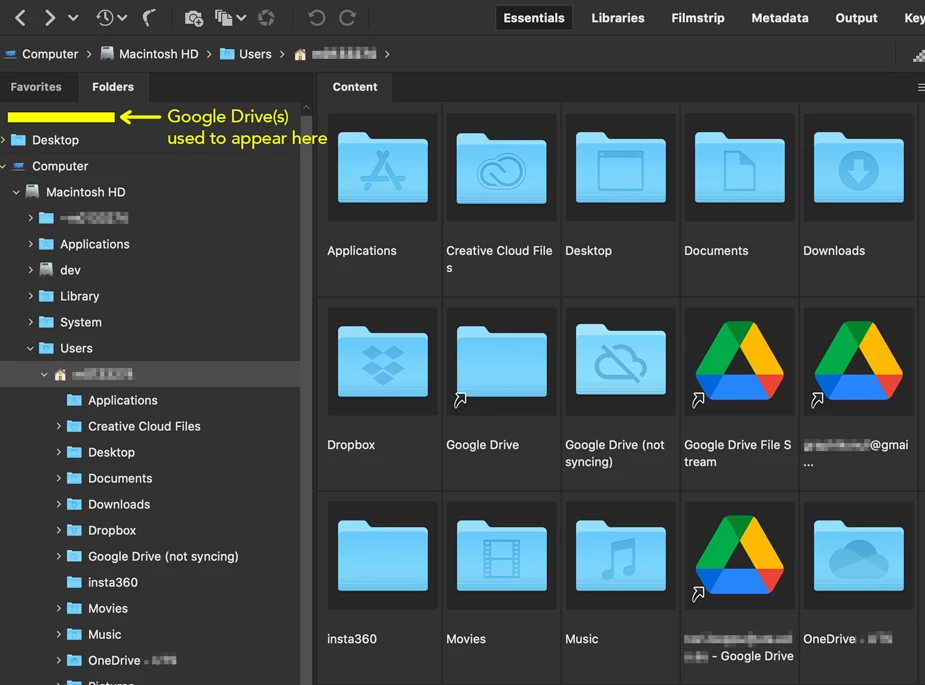
 

Does anyone know how to fix this? Any help would be much appreciated. Thanks.


5 replies

Participant
July 7, 2022

To add it, just open the google drive folder in your finder and drag it to 'favorites' in bridge.

It will add the shortcut.

Participating Frequently
July 7, 2022

This whole thread is about seeing Google Drive folders in Bridge's "folders" panel, not favorites @Geline 

Participant
May 5, 2022

I made an Alias of Google Drive on my Desktop.

Navigated to Desktop in Bridge.

The Alias shows up in Bridge.

From there I moved all my important working folders in Drive to my Favorites in Bridge.

Works fine so far.

Participant
September 14, 2022

I did this and it worked for me. Thank you so much for posting this, I was getting frustrated 🙂

Participant
December 20, 2021

Same thing happened to me after a recent upgrade, but I was able to fix it by going to the View menu inside Bridge and ticking "Show Hidden Files"! Suddenly Google Drive was back in my sidebar and fully browsable and workable like always. 🙂

Participant
April 1, 2022

I was able to see my own google drive files that I own and the ones that were "shared with me" after clicking on "Show Hidden Files".  However, I could not actually open any google drive folder that was "shared with me."  I fixed that clicking on Google Drive in Bridge's Favorites folder, then the .shortcut folder, then navigating through those folders to find the one I wanted access to.  Once I found it, I dragged it over to the Favorites panel for easy access later.  So far so good.

My goal is to give 20 students and a teacher access to a shared google drive folder called "Yearbook" through Adobe Bridge.  We want to build a collaborative yearbook and school magazine in InDesign where all students have shared access to the files, photos, and pages of the yearbook.  Hoping this is the answer!

jbm007
Community Expert
Community Expert
April 3, 2022

I hope it works for you.

Its a unsupported hack that will go bye bye after Bridge does an app update.

Hope not. Keep us posted.


Participating Frequently
November 7, 2021

Same problem here. It's as if Bridge doesn't recognize Google Drive as a network drive anymore. I can open an image from google drive in bridge, then I can see google drive in the file path, but it's still not listed under "computer" in the folder list below (see image). So frustrating. Any ideas would be greatly appreciated. Thanks, -oo


Participating Frequently
November 7, 2021

Also, given that the Google Drive icon doesn't match any of the other icons in Finder tells me Google Drive is not compatible with MacOS Monterey.


Legend
November 1, 2021

You cannot use Google Drive reliably with Bridge. Period. Bridge does not understand cloud services or support them. Your files MUST be local to work.

Participating Frequently
January 16, 2022

this is not entirely correct.


1. if folders are synced in GDrive, they *are* local

2. while Bridge's folder browser doesn't find Google Drive folders, Bridge "favorites" from before the recent chnage *still work* and can browse into GDrive folders. 


My cynical nature says this is not a priority for Adobe since they'd prefer to force you to use thei cloud $ervice.

Participating Frequently
January 16, 2022

Also, to add un-browseable folders as favorites, just drag them into Bridge's Favorites panel from the Finder. Problem not-solved-but-workable.