
Participant
November 20, 2017
Answered

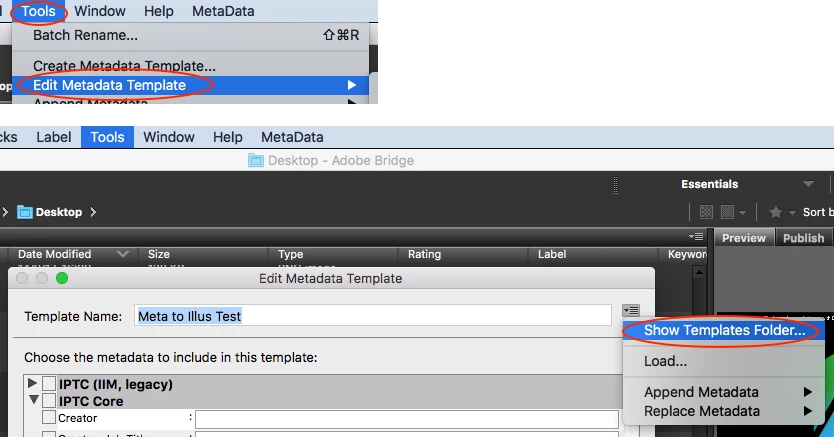
Where are Adobe Bridge metadata templates stored on a mac

  • November 20, 2017
  • 1 reply
  • 4420 views

I am using two Mac computers. I'd like to bring all my metadata templates to the new laptop from the desktop computer to use in Bridge when I'm on the road. I just installed Bridge CC 2018 on the laptop and I don't want to re-create all my templates. I'd appreciate any help.
    This topic has been closed for replies.
    Correct answer Stephen Marsh

    Should be similar to:

    /Users/username/Library/Application Support/Adobe/XMP/Metadata Templates

    1 reply

    Stephen Marsh
    Community Expert
    Stephen MarshCommunity ExpertCorrect answer
    Community Expert
    November 23, 2017

    Should be similar to:

    /Users/username/Library/Application Support/Adobe/XMP/Metadata Templates

    Participant
    February 20, 2024

    I had the darndest time finding the "Library" folder in the user folder until I understood it is was a "hidden" file.


    To reveal hidden files

    Use Finder

    Click the Finder icon in your dock to open Finder.
    Navigate to the folder where you want to find hidden files.
    Press Command + Shift + . (the period key). This will show hidden files in the folder.
    To hide the files again, press Command + Shift + . again.

    gary_sc
    Community Expert
    Community Expert
    February 20, 2024

    Let me add a bit more to that answer, @Craig35545838ilky 

    The option to show the Library folder only appears if you are at the home folder.

    So:

    press Command-Shift-H to open your home folder; go to View->Show View Options (or press Command-J); check the box to show Library folder.


    However, if you want to always easily find it, once seen, just drag it to the left column along with Applications, Desktop, Downloads, etc. I find no reason to hide something that I often need.