pixxxelschubser
Community Expert
Community Expert
March 16, 2017
Answered

Where are these files can be found?

  • March 16, 2017
  • 2 replies
  • 1370 views

From javascript_tools_guide.pdf (page 179 BridgeTalk)

" …

and the example code provided with the Adobe ExtendScript SDK.

Example code

The sample code distributed with the Adobe ExtendScript SDK includes these code examples that specifically demonstrate the use of interapplication messaging:

Interapplication messaging

MessagingBetweenApps.jsx

MessageSendingToInDesign.jsx

Shows how to send a message to a Creative Suite application and receive a response.

SendArrayToPhotoshop.jsx

Sends message to Photoshop that creates an array in the target and passes it back to the sender.

SendObjectToPhotoshop.jsx

Sends message to Photoshop that creates a JavaScript object in the target and passes it back to the sender.

SendDOMObjectToPhotoshop.jsx

Sends message to Photoshop that creates a Photoshop object in the target and passes values from it back to the sender.

SaveAsDifferentFileType.jsx

Locates an image file, uses messaging to load it into Photoshop and save it as a different file type …"

Sorry my english is not good enough to find the (red marked) jsx files. Who can help me please?
This topic has been closed for replies.
Correct answer Kasyan Servetsky

I doesn't still found these files yet.

You didn't look for them hard enough. Go to this page and at the very bottom you'll find the links: both for Windows and Mac.

Agree and download Bridge CS6 SDK for Windows (ZIP, 4.9 MB)

Agree and download Bridge CS6 SDK for Macintosh (DMG, 5.3 MB)

Anyway, here's a working code to illustrate you how to return the result and error from BridgeTalk message. (Based on the code you posted). I used the latest Illustrator and Photoshop.

#target illustrator

var width = "800px";

var height = "1000px";

var resolution = "72";

var docName = "Temp";

CreateBridgeTalkMessage(width, height, resolution, docName);   

function CreateBridgeTalkMessage(width, height, resolution, docName) {

    var bt = new BridgeTalk();

    bt.target = "photoshop";

    var script = "DoSomethingInPS = " + DoSomethingInPS.toSource() + "\r";

    script += "DoSomethingInPS('" + width + "', '" + height + "', '" + resolution + "', '" + docName + "');";

    bt.body = script;


    bt.onResult = function(resObj) {

        DoSomethingInIlly(resObj.body);

        alert("Hi! This is the result returned by BridgeTalk - " +  resObj.body);

    }

    bt.onError = function(msg) {

        alert("Oops! Error: " + msg.body);

    }

    bt.send(100);

}

function DoSomethingInPS(width, height, resolution, docName) {

    app.displayDialogs = DialogModes.NO;

    app.documents.add(width, height, resolution, docName);

    app.preferences.rulerUnits = Units.PIXELS;

    var h = activeDocument.height;

    var w = activeDocument.width;

    var arr = [w, h, w*h];

    app.displayDialogs = DialogModes.ALL;

    $.writeln("Hey! This message is from Photoshop: w = " + arr[0] + ", h = " + arr[1] +", w*h = " + arr[2]);

    return arr;

}

function DoSomethingInIlly(btResult) {

    var reconstructedArray = btResult.split(",");

    $.writeln("Reconsrtucted the array sent from PF in the DoSomethingInIlly function");

}

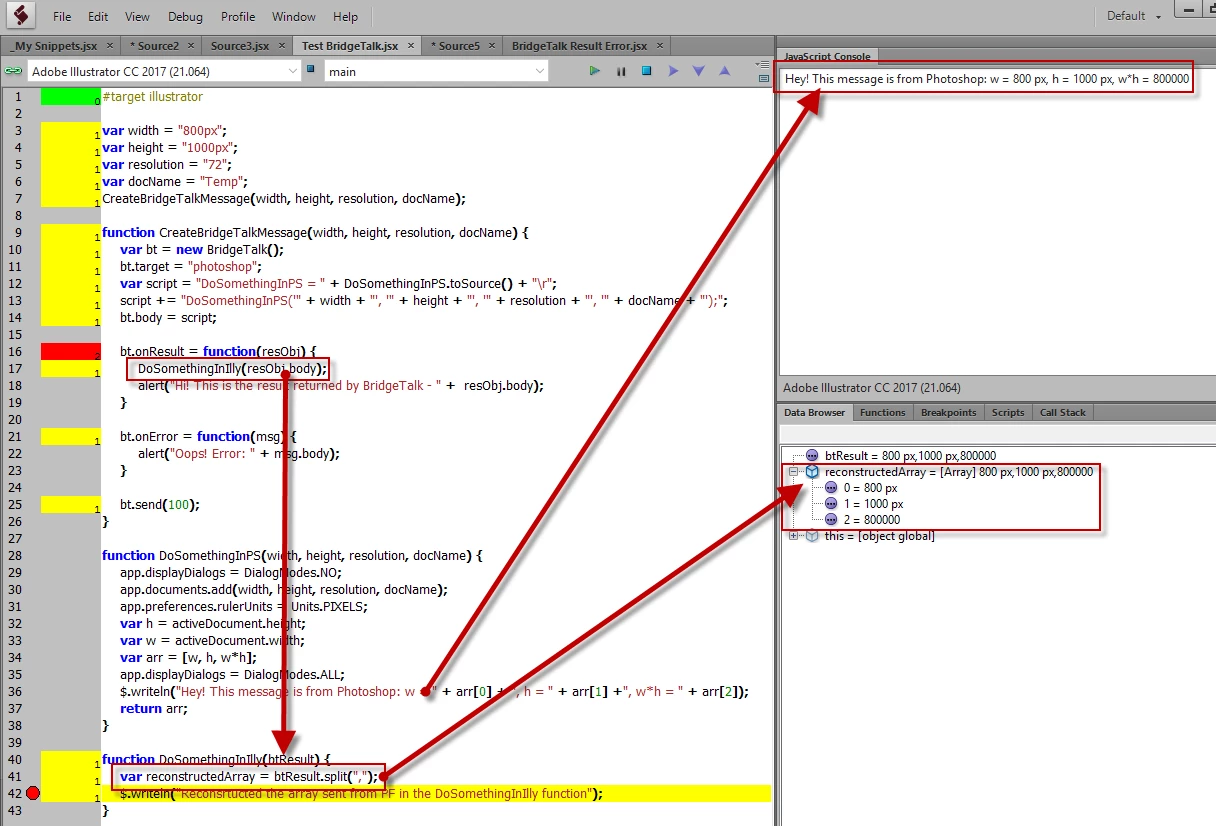
At the end, the script reconstructs the array sent from Photoshop:

Note line #13 -- you should be very careful with quotes here. I usually use combination of single and double quotes.

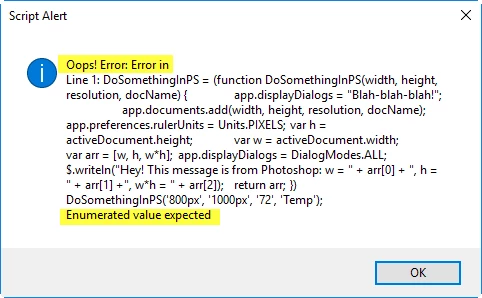
Now let's create an error condition:

BridgeTalk returns quite an informative message:

Regards,

Kas

2 replies

Community Expert
December 2, 2020

Hi together,

came accross this old thread from 2017 today.

pixxxelschubser's issue is solved.


However, just to leave a note here.

The asked scripts are installed with every ESTK version.


From my German Windows 10 machine where Adobe ExtendScript Toolkit CC is installed.

The scripts can be found easily:

Applications (x86) > Adobe > Adobe ExtendScript Toolkit CC > SDK > Samples > javascript


Regards,
Uwe Laubender

( ACP )

Kasyan Servetsky
Legend
March 18, 2017

They are there, but the file names are a little different.

See the documentation in SDK: bridge_cs6_sdk_win_001\sdksamples\javascript\docs\index-all.html

For example, SendArrayToPhotoshop.jsx in fact, is  SnpSendArray.jsx

However, their examples, (though they're well tested and always work) are a little bit confusing: you can make it much simpler. I recommend you to search for BridgeTalk on the InDesign scripting forum.  I posted a few examples here on my site.

Also, when I studied BridgeTalk (long ago in the times of CS3) I found that the sample code in the JavaScript Tools Guide CS3.pdf had a lot of mistakes and didn't work. (Don't know how the things are going in the latest edition.)

— Kas

pixxxelschubser
Community Expert
Community Expert
March 19, 2017

Hi Kasyan Servetsky​,

thanks a lot for your answer. It was helpful, but not really helpful in detail. I doesn't still found these files yet.

And I found and have read your linked thread a few days ago. Useful, but unfortunately only at half.

I can call BridgeTalk and it does what it should be. But at the end I need the results in the first target engine.

Let me go into deep with an example.

The reason is: Illustrator is not good for measurements of the real area of pathItems or compoundPaths or groups of items. That's why I need a workaround.

  • select somthing in Illu
  • go to PS and open a exported file or insert the selection in a new created PS document
  • check the pixels which not have transparency and do some maths
  • give this informations back to Illu, e.g. as contents in a new textFrame (THIS PART doesn't works for me)

I do:

I select (by hand) an item or agroup of items (works)

I start my script in Illustrator from a palette or script menu. (works)

I call PS with BridgeTalk and work with the exported file or the clipboard information. (works)

I collect the informations that I want, and do same maths in PS. (works)

I can show the collected informations as an alert or as en editable edittext in a window. (works)

But it is not possible for me to give the collected informations back to illustrator and do the next steps in illustrator with these new informations.

Here is a very very simple example code. In this case I want to work with the variable w and h (from PS) in Illu after BridgeTalk is completed.

#target illustrator

_gotoPS();

// In know about asynchronous behavior in BridgeTalk

// this alert pop up too early, but it's only for showing the behavior

alert("How I can get variable w and h (values of arr[]) and use here in Illu?");

// do somthing in Illu with the variables from PS

// eg new TextFrames.add() with contents w and h

function _gotoPS(){

    // do something

    alert ("in Illustrator")

    // do something

var bt = new BridgeTalk();

    bt.target = "photoshop";

    // do something

    // be sure this is only a very simple example

    bt.body = 'app.documents.add("800px" ,"1000px", 72, "Temp");app.preferences.rulerUnits = Units.PIXELS;'+

    'var w = activeDocument.width;'+

    'var h = activeDocument.height;'+

    'var arr = [];'+

    'arr.push(w); arr.push(h); arr.push(w*h);'+

    'alert(arr[0]);'+

    'alert(arr[1]);'+

    'alert(arr[2]);'

    bt.onError = function(e){

        alert(e.body);

    };

    // because bt.onResult is not useful for me

    // because bt.onResult will also hold the variables here and I need them in Illu

bt.send();

};

Do you know a way how to do this?

Kasyan Servetsky
Kasyan ServetskyCorrect answer
Legend
March 19, 2017

I doesn't still found these files yet.

You didn't look for them hard enough. Go to this page and at the very bottom you'll find the links: both for Windows and Mac.

Agree and download Bridge CS6 SDK for Windows (ZIP, 4.9 MB)

Agree and download Bridge CS6 SDK for Macintosh (DMG, 5.3 MB)

Anyway, here's a working code to illustrate you how to return the result and error from BridgeTalk message. (Based on the code you posted). I used the latest Illustrator and Photoshop.

#target illustrator

var width = "800px";

var height = "1000px";

var resolution = "72";

var docName = "Temp";

CreateBridgeTalkMessage(width, height, resolution, docName);   

function CreateBridgeTalkMessage(width, height, resolution, docName) {

    var bt = new BridgeTalk();

    bt.target = "photoshop";

    var script = "DoSomethingInPS = " + DoSomethingInPS.toSource() + "\r";

    script += "DoSomethingInPS('" + width + "', '" + height + "', '" + resolution + "', '" + docName + "');";

    bt.body = script;


    bt.onResult = function(resObj) {

        DoSomethingInIlly(resObj.body);

        alert("Hi! This is the result returned by BridgeTalk - " +  resObj.body);

    }

    bt.onError = function(msg) {

        alert("Oops! Error: " + msg.body);

    }

    bt.send(100);

}

function DoSomethingInPS(width, height, resolution, docName) {

    app.displayDialogs = DialogModes.NO;

    app.documents.add(width, height, resolution, docName);

    app.preferences.rulerUnits = Units.PIXELS;

    var h = activeDocument.height;

    var w = activeDocument.width;

    var arr = [w, h, w*h];

    app.displayDialogs = DialogModes.ALL;

    $.writeln("Hey! This message is from Photoshop: w = " + arr[0] + ", h = " + arr[1] +", w*h = " + arr[2]);

    return arr;

}

function DoSomethingInIlly(btResult) {

    var reconstructedArray = btResult.split(",");

    $.writeln("Reconsrtucted the array sent from PF in the DoSomethingInIlly function");

}

At the end, the script reconstructs the array sent from Photoshop:

Note line #13 -- you should be very careful with quotes here. I usually use combination of single and double quotes.

Now let's create an error condition:

BridgeTalk returns quite an informative message:

Regards,

Kas