Participant
April 13, 2024
Answered

Where is Photomerge in Bridge 2024?

  • April 13, 2024
  • 1 reply
  • 1395 views

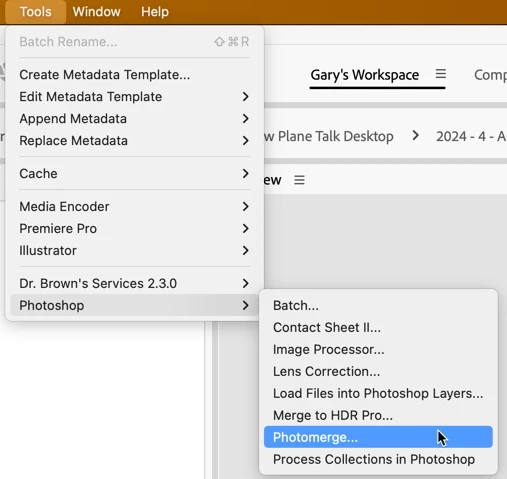
Maybe I missed this in a recent update but where did Photomerge relocate in Bridge?  It used to be under Tools > Photoshop > Photomerge.


I'm on version 16.2.0.1763. 

This topic has been closed for replies.
Correct answer gary_sc

OK, it's still there, 

 But I have a question: you are on version 16.2.0.1763 of what? Bridge is now in version 14, not 16 (and Photoshop is in version 25). 


Assuming you misread the version, here's how to get things back to normal. If any of these Tools are not under the Tools menu, it's missing because of either:


  1. Your copy of Bridge does not match your copy of Photoshop. That is, if you are using Bridge 2022 and Photoshop 2023 when Photoshop is installed, Photoshop looks at the copy of Bridge, and if the two do not match, Photoshop will not install the scripts.
  2.  If Photoshop is installed before Bridge, it cannot know that Bridge "may" be installed in the future, so it does not install any of the scripts into Bridge.


To resolve this, be sure you are using paired copies of Bridge and Photoshop, and when installing, be sure to install Bridge BEFORE installing Photoshop. If you've already installed both applications, you'll probably have to uninstall both and then reinstall them in the proper order. Let me add that whenever I update PS, besides quitting PS, I also quit Bridge (this resolves any issue around item #1 above).


Let me know if this works.


1 reply

gary_sc
Community Expert
gary_scCommunity ExpertCorrect answer
Community Expert
April 13, 2024

OK, it's still there, 

 But I have a question: you are on version 16.2.0.1763 of what? Bridge is now in version 14, not 16 (and Photoshop is in version 25). 


Assuming you misread the version, here's how to get things back to normal. If any of these Tools are not under the Tools menu, it's missing because of either:


  1. Your copy of Bridge does not match your copy of Photoshop. That is, if you are using Bridge 2022 and Photoshop 2023 when Photoshop is installed, Photoshop looks at the copy of Bridge, and if the two do not match, Photoshop will not install the scripts.
  2.  If Photoshop is installed before Bridge, it cannot know that Bridge "may" be installed in the future, so it does not install any of the scripts into Bridge.


To resolve this, be sure you are using paired copies of Bridge and Photoshop, and when installing, be sure to install Bridge BEFORE installing Photoshop. If you've already installed both applications, you'll probably have to uninstall both and then reinstall them in the proper order. Let me add that whenever I update PS, besides quitting PS, I also quit Bridge (this resolves any issue around item #1 above).


Let me know if this works.


Known Participant
April 30, 2024

Hi Gary,


First off, thanks for all your helpful advice in these forums regarding PS issues. Much appreciated.


I have all current versions of PS and Bridge. With 2023 versions of Bridge I could simply select the images, then Tools > Photoshop > Photomerge, which would then automatically open the Photomerge window in PS.  That doesn't exist in the recent versions. The only method I've found is to access Photomerge from PS, which is not nearly as convenient. 


I often wonder what goes through the minds of Adobe programmers, what their agenda is in constantly making seemingly unnecessary changes that are not as user friendly. "Why not leave well enough alone?" I ask.


Here's some screen grabs showing Bridge 2023 and Bridge 2024.

Thanks again. 

gary_sc
Community Expert
Community Expert
April 30, 2024

Hi, @ML2travel, please read my comment above that was marked as "Correct Answer."


Now, to get your Photoshop back into the Tools menu:

  1.  Uninstall both Photoshop and Bridge.
  2.  Reinstall Bridge
  3.  Reinstall Photoshop.


That should do it. 


Again, the reason for this is that the item you want, Photomerge, is a script within PS. If PS is installed before Bridge, there is no Bridge for PS to install the script into. By installing Bridge first, PS has a location to place the scripts.


On a related but different note, I am not a big fan of Photomerge. I am not going to go into any details here beyond I just do not like the look it gives images. However, when the Adobe crew came up with "Merge to HDR" in their Adobe Camera Raw processors, it opened up a whole new world on this for me. If you're doing HDR, it opened up a whole new world for me. If you're not doing HDR, this might still be worth a look.


When I use the "Photomerge" option, I get this:

When I used the Merge to HDR, I get this:

To do this, take your HDR proto-images and open them all up in Adobe Camera Raw. Then select all of your images and right-click on the ellipses

When this window opens up, select your options (seen in the upper right corner):

The only one that may or may not be needed is the Deghost option. If there are any moving objects (people, leaves, pets, etc.) they will appear pretty bad if you do not have some option selected here from the dropdown. I've found that "Medium" is generally very good. Rarely does one find a scene where no leaves are moving so I find that something is good here, and more rarely do I find that I need anything more than "Medium."


If you have any questions, just ask.