
Participating Frequently
October 22, 2020
Question

adobe bridge 2021 mac version causes very heavy GPU load on activity monitor

  • October 22, 2020
  • 4 replies
  • 5080 views

hello,


newly installed (as of yesterday) adobe bridge 2021 mac version causes very heavy GPU load on activity monitor in macos catalina (up to 2.000 %)
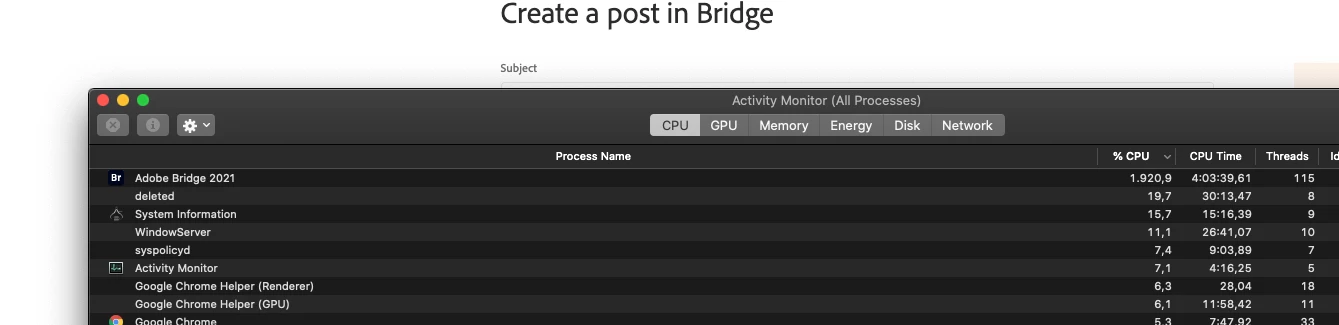


can you please help to fix this bothersome issue which makes fans works like crazy and make unbearable noise, which is very unusual for macs.


the sound and CPU usage stop as soon  as i quit, and start as soon as i open bridge.


very disturbing, PLEASE HELP!!!


thanks, murat.

This topic has been closed for replies.

4 replies

Adobe Employee
December 18, 2020

Hi,

Thanks for your feedback, we are able to reproduce the high CPU usage behavior.
Team is investigating the issue.

Thanks,
Bridge Team

Participating Frequently
December 18, 2020
Conrad_C
Community Expert
Community Expert
November 9, 2020

I’m not sure if this is a fix, but here is something to try:


It is possible that the high CPU/GPU usage is because Bridge might be set to pre-build previews for files in folders you browse with Bridge, especially if they are folders with large number of raw files. If a folder, collection, or search result has 200 files, Bridge will start rendering 200 previews. If this is the cause, you might be able to cut CPU/GPU usage by setting Bridge to use embedded previews instead of making its own, and to defer preview generation until you select a file.


Click the Thumbnail Quality/Preview Generation icon in the path bar and check these settings:

The settings below should use the least CPU/GPU by displaying embedded previews if available, so Bridge does not have to render its own.


This settings below might be the default, and if they are on for you, Bridge starts getting busy rendering high quality previews for files every time you change which folder/collection is selected, unless rendered previews already exist.


Although the settings in the first picture use less computer power, there is a tradeoff: When you select a file, it will take longer for the Preview panel to show a preview with up-to-date edit settings, because Bridge was prevented from generating previews in advance.


After previews are generated, they are cached so that in theory it doesn’t have to spend CPU/GPU re-rendering previews when you come back to a folder. You can manage them using the Cache preferences and the commands on the Tools > Cache submenu. If you use those tools to purge the cache for a folder, the next time you select that folder Bridge is going to have to go back and re-render any previews in it that you need, consuming CPU/GPU again. The more free space your storage has, the bigger you can set the cache size, so fewer previews get purged and re-rendered, using less CPU/GPU.


If this seems to happen with a new version, upgrading might make Bridge reset its caches, but I’m not sure. If that’s what it is, then all you need is patience, because after Bridge renders and caches previews for a folder it shoudn’t have to do them again for a while. After that point, Bridge should only need to hike up CPU/GPU usage when you select a folder with files you have not viewed before, or if many files in it were edited recently, or if its cache got purged.

jbm007
Community Expert
Community Expert
November 9, 2020

I have tested many of the things you have noted here and you are correct.

The biggest memory change is going from embedded to high quality previews.


The computer hogger is "monitor size previews" and always generate previews.

jbm007
Community Expert
Community Expert
November 9, 2020

Bridge still has major memory management problems. 

The memory usage continues to increase and at some point you need to close it and restart it.


Participant
November 6, 2020

Having the same trouble, since the Adobe Bridge 2021 update when i go though folders in Adobe bridge it maxes out my CPU usage on a Macbook pro 16" 2019 with 8core i9. completely nuts!

Participating Frequently
November 7, 2020

and adobe never answers / finds solutions, very annoying and frustrating...

CanalogSE
Known Participant
October 23, 2020

After editing one image in both Camera Raw and Photoshop (both also latest 2021 updates done) I tried to exit the software Bridge - it has been the easiest way to exit Photoshop first, and then Bridge....it really took time now, and in order to refraining to wait, I clicked again and the "Tvångsavsluta" (Swedish language equivalent for a forced shut-down) and finally the error report menues occurred.


I thought that this problem was fixed with the newest version of Bridge - with the previous Bridge software version this occurred frequently.


Am I doing something wrong when this happens???


My image editing procedure progression is: 1) In Adobe Bride, I double click on the requred Canon Cr2 raw file, to start editing 2) The image is opened in CameraRaw, and I do som adjustments there...then I click on "open" button. 3) The image is then opened in Photoshop for final adjustments and final save (as a TIFF file) on my hard drive. 4) Ending the session, I exit Photoshop first...by right-click on the Ps icon below in the dock at the screen lowest part. 5) then I try to exit Bridge the same way - which does not work. Another right click on the Bridge dock-icon below, triggers at small pop-up menue that has a few alternatives (4?) for which I select "forced exit"...


Ok-  then the error (crash?) message occurs, and the crash report option is then available. and 

previous moths with the earlier Bridge software this type of crash was a result of something the matter with with deleting/emtying of some cache files/folders... Which was the recommendation to do, given during communication (a chat) with the Adobe software support technicians...


The whole issue is not terribly problematic for me (yet) but rather annoying.   Please advise!