Participant
November 27, 2019
解決済み

Adobe Bridge/ ACR for editing jpg

  • November 27, 2019
  • 返信数 1.
  • 791 ビュー

Hi Community!

I am editing jpg photos in Adobe Bridge, by opening them in ACR (v11.3)

I edit the photo, do my adjustment, then save and save with a new file name.

Then I click "done" and return to bridge.

Now, my original jpg file has all the changes I just made to the file I saved as a new name.

I know the raw file isn't altered, but I've started with a jpg file.

I can't see anywhere on the orignial jpg file how to "undo" change I did in ACR to go back to the original jpg. 

How do I keep the original jpg unaltered?

Thanks much!

 

このトピックへの返信は締め切られました。
解決に役立った回答 gary_sc

Hi Michele,


This is an easy one. Doesn't make a difference if they are JPGs, TIF, or raw images, the process is always the same. 


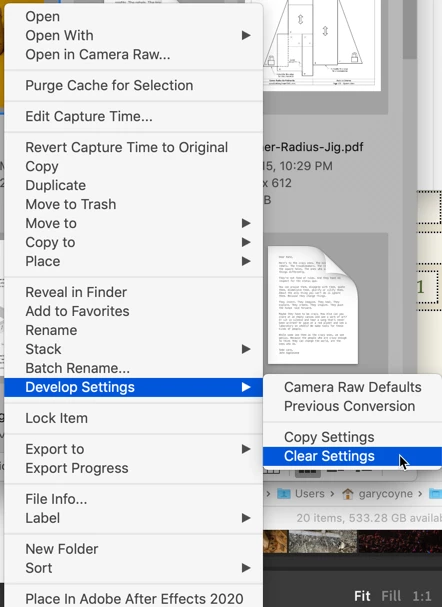
Right-click (or control-click if you have a one-button Mac mouse) and select "Clear Settings." See below. [Also note in the image below it shows Copy Settings. This means that if you have some settings that can be placed on other images you can select this (or Command/Control-c) and then on one and/or many images you can Paste (or Command/Control-v) the same settings.


Please let us know if this is what you were asking for.


返信数 1

gary_sc
Community Expert
gary_scCommunity Expert解決!
Community Expert
November 27, 2019

Hi Michele,


This is an easy one. Doesn't make a difference if they are JPGs, TIF, or raw images, the process is always the same. 


Right-click (or control-click if you have a one-button Mac mouse) and select "Clear Settings." See below. [Also note in the image below it shows Copy Settings. This means that if you have some settings that can be placed on other images you can select this (or Command/Control-c) and then on one and/or many images you can Paste (or Command/Control-v) the same settings.


Please let us know if this is what you were asking for.


michele.j.v作成者
Participant
November 27, 2019

Thank you!!

That is exactly what I was looking for.

I just assumed jpg behaved differently than raw!


Thanks so much for your quick reply.


Michele

gary_sc
Community Expert
Community Expert
November 28, 2019

Great, glad to hear.


With JPGs things can be a bit wanky: if you do things in a JPG file via ACR and then email that to someone who does not have ACR, when they open it, they will only see the image BEFORE correction. 


If you make corrections in a JPG image and plan on sending that to someone, be sure to RE-SAVE it before you send it or your corrections will not be seen by the recipient. 


As long as you are using ACR, I hope you are also taking raw images from your camera and getting the full benefits out of your images.


Glad to help