Zesty_Wonderland154A
Participating Frequently
May 13, 2020
Answered

Adobe Bridge cc2019 Raw editing is greyed out (again)

  • May 13, 2020
  • 1 reply
  • 3063 views

Ok i have this problem, i've got a temporary fix, but that does not really help.


I cant open all the Raw images in Camera raw, its just greyed out. I have files from a Nikon D610 wich is quite old and they should work. It actually works on all other photos, but the new images i shot just don't. i moved them now into another old folder with files i have already edited and there i can open them in camera raw, but WTF. Why???

I have updated everything, (cc2019!!) camera raw seems to be ok...

I’m actually pissed of...

This topic has been closed for replies.
Correct answer gary_sc

OK, 'nother quick question: have you always used a RAID system? Even with your old files?


OK, just saw your edit.


Please check the following on the new folder and compare that to the old folder:


In the Finder select one of the new folder(s) that you're documents/images are contained in and press Command-i (i for information). A new window will pop up on the left side of the screen. On the bottom you will see a region called "Sharing & Permissions:"
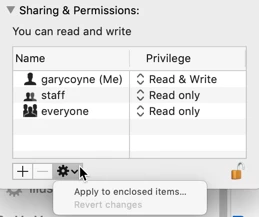


First, do you have Read & Write privileges ? If not, continue.


To do anything here, you need to unlock the padlock on the bottom right. Click it and a window will pop up asking you for your authorization (your Mac password). Once that's done, click on the "Everyone" and on the right change "Read only," to "Read & Write."


Now, if there are folders inside this, go to the dropdown gear below and select "Apply to enclosed items..." and you can save yourself some time.


HOWEVER: be judicious when you do this. This should ONLY be done if there are nothing but documents inside these folders. Never EVER do this if there are applications or preferences or other application-related files. Don't ask me how I know this to be true. Otherwise, I do this all the time as necessary.

1 reply

gary_sc
Community Expert
Community Expert
May 13, 2020

Hi Sobo,


I'm trying to understand your "fix," let me know if I understand it correctly:


First off, are you looking at the images in Bridge or in Adobe Camera Raw?


You have some raw files that if you try to open, you see a gray window. If you move the files into another folder that has the same kind of files but were taken long ago, then you can open the same files that moments ago you could not. Is that correct or not?


Meanwhile, what is your OS and what release?


Hopefully we can make you "un" pissed.


Zesty_Wonderland154A
Participating Frequently
May 13, 2020

Thats exactly what happens.

Yeah being pissed when opening an adobe product is quite normal. I just lost over an hour of work because i did not know that camera raw just resets itself and every single correction when i play with the calibration version, so i’m super pissed... 


I’m on MacOs Mohave and everything on cc2019, latest version.


gary_sc
Community Expert
Community Expert
May 13, 2020

Well I'm trying to help so please do not get pissed at me. ;>)


I have to admit that what you are describing makes no sense (I belive you, so do not worry, I'm just trying to understand it and I can understand why you'd be pissed). 


OK, but let's take this one step at a time. When you talk about the Calibration Version, are you referring to changing the Process Version here?

Let me explain what that is there for any what is happening when you change it.


You said that you have old and newer raw images. Let's say you have some old raw images that were processed in Version 2. At the time, Version 2 was the latest-greatest way that Adobe had to interpret raw images. But that was then, things have gotten better. So they make Version 3, then 4 and now Version 5 is their latest-greatest. However, if they had ACR set so that whenever you opened up an old image it would automatically update all of your images, it changed all of your settings, you'd be REALLY pissed especially if you were a professional photographer who was asked by a client to provide some duplicates of an image. 


So what Adobe did was to maintain access to those older versions so that anyone can always maintain the settings that were last done on any image. If you change the Version #, you will have to readjust the image. That's it, there's no way around that. Different input means differant adjustments to accomodate those changes. 


Now, I'm going to guess that you do not convert your images to DNG format and all of your images have sidecar files, correct? Please let me know because I have a guess for what's happening going on here but need to find out before I venture further. 


Also, can you tell me where the files are being kept. Internal drive, external drive?