

The Little Hak
Participant
November 28, 2018
質問

.cr3 is not support in Adobe Bridge 2019

  • November 28, 2018
  • 返信数 2.
  • 4772 ビュー

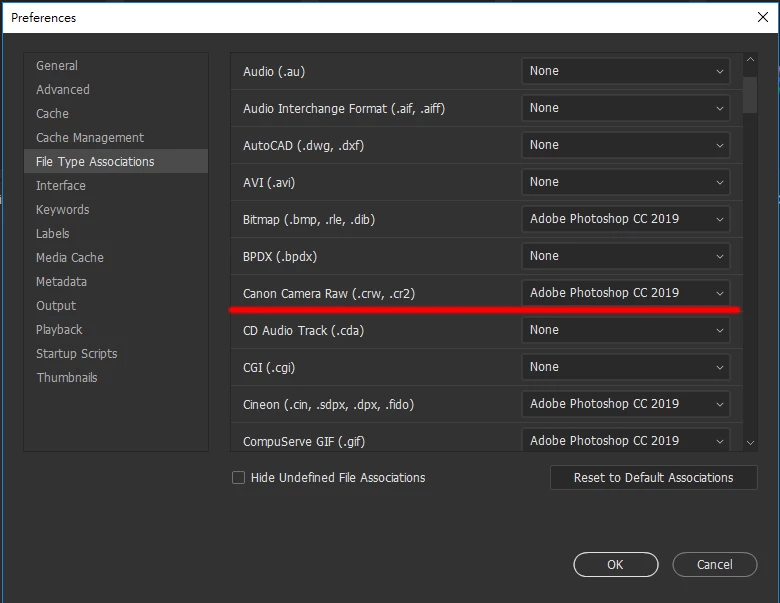
The new Canon Camera Raw format .cr3 is not in the Adobe Bridge file type association

When selecting a batch of .cr3 files, press Enter and Photoshop will not be processed in batches like .cr2


返信数 2

The Little Hak
Participant
April 3, 2019

after half year,the Adobe Bridge still not support EOS R,  EOS RP & EOS M50 Raw files(.CR3)

Legend
April 3, 2019

Camera RAW supports these models and will work in Bridge.

Cameras supported by Camera Raw

The Little Hak
Participant
April 3, 2019

But still not support in Adobe Bridge file type association,

you can't open multiple .cr3 files in a batch

please check my screenshot,  Adobe Bridge file type association's Canon Camera Raw only have (.CRW & .CR2)

not support EOS R,EOS RP,EOS M50 yet ,because Adobe Bridge still not fully support .CR3

Adobe Employee
November 28, 2018

Thank you for sharing this feature request. I have added it to Bridge User Voice Feature Request page Add support for Cr3 files in file type associations – Adobe Bridge Feedback

The Little Hak
Participant
November 28, 2018

Thank you for your follow-up and hope to update it as soon as possible.

Now the Canon EOS R user can't process photos with photoshop's camera raw batch as before with .cr2 (eg.canon 5d iv)

PECourtejoie
Community Expert
Community Expert
November 28, 2018

I suggest to go and vote for that function, and invite other users in specialized forums to pile in and explain how it hurts their workflow.