Participant
December 14, 2016
Answered

Output Module Bridge 2017 - still not working

  • December 14, 2016
  • 4 replies
  • 3020 views

It is impossible to get the Output module to work!
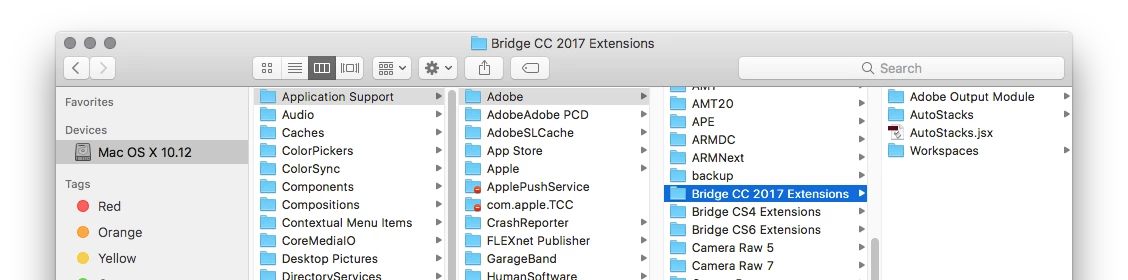
And yes, I have placed it in the correct Library folder. In fact I have tried to place it in any folder that I can find possible. If I place it in the user Library, at least it show up in Bridge, but I cant access it, nothing happens if I click on it.

I have tried several times to uninstall Bridge and also manually removed every possible Preference file.

I use Mac OS 10.10 and a swedish version of Bridge.

A hint can be that when I install Bridge CC 2017 from scratch, I dont get an Extension-folder anywhere. Not in any Library.

Help, Please!
    This topic has been closed for replies.
    Correct answer Jeff Arola

    You downloaded the 2017 version of the output module and are following the directions from this page?

    https://helpx.adobe.com/bridge/kb/install-output-module-bridge-cc.html

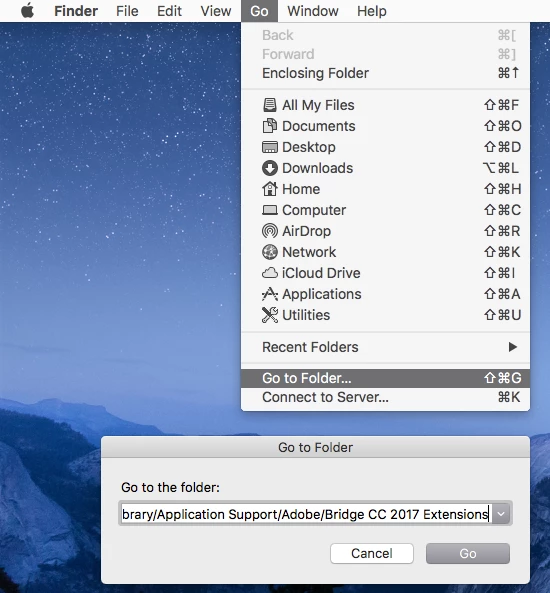
    If you click on your desktop and in the Go>Go to Folder you type or paste

    /Library/Application Support/Adobe/Bridge CC 2017 Extensions

    does that open the correct folder?

    4 replies

    Deepak_Gupta1
    Community Manager
    Community Manager
    October 18, 2017

    Hi All,

    We have released a new version of Adobe Bridge (CC 2018) on 18 Oct 2017. The new version build number is 8.0.0.262. This version is available to install via Adobe Creative Cloud application.

    This Bridge update contains Native PDF Output in application. Please check the Output workspace after installing new version of Bridge CC.

    You may need to update the Creative Cloud application and restart your computer to see the updated installer.

    Thanks,

    Deepak Gupta

    Known Participant
    January 27, 2017

    My output module is there but doesn't work. The weirdest thing is that I don't have the 'extensions' folder. Here's what I have after uninstalling and re-installing (attached). Just a folder called "Adobe Bridge CC 2017". I've tried changing the name to the recommended ones, opening all permissions, etc. with no luck. Any thoughts? Thanks!

    Jeff Arola
    Community Expert
    Community Expert
    January 29, 2017

    You don't have a folder called

    Bridge CC 2017 Extensions

    further down the list?

    If you click on your desktop and in the Go>Go to Folder you type or paste

    /Library/Application Support/Adobe/Bridge CC 2017 Extensions

    does that open the correct folder?

    stearnslh
    Participant
    January 31, 2017

    No one else but me who still have the I/O error when trying to export PDF? See my description in post above.


    i have this problem as well JockeBohlin. i was able to get it to work by limiting the number of images selected for output to PDF. it seemed to be a problem when settings and selections necessitate more than one page. my work around for my last excercise was to do one  PDF page at a time.... sometimes it crashed-- but sometimes it did not....

    Participant
    January 3, 2017

    Hi Again.

    Last time I got it to work somehow, I really dont know how...

    Now I have updated to last version of MacOS and When trying to save PDF from Output Module in Bridge i got the error message:

    I/O error.

    I have tried downloading the latest files via your link and reinstalled all of them in the same folder as before:

    The Output Module seems to work fine until the point I want to export as PDF. Then the I/O error message.

    Any suggestions?

    Jeff Arola
    Community Expert
    Jeff ArolaCommunity ExpertCorrect answer
    Community Expert
    December 15, 2016

    You downloaded the 2017 version of the output module and are following the directions from this page?

    https://helpx.adobe.com/bridge/kb/install-output-module-bridge-cc.html

    If you click on your desktop and in the Go>Go to Folder you type or paste

    /Library/Application Support/Adobe/Bridge CC 2017 Extensions

    does that open the correct folder?