Participant
November 4, 2016
Answered

Output module in Adobe bridge 2017

  • November 4, 2016
  • 4 replies
  • 3668 views

I've downloaded the module folder on the website : How to install Adobe Output Module in Bridge CC 2017

and install into the location that they suggest but still don't have the output panel in Bridge 2017

    This topic has been closed for replies.
    Correct answer GautamBahl

    There is nothing in the Workspaces folder.
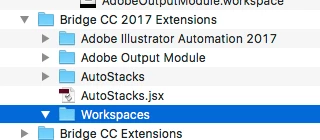

    Hi Dale,

    When you downloaded the Adobe Output module package and extracted the zip file you would have seen an "Adobe Output Module Folder" as well as "AdobeOutputModule.workspace file".

    You need to copy the "AdobeOutputModule.workspace" file in the workspaces folder.

    Regards,

    Gautam

    4 replies

    Deepak_Gupta1
    Community Manager
    Community Manager
    October 18, 2017

    Hi All,

    We have released a new version of Adobe Bridge (CC 2018) on 18 Oct 2017. The new version build number is 8.0.0.262. This version is available to install via Adobe Creative Cloud application.

    This Bridge update contains Native PDF Output in application. Please check the Output workspace after installing new version of Bridge CC.

    You may need to update the Creative Cloud application and restart your computer to see the updated installer.

    Thanks,

    Deepak Gupta

    Known Participant
    November 6, 2016

    I downloaded the AOM file.

    Instructions told me to place the Adobe Output Module folder in my “/Library/Application Support/Adobe/Bridge CC 2017 Extensions (here, Library refers to the System Library, not the User Library on Mac OS X)”.

    There is no Bridge CC 2017 Extensions folder in my Adobe Application Support folder.

    There is no Bridge CC 2015 application for me to fall back on either - it has been deleted from my Applications folder!

    GautamBahl
    Community Manager
    Community Manager
    November 6, 2016

    Hi Erica and Dale,

    It seems like you both are in the hidden library folder rather than the system library folder.

    "Bridge CC 2017 extensions" folder is created in system library and "Bridge CC 2017" folder is created in hidden library.

    Please see the below screenshot which might help you in copying the folders in the right location.

    Regards,

    Gautam

    Known Participant
    November 6, 2016

    OK, thanks!

    I transferred the AOM to the Bridge CC 2017 Extensions folder and relaunched Bridge. It asked me if I wanted to add the Output Module, so I accepted, but I can't find "Output" in the module listing.

    bjerneri
    Participating Frequently
    November 4, 2016

    I'm having the same issue. I click on the "Output" tab in top right corner of window, and nothing happens.

    GautamBahl
    Community Manager
    Community Manager
    November 4, 2016

    Hi Sunisa,

    Can you please share a screenshot of your Bridge CC 2017 extensions located in Mac HD/Library/ApplicationSupport/Adobe.

    Regards,

    Gautam