johnrellis
Legend
February 14, 2017
Question

P: Map > Tracklog > Auto-Tag Photos incorrectly greyed out

  • February 14, 2017
  • 17 replies
  • 6603 views

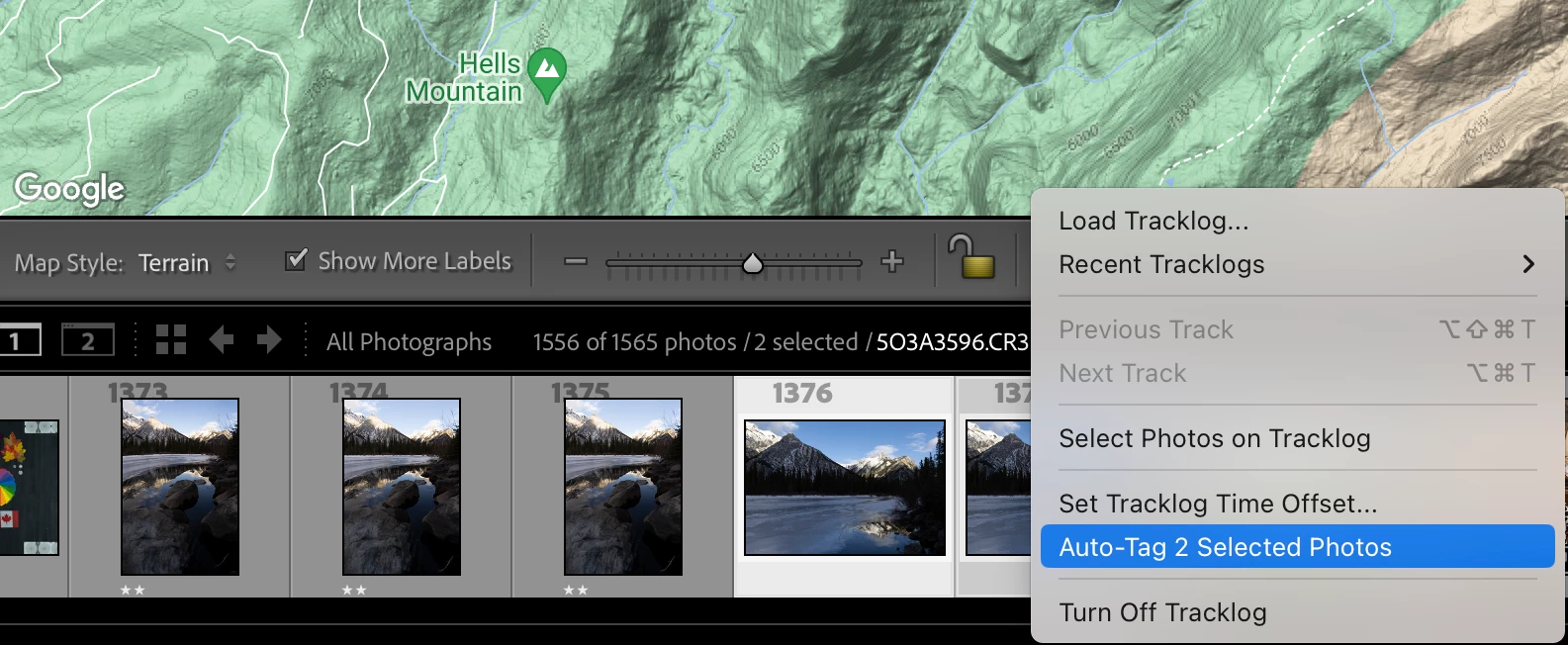
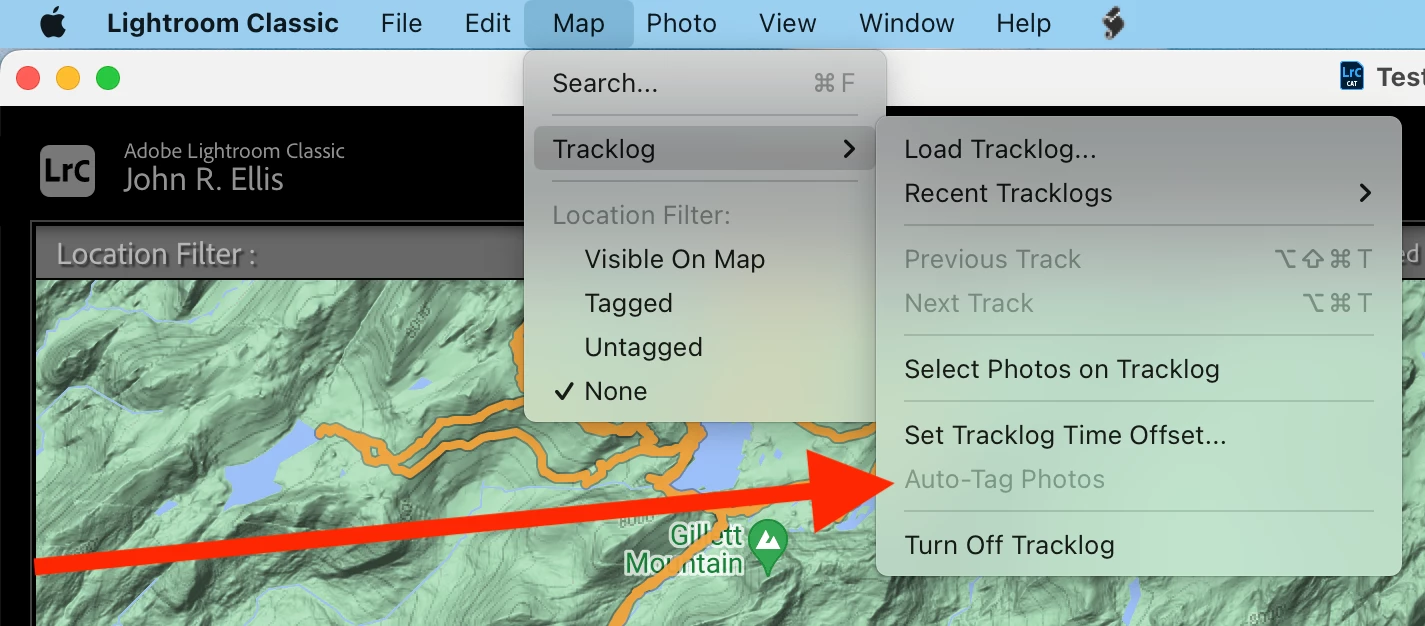
The menu item  Map > Tracklog > Auto-Tag Photos is always greyed out, even though the toolbar's Lightning Bolt > Auto-Tag n Selected Photos is not.  This bug has been present since at least LR 9.1.


To reproduce:


1. In the Map module, load this tracklog:

https://www.dropbox.com/scl/fi/c4mtos3k945v3z8kcamgi/Big-Lake-2023-Tracks.GPX?rlkey=18dxvhr56v0i45ib1amitgylx&dl=0


2. Select one or more photos in the filmstrip.


3. Observe that Map > Tracklog > Auto-Tag Photos is greyed out.


4. Observe that the toolbar's Lightning Bolt > Auto-Tag n Selected Photos is not greyed out.


Tested on LR 12.5 Mac OS 13.5.1 and Windows 11; LR 9.1 Mac OS 13.5.1.


17 replies

Rikk Flohr_Photography
Community Manager
Community Manager
October 9, 2023

Updating status

Rikk Flohr: Adobe Photography Org
Participant
October 25, 2024

@Rikk Flohr: Photography issue of "Auto-tag Photos" is still grayed out after loading GPX.  The lightning bolt method works.  When is Adobe going to fix this bug?  LrC 14.0.1

Known Participant
October 9, 2023

auto-tag images in the Map module does not work after uploading the GPX.  The selection is greyed out, unable to use.

Window 10.  Lightroom has last update 12.5.

johnrellis
Legend
October 9, 2023
Known Participant
October 9, 2023

Thank you Johnrellis,

#3 with the lightning bolt worked!!!

Thanks for the help!

Ralph Hatt

Participating Frequently
November 24, 2020

I use GEOTAG PHOTOS PRO to record my locations as I take photos. After returning home. I download the tracklog and within GPP I connect the GPS coordinates to the photos. When I  open LrC, the GPS data are not visible. But if I open the image in Ps and then save it, the GPS data are visible in the Metadata panel in LR. That’s Problem 1 – why are they not initially visible in LrC?

To address that problem, I’ve been following up by using the Map panel in LrC. I select the images, open the Map panel, select the Map command in the upper left, select/open the tracklog, and then auto-tag the photos. The GPS data are then visible in the Metadata panel. That has worked fine the past few days, but when I tried it today the “auto-tag” command was greyed out, so I couldn’t do it. There’s no problem with the time match. That’s Problem 2. I’d be grateful for insights or solutions for either problem.

GoldingD
Legend
November 25, 2020

Please post your System Information as Lightroom Classic (LrC) reports it. In LrC click on Help, then System Info, then Copy. Paste that information into a reply. Please present all information from first line down to and including Plug-in Info. Info after Plug-in info can be cut as that is just so much dead space to us non-Techs.


Participating Frequently
November 25, 2020

Thanks.


Lightroom Classic version: 10.0 [ 202010011851-ef6045e0 ]
License: Creative Cloud
Language setting: en
Operating system: Windows 10 - Business Edition
Version: 10.0.19041
Application architecture: x64
System architecture: x64
Logical processor count: 12
Processor speed: 3.6 GHz
SqLite Version: 3.30.1
Built-in memory: 32578.6 MB
Real memory available to Lightroom: 32578.6 MB
Real memory used by Lightroom: 965.9 MB (2.9%)
Virtual memory used by Lightroom: 917.4 MB
GDI objects count: 650
USER objects count: 2239
Process handles count: 2401
Memory cache size: 5.8MB
Internal Camera Raw version: 13.0 [ 610 ]
Maximum thread count used by Camera Raw: 5
Camera Raw SIMD optimization: SSE2,AVX,AVX2
Camera Raw virtual memory: 4MB / 16289MB (0%)
Camera Raw real memory: 7MB / 32578MB (0%)
System DPI setting: 144 DPI (high DPI mode)
Desktop composition enabled: Yes
Displays: 1) 3840x2160
Input types: Multitouch: No, Integrated touch: No, Integrated pen: No, External touch: No, External pen: No, Keyboard: No

Graphics Processor Info:
DirectX: NVIDIA GeForce GTX 1080 (27.21.14.5167)


Application folder: C:\Program Files\Adobe\Adobe Lightroom Classic
Library Path: D:\Data\Pictures\LR Catalog\LR Catalog-2-v10.lrcat
Settings Folder: C:\Users\David\AppData\Roaming\Adobe\Lightroom

Installed Plugins:
1) AdobeStock
2) ColorChecker CameraCalibration
3) Facebook
4) Flickr
5) Nikon Tether Plugin
6) Syncomatic


Participant
November 29, 2018

I am having a few problems trying to auto-tag some photos I took in France when my GPS (phone) was on local French time but the camera was set to my home time (we are seven hours ahead of France).

Anyway whilst trying to get this sorted the auto tag menu item has now greyed out and I cannot find a way to reverse this.

Anyone have any suggestions? The fixes for early versions of Lightroom don't seem to apply in Classic CC 8.0 (different menus etc).

Abambo
Community Expert
Community Expert
November 29, 2018
ABAMBO | Hard- and Software Engineer | Photographer
johnrellis
Legend
November 29, 2018

Troubleshooting steps:

1. Double-check you have at least one photo selected in the filmstrip.

2. Double-check you have a tracklog loaded via the menu command Map > Tracklog > Load Tracklog.

3. If you've tried the menu command Map > Tracklog > Auto-Tag Photos, try the "lightning bolt" button on the bottom Map toolbar, and vice versa:

4. Reset LR's preferences, which in the past has sometimes fixed this issue: https://www.lightroomqueen.com/articles-page/how-do-i-reset-lightrooms-preferences/

Unfortunately, this is an intermittent, long-standing bug that Adobe has never fixed.  See this bug report in the official Adobe feedback forum: Lightroom: Map module Auto-Tag greyed out | Photoshop Family Customer Community

Participant
October 30, 2017

I am unable to geotag photos in Lightroom Classic. I loaded a tracklog, made sure several photos were selected, and checked the time zone option to make sure the photos were taken in the time captured by the tracklog. The option to autotag the photos was greayed out and nothing happened when I clicked on it.

cmgap
Community Expert
Community Expert
October 30, 2017

Can you post a screen shot?

Participant
April 24, 2017

Hi. For a few moths I work with a Dutch version of Ligthroom 6.8. Last week I made new photos and recorded a tracklog on my Garmin gps. Now I want to tag my photos with the geo position, so I loaded the tracklog and see that on the map. Then I select all photos in the filmstrip at the bottom and want Lightroom to tag this photos with the information in the tracklog. Unfortunately this line (maps > tracklog > photos autom. taggen ) remains grey (not available). What is it I do wrong?

Thanks for hulp in advance.

Jos.

99jon
Legend
April 24, 2017

See this helpful link from Michael at Tip Squirrel. There is also a video walkthrough.

http://www.tipsquirrel.com/map-your-images-with-a-tracklog-in-lightroom/

Participant
April 24, 2017

This learned me a few things more. Though the "tracklog" button at the bottom of the screen, the photos wil be placed. :-)

Thanks!

lesireg
Participating Frequently
February 14, 2017

Bonjour

En bref: (suis nouvel utilisateur de LR5)

- j'ai chargé mes photos a géolocaliser et les ai toutes selectionnées

- j'ai "chargé le relevé d'itinéraire" et l'itinéraire apparait parfaitement sur l'écran

- j'ai appliqué le décalage horaire (-7)

mais dans le menu, le "balisage automatique des photos" n'est pas accessible (grisé).

Nb1: hier, j'avais testé cette procédure et je n'ai pas eu de problème, cela avait fonctionné parfaitement.

Nb2: si je selectionne un groupe de photos et que fais right-clic sur la carte : cela marche.

Ma question : qu'est ce qui fait que ce menu "balisage automatique ..." n'est pas accessible?

Merci par avance pour votre aide.

Bien a vous

johnrellis
Legend
February 14, 2017

In short: (am new user of LR5)

-I loaded my a geotag photos and have them all selected

-I "loaded route reading" and the route appears perfectly on the screen

-I applied the lag (-7)

but on the menu, "automatic tagging of photos" is not accessible (grayed out).

Nb1: yesterday, I tested this procedure and I have not had a problem, it's been working perfectly.

Nb2: if I select a group of photos and do right-click on the map: it works.

My question: what makes that this menu "markup automatic..." is not accessible?

You may have tripped over a bug that hit some users of LR 5 but that is likely fixed in LR 6 / CC 2015: Lightroom 5 Maps Module will not Auto-Tag Photos | Photoshop Family Customer Community

A couple of things to try:

- Click the menu that looks like a lightning bolt at the bottom of the map module:

A number of people have reported that works even when Map > Tracklog > Auto-Tag Photos is incorrectly greyed out.

- Reset LR's preferences: http://www.lightroomforums.net/showthread.php?25197-Resetting-the-lightroom-preferences-file-updated . Several people have reported that fixes the problem also.

Participant
July 28, 2025

Amazing! This saved my day with LrC 14.4.