


charlesl75177870
Participating Frequently
March 27, 2025

P: Color issue with Raw files from Sony A1 ii and lightroom classic 14.2 and Photoshop 26.5

  • March 27, 2025
  • 45 답변들
  • 10482 조회

I've been having color issues using adobe color profile and LRC 14.2 and PS 26.5 and my Sony A1 ii.  I have a Sony a9iii and a7rv with no issues and LRC 14.1 the colors are fine.  The work around right now is converting the raw to dng in LRC 14.1 before editing in PS.  I reached out to Adobe and they confirmed the issues with the samples I provided.  Since it's isolated to the A1 ii it's not a monitor or icc issue.  see the issue in the pic below
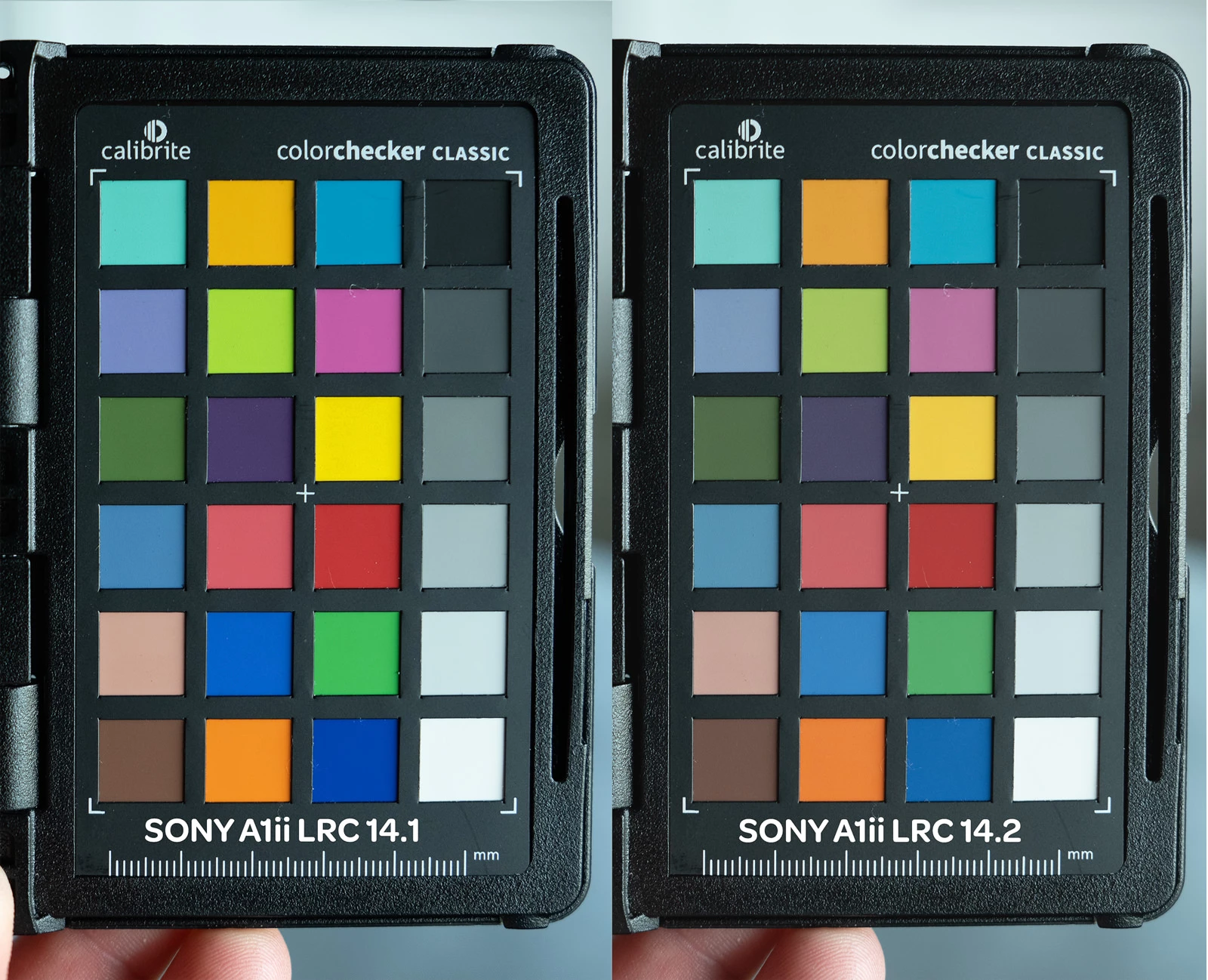
45 답변

Participating Frequently
May 4, 2025

I have the same issue. I downgraded my LR to 14.1 and my colors are back to normal. The only problem is if I open an image in PS through LR, the colros are also dull. WHich means to get the correct color, I have to export the image from LR and then import it into PS to get normal colors. They better fix this soon


charlesl75177870
Participating Frequently
May 4, 2025

you can convert your raw to dng in LR 14.1 and PS will reder the colors correctly.  This is the only workaround that works for me.  

Participating Frequently
May 4, 2025

THANK YOU! That worked. I hate having to do workarounds for problems that should not happen in the first place- but this is definielty much quicker than what I have been doing and it will be a big time saver until Adobe fixes this issue. I am having to edit 100 product shots right now and all of them have to be 100% correct in their colors. This is going to make it easier for me. Thank you.

Participant
April 14, 2025

Same problem here, Sony A1ii with Lightroom 14.2, the color difference looks huge compare to A9iii or any other previous Sony camera, hope Adobe can fix it soon

Claire H.
Community Manager
Community Manager
April 14, 2025

Hi @lampsony and @Jaap Koole, Let's try to fix this issue! We just need a few more details to try to help. 

In your post, it’d be super helpful if you could include:

  • Issue – A quick summary of the problem

  • Steps to reproduce – A numbered list of the steps you took

  • Expected result – What you expected to happen

  • Actual result – What actually happened

  • Lightroom version

  • Operating System – Windows or macOS, plus version info

Screenshots and sample media would be a great help! Let me know if you have any questions. Thanks! ^CH

Participant
April 15, 2025

Issue - when the Raw file of A1ii imported into Lightroom, the color changed, it was significantly different with other Sony camera, specialy the blue color  

Steps to reproduce - Just imported the photo to Lightroom

Expected result - the color should be close to others Sony camera

Actual result – way different color, desatruated (please see the attached file, raw photo without any edit, same stadium same light same jersey, the blue color on the left(Sony A1ii)  is way different than the blue on the right (Sony A9iii)

Lightroom version - 14.2

Operating SystemmacOS 14.6.1 

Participant
April 6, 2025

Same problem here. Luckily I still have the A1, but this is definitely disappoiting!!


Participant
April 4, 2025

I have the same problem. Don't understand how this is not more known as we must not be the only ones using A1ii with Lightroom 14.2


Any solution besides going back to 14.1 ? 

charlesl75177870
Participating Frequently
April 5, 2025

I agree and they did see it when I sent Adobe the raw file.  The only other workaround is using other color profiles besides Adobe.  The Sony camera ones are not good IMO, so I use a Calibrate color checker now and it brings back the colors to normal. It works, but just an extra step at my shoots, until they fix the adobe color profiles.

Rikk Flohr_Photography
Community Manager
March 28, 2025

I've reviewed your Support Chat transcript, and it only mentions issues with 14.1 and the Sony A1 II—it doesn't mention 14.2 at all. I point that out because support for this camera was preliminary in 14.1 and final in 14.2.

Is the problem only after the file reaches PS? Before? 

A precise step-by-step recap of your Edit in PS workflow, including your Edit in Method, the Settings in Preferences>External Editors, your PS workspace settings, and complete system information, is necessary here. 

Can you provide a DNG of the file you are showing in your screenshots for the engineering team to review?

Rikk Flohr: Adobe Photography Org
charlesl75177870
Participating Frequently
March 28, 2025

It happens in LRC 14.2 so I reverted back to 14.1 because I was noticed it with 14.2 and PS.  At least with 14.1 I can convert it to dng before editing in PS and the colors are correct.   I tried to roll back camera raw as well (I can't remember the version I think it was 17.1)  that worked but is no longer available and the one before that version doesn't support the A1ii so I have to use the most current version of camera raw.


As far as the PS workflow, it was checked by the tech on the chat you are referring to.  Did you want me to email you the raw file?