
Participant
September 16, 2023

P: (macOS Sonoma) Photoshop 2023/2024 Save for Web shows incomplete preview

  • September 16, 2023
  • 184 replies
  • 38151 views

Have just updated to Photoshop 2024 and my save to web panel is now not displaying correctly - see screengrab.  How can I adjust it to have the full image fill the four windows?  cheers, Bob
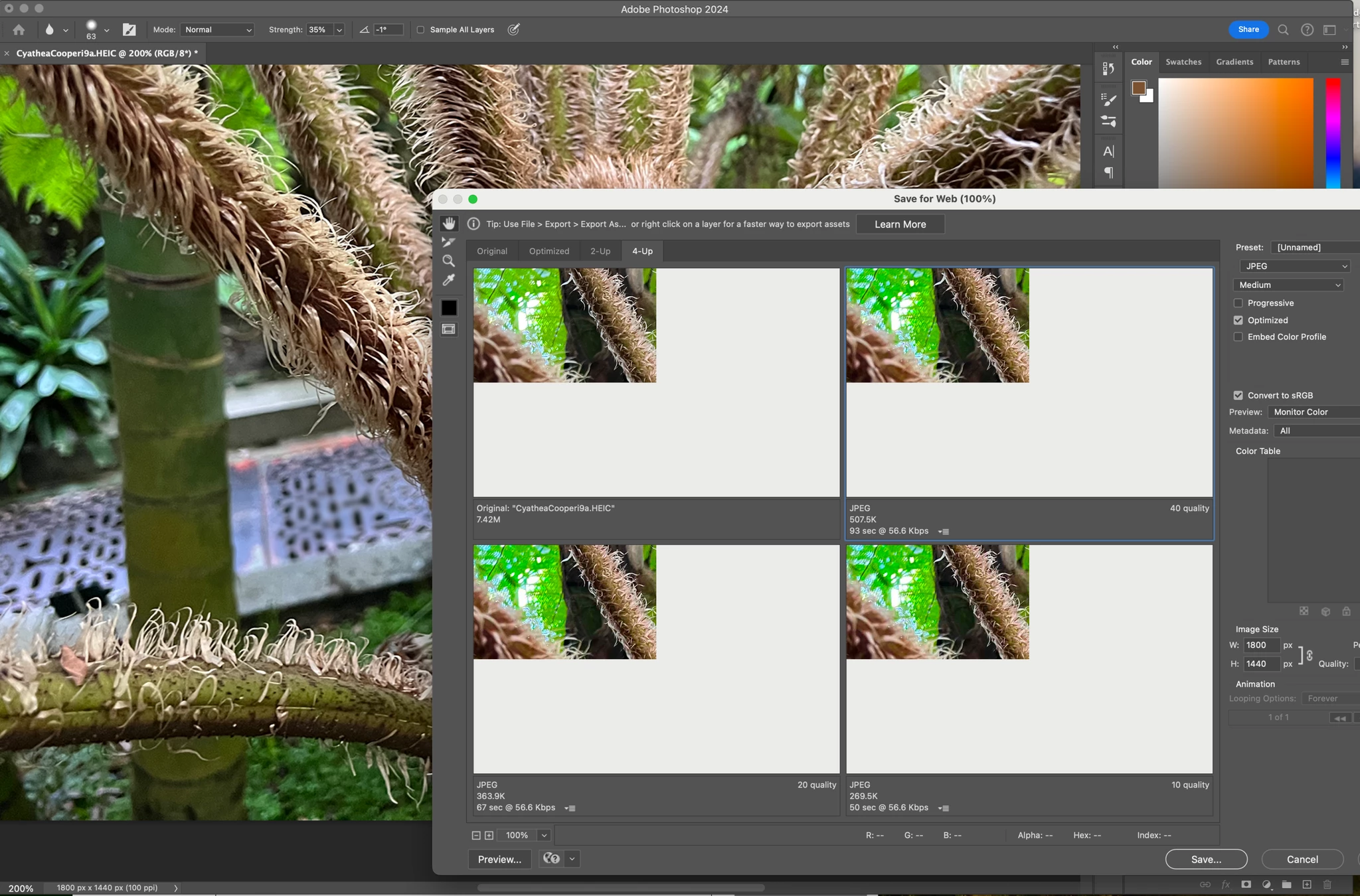


184 replies

Participant
September 28, 2023

Actualicé a Sonoma OSX y ahora también a Photoshop 2024 y ahora cuando quiero guardar para web no me previsualiza la imagen o bien la muestra rota, alguien sabe como solucionarlo? 


Participant
September 28, 2023


Participant
September 28, 2023

When I am exporting using save for web I am getting an issue where I can't see my work in the preview section. Instead it just shows as one big grey area. I have tried opening and saving these files in the same way on a colleagues computer and it is saving and previewing as it should be. I have tried uninstalling and reinstalling photoshop too and this hasn't fixed it. Please could someone help resolve this issue. Thanks.

user5584859
Participating Frequently
September 16, 2023

I just install photoshop on my new macbook pro, when I saving my image by save for web, the preview screen only part of it can be displayed, or even nothing can be displayed....


I tried to install again and not keep the old preference, or in Preferences click the "Reset Preferences On Quit", still no improvement, how can I fix it.... Thanks...

Stephen Marsh
Community Expert
Community Expert
September 16, 2023

Perhaps a GPU or other preference setting such as native canvas?


Save for Web (Legacy) uses very old code. Export As/Quick Export uses updated code, however, does not offer feature parity.


I also noticed that you are reducing the % of the exported image. What size in pixels is the original on the longest edge? Is the longest edge 8192 px or larger?

mglush
Community Expert
Community Expert
September 27, 2023

Hi Bob,

Are you using the Export>Save for Web (Legacy)? What happens when you cycle through the other options, does the image stay the same size in the top left hand corner? Can you use the hand tool to move it around, or zoom in with the magnifying glass?

Michelle

Participant
September 27, 2023

Yes Export for web (legacy).. Yes stays the samew when cycling through others.  Handtool no movement.  Magnifying glas zooms in on the image but it remains masked exactly the same e.g. 25% of available window.

mglush
Community Expert
Community Expert
September 28, 2023

Have you tried resetting your preferences? Here is a help doc that will walk you through the process. https://helpx.adobe.com/photoshop/using/preferences.html

I would suggest following the manual process.

Let us know if this works?

Michelle

Known Participant
September 27, 2023

Hello since the update this morning of Photoshop Beta (but it is also true on the "normal" version) there is a problem displaying the visual when we do "Export -> save for the web". It's very small and at the top left. As if the viewing window had been shifted! it's very painful.

I am on MAC version Sonoma 14.0
THANKS

Participant
September 27, 2023

I'm having the exact same problem on my fully spec'd M2 Macbook Pro using PS 2024

Known Participant
October 1, 2023

Still no news from Adobe about this problem !!!