


Known Participant
October 18, 2022

P: (ACR hosted by Bridge) results in parsing error when opening in PS

  • October 18, 2022
  • 19 replies
  • 7581 views

1) Open a file in Camera Raw hosted by Bridge

2) Create a mask using the new "People" feature, or use the new Content Aware tool (I guess other new features will trigger the same error, but these two are the ones I've tested)

3) Click open


When Photoshop opens, this errors message appears (and the file doesn't open):
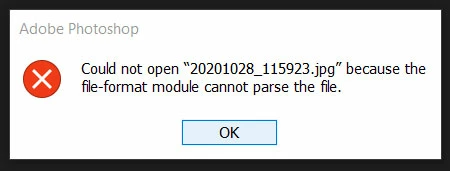


"Could not open "(file name) because the file-format module cannot parse the file"


I'm using Windows 10 and the lastest Bridge/ACR/PS versions at the time of writing, but more people have reported this to me on my blog/YT channel.

This topic has been closed for replies.

19 replies

Peter A Lund
Inspiring
November 30, 2022

Hey I am curious. 

How can this error pass the golden canditate beta test status? 

This is the first thing you do wenn you want to open a file from bridge to ps. 

I am speechless. 

rejoice in the way things are.When you realize there is nothing lacking,the whole world belongs to you.>Be content with what you have;rejoice in the way things are.When you realize there is nothing lacking,the whole world belongs to you.
Rikk Flohr_Photography
Community Manager
Community Manager
November 25, 2022

See update to 13.0.1.583

Rikk Flohr: Adobe Photography Org
Adobe Employee
November 25, 2022

Hi,

The mentioned issue is fixed in the latest patch release #13.0.1.583. Please install and confirm if that fixes the issue.You can refer to the issues fixed in the patch at the following link https://helpx.adobe.com/bridge/kb/fixed-issues.html

Thanks,Bridge Team

Inspiring
November 20, 2022

New day, new problem.

(how I love spending two days and many hours trying to do a task that should take all of 20 minutes)

Today's problem: 

I adjust an image in ACR, click "Open" to move it into PS, but nothing happens.

I've uninstalled, reinstalled, updated, reverted, rebooted, etc. all to no avail.

Any advice?

(yes, I can save the images as jpgs from ACR and then open them from PS but that's not what I want to do)

Thank you.


Derek Cross
Community Expert
Community Expert
November 20, 2022

Which (exact) version of Photoshop and OS?

How much RAM and spare hard disk capacity do you have?

Have you tried resetting Photoshop back to the factory defaults?

Rikk Flohr_Photography
Community Manager
Community Manager
November 15, 2022

@Scotimages Milngavie 

This thread is open and replies are active. To which thread are you referring?

Rikk Flohr: Adobe Photography Org
Scotimages Milngavie
Participant
November 15, 2022

Windows 11 Pro Bridge + ACR + Olympus RAW files. 


I seem to have the notorious ACR parsing error but only after going from Bridge to ACR then adding masks.   If I re-edit the same image and remove the masks the problem disappears. I can then open the file directly from Photoshop, convert to a Smart Object and open in ACR and the same maksing will then work.  The problem is happing only with a few edits and apparently at random but is still really annoying.

Why have replies been stopped to the main post on this topic? Too many embarrasing responses?

Participant
November 15, 2022

I have update photoshop 2023, bridge 2023 with camera raw 15. I found two problem after I did this update.

1. Camera raw no longer open photoshop automatically when you click 'open ' button,  after macro photo adjustment.

2. JPG is not the defaut saving format for photoshop, each time I save photo I have to switch PSD to JPG.

I have reinstall photoshop 2023 and bridge 2023 again, but problem stay. 

My computer is pc, OS is windows 10.

Peter A Lund
Inspiring
November 12, 2022

Hey, 


thanxs ... thats a good idea I going to test that. 


rejoice in the way things are.When you realize there is nothing lacking,the whole world belongs to you.>Be content with what you have;rejoice in the way things are.When you realize there is nothing lacking,the whole world belongs to you.
Known Participant
November 11, 2022

I re-downloaded the same files from my camera and didn't have any issues.  Also, if you open the image in CR and then save it as a tiff you should be able to get around any problems.

Participant
November 2, 2022

To add: one thing I find interesting is if I go to an image thumbnail within the "contents" section in Bridge, and right-click to "open with Adobe Photoshop", the image will go to the ACR screen and open in Photoshop without issues. I'm not sure if this means anything, or if it will help, but I've been able to open up various individual images like that. This work if you select multiple images too.