


markovesterinen
Participating Frequently
June 9, 2016

P: Can't read DNG files from Fuji X-E2 anymore

  • June 9, 2016
  • 75 replies
  • 2179 views

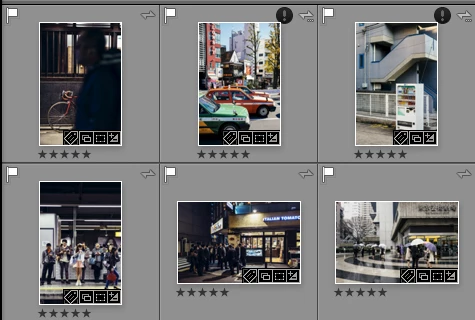
Just installed the new Lightroom CC 2015.6 / 6.6 update and i have a really strange issue. All my files are in DNG format. Everything works fine except the files from my Fuji X-E2. Lightroom and Photoshop can't read these anymore! The files get's a black exclamation mark next to them. See the screenshot. 
All files from the other Fuji X-series cameras works just fine. It's only X-E2 files that doesn't. 
The files work just fine with any other software and i tried them on a different computer which has the previous version of lightroom CC and there they work just fine!
Is there a way to make a roll-back to previous version?
This topic has been closed for replies.

75 replies

Light-Zone
Participating Frequently
July 2, 2016
Well Harry, still no reply from Adobe, so I will officially stop holding my breath, and officially start exploring Capture One with the 30 day free trial I downloaded.
wizmosis
Known Participant
July 1, 2016
Me too, Ed. I feel like Adobe used us as guinea pigs, found out their product was defective, and left us waiting and at their mercy. I can see by the thread it's been several days, and still no fix, no apology, no official notice or warning to those thinking of upgrading. Really shoddy communication for such a big company. They should be all over this by now. Maybe they just have too big a market share to worry about losing customers. 
wizmosis
Known Participant
July 1, 2016
I upgraded to the most recent versions of PS/LR/BR and Mac OSX 10.11.5. Bridge crashed on launch repeatedly. After three hours of tech help chatting with Adobe, I went back to one earlier version of Bridge just to get it to not crash on loading (I have dual monitors and there is a known issue which still hasn't been fixed as far as I know). Suddenly PR, LR, BR wouldn''t read raw files. Couldn't access older versions to try even though I looked in Adobe CC manager where previous versions are supposed to be. Yesterday, totally frustrated, I found, deep in forums, a link to the previous raw processor, and it worked, and I'm back up and running with raw files, although not without losing a client. So, my reward for being a 'good' Adobe customer and upgrading was 4 lost hours of my time doing tech problem-solving, one lost client, and I'm back to the old versions of Bridge and camera raw. You can imagine I'm not very happy with Adobe at this moment. I'm livid.
Just Shoot Me
Legend
July 1, 2016
No problems here after downgrading.
But I suggest, for the time being, that you don't convert any files from any camera to the DNG format.
I certainly won't be ever again. I've learnt my lesson.
Olf
Participant
July 1, 2016
I imported quite a few new files from my X-E2 and converted them to DNG before I noticed this problem. I am a bit afraid of what will happen to these newly imported files that have never ever worked. Could there be a problem if I downgrade Lightroom?

So I decided to wait for a fix. I thought this was the kind of thing that a software team would fix right away and I thought that I could wait a few days without any problems. But it doesn't seem like this has any high priority. Anyone can make mistakes and it's difficult to test all possible file types, so I understand that an error like this can slip through, but what I can't understand is that we after 3 weeks, we don't get any feedback except that Adobe is "looking into it". That is not good customer service.
Adobe Employee
July 1, 2016
The issue reported for the current thread affect the Fuji X-E2 camera only. If you're reporting issues for other camera models, please start a new thread. Thanks.
Rikk Flohr_Photography
Community Manager
Community Manager
July 1, 2016
What is your software version for PS/LR/Bridge. Is it possible you have rolled back to a point before support for the specific camera?
Rikk Flohr: Adobe Photography Org
wizmosis
Known Participant
July 1, 2016
I'm having the same problem with Nikon D750 files in ACR, Bridge and LR. I already rolled back Bridge to an earlier version because of the dual monitor problem, but now it doesn't read the raw files either. And of course tonight a new client called and wants me to take a look at his raw files. What camera? Fuji XT1 and XT2.... Adobe, this is a nightmare. 
Participant
June 29, 2016
I have the same problem and I hope two things:
1. ASAP fixing the problem
2. Repair files still imported/conversed with the problem!
Participating Frequently
June 28, 2016
Thanks for posting your experience. I'm very sorry to hear your chat session with Adobe was less satisfactory than mine. It appears that Customer Service agents have some degree of discretion in granting on the spot subscription credit and that I was just lucky. But I hope you'll get the credit when you're contacted again.